

Choosing the right dental accounting software plays a major role in deciding how you manage the financial aspects of your practice. A dental practice has more financial moving parts than a simple list of income and expenses. Patient payments, insurance collections, lab fees, supplies, payroll, and equipment costs can all affect your bottom line. Your accounting system should bring these numbers together in a way that helps you understand where your practice stands.
But with so many accounting tools available, it can be hard to know which features are worth paying for. A dental practice may have needs that go beyond basic bookkeeping, such as insurance payments, patient balances, payroll, dental supply costs, multiple providers, and links to practice management systems.
In this blog, we’ll look at the key features dentists should consider, whether you really need dental-specific tools, and what to check before choosing a system. We’ll also explain where dental accounting services can add value when software alone is not enough.
What You Will Learn From This Blog
By the end of this guide, you will understand:
- What dental accounting software does
- Which features matter most for a dental practice
- When dental-specific features are worth having
- How dental accounting software can support better financial control
- What to check before choosing an accounting platform
- When professional accounting support may still be needed
What Is Dental Accounting Software?
Dental accounting software is an accounting system used to record, organize, and review the financial activity of a dental practice.
At a basic level, it can help you track revenue, expenses, bank activity, bills, and other financial data. More advanced systems may offer tools for reporting, payment tracking, payroll data, budgeting, and financial analysis.
The main goal is simple: make your financial data easier to manage and use.
For example, a dental practice may receive payments from patients, insurance plans, and other sources. It may also have costs for staff, dental supplies, lab work, rent, equipment, software, and marketing. Good accounting software helps keep these transactions organized.
It can also reduce the need for manual data entry and make it easier to spot issues before they become larger problems.
However, dental accounting software does not replace sound accounting processes. Your books still need to be reviewed, reconciled, and kept accurate. That is why many practices use software along with dental accounting services from an accounting professional.
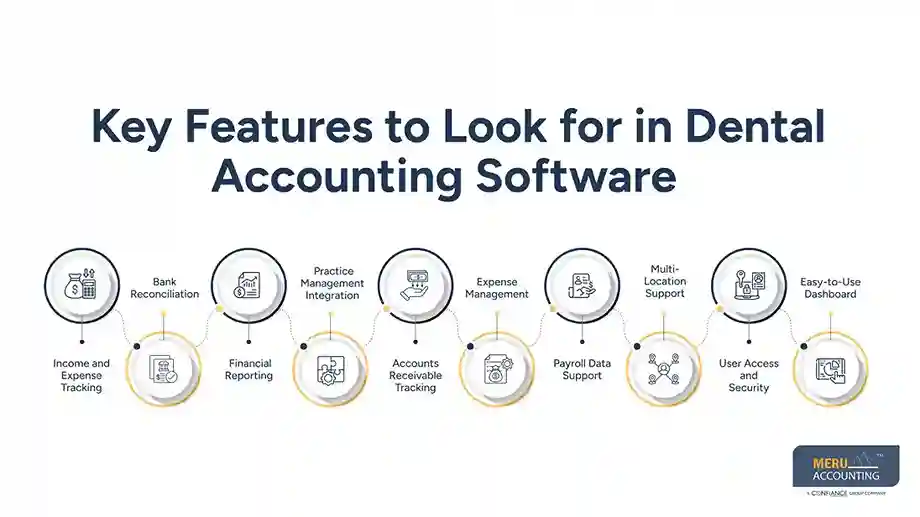
Key Features to Look for in Dental Accounting Software
Here are some key features to look for in a dental accounting software:
1. Income and Expense Tracking
Your software should make it easy to record income and expenses by type.
This gives you a clearer view of where your money comes from and where it goes. You should be able to track common costs such as payroll, rent, supplies, lab fees, equipment, insurance, and office expenses.
Look for clear categories and easy transaction entry. The system should also let you review past transactions without digging through several screens.
2. Bank Reconciliation
Bank reconciliation is one of the most important parts of keeping clean books.
The software should help match your accounting records with your bank and credit card activity. This can help you find missing transactions, duplicate entries, or other errors.
A strong reconciliation process also gives you more confidence in your financial reports.
3. Financial Reporting
Good reports turn raw numbers into useful information.
At a minimum, look for reports such as:
- Profit and loss statements
- Balance sheets
- Cash flow reports
- Income reports
- Expense reports
- Accounts receivable reports
You should also be able to set date ranges and compare results over time.
For a dental practice, these reports can help you see whether revenue is rising, costs are under control, and cash flow is moving in the right direction.
4. Practice Management Integration
Your accounting system should work well with the tools your practice already uses.
Dental practices often rely on practice management systems for patient records, appointments, billing, and collections. If your accounting software can connect with those systems, you may spend less time moving data from one platform to another.
Before choosing software, check which integrations are available and what data can be shared.
5. Accounts Receivable Tracking
Outstanding balances can affect a practice’s cash flow.
Your software should help you monitor money that is still owed to the practice. Depending on the setup, this may include patient balances, insurance receivables, or other amounts due.
Useful reporting can help you see how much is outstanding and how long balances have been open.
6. Expense Management
Dental practices have many recurring and one-time costs. Your software should make it easy to record and review them.
Look for features that support receipt storage, vendor tracking, expense categories, and recurring expenses.
This can help you see which costs take up the largest share of your revenue and where spending may need closer review.
7. Payroll Data Support
Payroll is often one of the largest expenses in a dental practice.
Your accounting software should either support payroll directly or connect with the payroll system you use. At a minimum, it should make it easy to record payroll costs and related entries.
This helps keep your financial reports complete and gives you a more accurate view of practice expenses.
8. Multi-Location Support
If you operate more than one dental office, basic accounting tools may not be enough.
Look for software that can separate financial data by location while still giving you a combined view of the business.
This can help you compare revenue, expenses, and profitability across offices. It can also make it easier to see which location may need more attention.
9. User Access and Security
Financial records should not be open to everyone in your office.
Choose a system that lets you control user access based on job role. You may want your office manager to handle certain tasks while limiting access to sensitive financial information.
Also check whether the provider uses security controls such as encryption, secure login methods, backups, and access logs.
10. Easy-to-Use Dashboard
You should not need to be an accountant to understand your own financial dashboard.
A clean dashboard can give you a quick view of revenue, expenses, cash position, receivables, and other key figures.
The best system is not always the one with the most features. It is the one that gives you the information you need without making simple tasks hard.
Does Dental Accounting Software Need Dental-Specific Features?
A dental practice does not necessarily need accounting software built only for dentists. In fact, a general accounting platform may be a better fit for some practices, especially when it handles the core accounting work well and connects with the other systems in use.
What matters is the financial detail behind the practice. Insurance payments, patient balances, lab fees, dental supplies, payroll, equipment, and multiple providers can create accounting needs that are not as common in other small businesses. Dental-specific features can be useful when they help organize this information or reduce manual work.
Before choosing a platform, look at how it fits your actual workflow. A system with fewer dental-specific features may still be the better choice if it gives you clean books, useful reports, reliable integrations, and room to grow.
optional anymore
on running the business
How to Choose the Right Dental Accounting Software
Start by listing the accounting tasks you handle today.
Write down what takes the most time. This might include data entry, bank reconciliation, expense tracking, reporting, or accounts receivable review.
Then check each software option against those needs.
Consider these points before you decide:
Integration: Does it connect with your bank, payroll system, and practice management software?
Reporting: Can you get the reports you need without complex workarounds?
Scalability: Will it still work if you add providers or another location?
Ease of use: Can your team learn the system without extensive training?
Access: Can you control who sees and changes financial data?
Support: Is help available when you have a setup or accounting issue?
Cost: Does the price make sense for the features and support you receive?
Also ask about data migration before switching systems. Moving years of financial data can be more complex than it first appears.
Most importantly, do not choose software based only on its feature list. Think about how your team will use it every week.
Dental Accounting Services From Meru Accounting
The right accounting setup looks different for a dental practice than it does for a typical small business. You may need to keep track of patient and insurance payments, provider collections, lab costs, dental supplies, payroll, equipment purchases, and other practice expenses. Keeping these records in the right accounts is just as important as recording them.
At Meru Accounting, we help dental practices manage these financial tasks with a practical, organized approach. Our dental accounting services cover the day-to-day work needed to keep your books current and give you reliable financial reports.
What We Handle
- Bookkeeping: Record and classify daily income, expenses, and other transactions.
- Bank Reconciliation: Match bank and credit card activity with your accounting records.
- Accounts Receivable: Track outstanding balances and help you maintain clear receivable records.
- Expense Management: Organize practice costs, from supplies and lab fees to rent and equipment.
- Financial Reporting: Prepare clear reports that help you review revenue, expenses, and practice performance.
- Month-End Support: Keep accounts updated and ready for review at the end of each month.
We can also work with the accounting and practice management tools your dental office already uses. Our expertise in using dental accounting software lets you keep your current workflow while getting the accounting support needed to make better use of your financial data.
Our Expert Insight
One mistake we often see in dental accounting is judging practice performance by collections alone. Strong collections can look good on the surface, but they do not always tell you whether the practice is profitable or where cash is being used.
When reviewing your accounting setup, look beyond total revenue. Pay attention to trends in payroll, supplies, lab costs, overhead, accounts receivable, and provider-level performance. Comparing these figures month over month can help reveal rising costs, slow collections, or changes in practice margins that may not be clear from a basic profit and loss report.
Your dental accounting software should make this review easier. If you have to spend hours cleaning data or building reports before you can understand what happened, the setup may need to be improved. In our experience, the real value of accounting technology comes from turning clean financial data into information that helps you make better practice decisions.
Key Takeaways
- Dental accounting software can help organize financial data and reduce manual work.
- Bank reconciliation, reporting, expense tracking, and accounts receivable tools are key features to consider.
- Integration with your practice management and payroll systems can save time.
- Dental-specific features are helpful when they match your actual workflow.
- Security and user access should be reviewed before choosing a platform.
- Dental accounting software does not replace proper accounting review and reconciliation.
- Professional dental accounting services can help keep your records accurate and easier to use.
FAQs
Track collections, expenses, payroll, supplies, lab costs, accounts receivable, and cash flow. This gives you a clearer view of practice performance.
Some platforms can track patient and insurance payments or connect with billing and practice management systems. Check the exact integration and reporting options before choosing one.
Bank and credit card accounts should generally be reconciled each month. Regular reconciliation helps keep financial reports accurate and catch errors early.
Key reports include the profit and loss statement, balance sheet, cash flow report, and accounts receivable report. Reviewing them each month can help you spot changes in revenue, costs, and outstanding balances.
Yes. Dental accounting services can often work with your existing accounting and practice management systems. The setup should fit your current workflow and reporting needs.
optional anymore
on running the business



