
Choosing easy bookkeeping software for small business can make daily money tasks easier. A reliable tool can track sales, costs, bills, invoices, and bank entries in one place. It can also give clear reports without the need for long manual work. For a small firm, easy bookkeeping software for small business should be simple to learn, fit the budget, and match the firm’s needs.
The best small business bookkeeping software is not always the tool with the most features. A shop with ten staff may need stock and payroll tools, while a solo worker may only need bills, costs, and reports. So, a clear bookkeeping software comparison is key before you buy or transfer your accounting records.
What You Will Learn From This Blog
- Why easy bookkeeping software for small businesses matters for daily financial tasks.
- Which key features to check before choosing bookkeeping software.
- How to compare software based on price, features, ease of use, and support.
- Which bookkeeping tools are suitable for different types of small businesses.
- How AI, cloud tools, and automation are changing small business bookkeeping.
- When professional bookkeeping support may be useful for your business.
Why Small Businesses Need Simple Bookkeeping Software
Less Manual Data Work
Manual entry takes time and can lead to errors. Easy bookkeeping software for small businesses can pull bank data, sort costs, and keep records in one place. QuickBooks, for example, can link bank and card data and track income and costs.
Clear View Of Cash
Cash flow is key for a small firm, and easy bookkeeping software for small businesses can make cash data easier to track. A reliable tool can show money due in, bills due out, and cash on hand. Clear data can aid better cash plans and cut the risk of missed bills.
Better Invoice Control
Late bills can hurt cash flow. Reliable small business bookkeeping software can send invoices, track due dates, and send payment reminders. QuickBooks, for example, offers invoice tools, pay links, and bill tracking.
Ready Financial Reports
Small firms need basic data such as profit and loss, cash flow, sales, and costs. Reliable small business bookkeeping software can make these reports with less work. Zoho Books lists P&L, balance sheet, cash flow, and other reports among its core tools.
Easier Work With Accountants
Easy bookkeeping software for small businesses can also give accountants secure access to the same financial records. That can cut the need to send many files back and forth. QuickBooks and Zoho Books both offer ways to give accountants access to business data.
Key Features To Look For In Small Business Bookkeeping Software
Bank Feeds
Bank feeds can bring bank data into the tool. The user can then check, sort, and match each entry. Bank feeds are a key part of easy bookkeeping software for small businesses because they cut repeated data entry.
Invoicing And Payments
Look for tools that can make quotes, bills, payment notes, and repeat invoices. Payment links and due-date notes are also useful. Zoho Books offers invoice, payment, and reminder tools for small firms.
Expense And Receipt Tracking
A reliable tool should let you log costs and save proof of each cost. Receipt scan tools can turn paper or phone images into records. QuickBooks and Zoho Books both offer receipt capture or scan tools.
Reports And Dashboards
A firm should not need to build every report by hand. Check for P&L, balance sheet, cash flow, sales, cost, and tax reports. The right small business bookkeeping software should make key data easy to find.
User Access And Security
A small firm may need access for the owner, staff, and accountant. When choosing easy bookkeeping software for small business, check user roles, access limits, audit logs, backups, and data safety. QuickBooks states that its cloud tools use access limits, backups, and activity logs.
Bookkeeping Software Comparison: What Should You Compare?
What to Compare | What to Look For |
Ease Of Use | A tool can have many features but still be hard to use. When choosing easy bookkeeping software for small businesses, test key tasks such as adding a sale, matching a bank entry, sending an invoice, and creating a report. |
Price And Plan Limits | Check more than the base fee. Review user limits, bills, invoices, bank links, stock, payroll, reports, and add-on costs. A low-cost small business bookkeeping software plan may become costly as your needs grow. |
Bank And App Links | Check whether the tool connects with your bank, payment app, POS, store, payroll tool, and other systems. Strong integrations can reduce duplicate entry and manual data work. |
Tax And Local Needs | Tax needs vary by country and business type. Indian firms may need GST tools, while US firms may need sales tax features. Zoho Books, for example, offers GST reports, e-invoices, and e-way bill tools for India. |
Growth And Scale | Check whether the tool can meet future needs as sales and staff grow. Review user limits, stock tools, multi-currency features, project tools, and advanced reports as part of your bookkeeping software comparison. |
How To Choose Easy Bookkeeping Software For Small Business
Start With Your Main Need
List the tasks you do each week. These may include sales, bills, bank checks, stock, payroll, or tax work. Pick small business bookkeeping software that solves the main tasks first.
Match The Tool To Your Size
A solo firm may need a low-cost plan with bills and costs. A firm with staff may need role access, payroll, stock, and more reports. Easy bookkeeping software for small business should fit the firm’s size, not just its sales.
Test Before You Buy
Use a trial or free plan where one is offered. Run real sample tasks and see if the tool feels clear. Zoho Books offers a free plan for some small firms, with tools such as invoices, costs, bank checks, and reports.
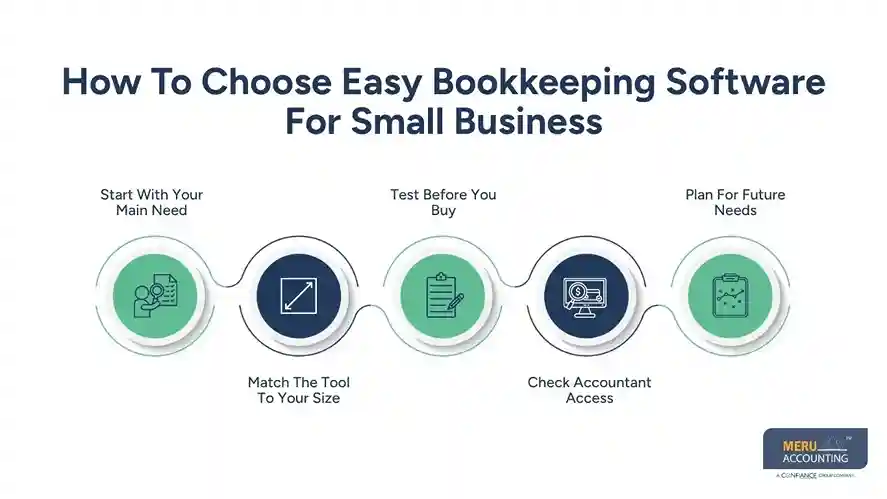
Check Accountant Access
Ask if your accountant can view, edit, and review the data. Proper access can simplify month-end work and reduce file exchanges.
Plan For Future Needs
Do not buy only for today’s needs. Check if the tool can add staff, stock, projects, more banks, and more reports as the firm grows.
optional anymore
on running the business
Top Easy Bookkeeping Software For Small Business
QuickBooks Online
QuickBooks Online is a strong option among easy bookkeeping software for small businesses, especially for firms that need broad accounting tools. It offers bank links, invoices, costs, reports, receipt tools, and app links. Its current plans also include features such as income and cost tracking, bank links, reports, and invoice tools.
Xero
Xero suits firms that want cloud accounting with bank checks, invoices, and cash flow views. Its site lists online invoices, bank matching, cash flow views, and access for small firms.
Zoho Books
Zoho Books is a useful option for small firms that need invoicing, costs, bank checks, reports, stock, and GST tools. Its India plans also include a free plan for some small firms.
FreshBooks
FreshBooks can suit firms that focus on invoices, costs, time, and client work. Its current accounting page lists invoices, payments, time tracking, payroll, costs, reports, and more than 100 links and automations.
Tool Fit Matters Most
No tool is best for every firm. QuickBooks may suit a firm that needs a broad set of tools. Xero may suit a firm that wants a clean cloud setup.
Zoho Books may fit firms with strong GST needs. FreshBooks may suit firms that bill by client or time. When comparing easy bookkeeping software for small business, focus on features, pricing, usability, and business fit rather than brand name alone.
Latest Trends In Small Business Bookkeeping Software
AI-Based Bookkeeping
AI is now moving into bank sorting, reports, invoice work, and data review. QuickBooks lists AI tools for task automation, data sorting, and financial insights.
Smarter Bank Matching
As a result, easy bookkeeping software for small businesses can handle more routine bank transactions with less manual effort. Zoho Books, for example, offers bank rules, auto-categorisation, and matching tools.
Mobile Bookkeeping
The growing demand for mobile access is also shaping expectations for easy bookkeeping software for small businesses. Mobile access lets firms record data close to the time of each sale or cost. Xero and Zoho Books both offer mobile access for key finance tasks.
More Automation
Small business bookkeeping software can automate repeat bills, invoice notes, cost sorting, and report tasks with less manual work. Zoho Books lists recurring invoices, expenses, and workflow tools as part of its automation features.
More Local Tax Tools
When choosing easy bookkeeping software for small business, local tax support can be just as important as automation and reporting features. For Indian firms, GST reports, e-invoices, e-way bills, and tax data links can be key buying factors.
Why Choose Meru Accounting For Small Business Bookkeeping?
Experienced Bookkeeping Support
Meru Accounting provides bookkeeping support for small businesses with different finance needs. Our team can manage daily records, bank entries, invoices, expenses, and account checks with care.
Flexible Service Options
Every small business has a different level of bookkeeping work. Meru Accounting can provide support based on your needs, from routine bookkeeping to regular account review and financial reports.
Support With Accounting Software
Choosing easy bookkeeping software for small businesses is only one part of the process. Our team can assist with software setup, account organization, data review, and regular bookkeeping tasks.
Clear Financial Reports
Effective bookkeeping should give owners clear and useful financial data. Meru Accounting can prepare and review reports that show income, expenses, receivables, payables, and other key financial details.
Time-Saving Bookkeeping Process
Daily bookkeeping can take time away from sales, clients, and other core work. Outsourcing routine tasks to Meru Accounting allows business owners to spend more time on running and growing their firms.
Our Expert Perspective
From our experience, the best bookkeeping software should make daily finance work simple and accurate. Businesses should focus on essential features such as bank feeds, invoicing, expense tracking, reports, and secure user access. Choosing software that fits current needs while allowing future growth can reduce manual work and support better financial decisions.
Key Takeaways
- Choose easy bookkeeping software for small business that matches your daily finance tasks and business needs.
- Check key features such as bank feeds, invoicing, expense tracking, reports, and user access.
- Compare the full cost of each plan, including add-ons and extra user fees.
- Test the software before making a long-term choice to ensure it is simple to use.
- Check tax features based on your country, business type, and reporting needs.
- Choose software that can meet your needs as your business grows.
- Review bank entries, unpaid bills, invoices, and financial reports each month.
- Consider expert bookkeeping or accounting support when records become complex or time-consuming.
FAQs
The best tool depends on your needs, budget, staff size, and tax rules. QuickBooks, Xero, Zoho Books, and FreshBooks are common options.
Easy bookkeeping software for small businesses should have clear menus, bank feeds, simple invoices, expense tracking, and easy reports. A free trial can show if the tool suits your work style.
Cloud bookkeeping can be safe when the provider uses strong access controls, backups, secure logins, and robust data protection. Owners should also use strong passwords and limit user access.
Use a bookkeeping software comparison that checks price, ease of use, bank links, reports, tax tools, user limits, support, and future needs. Test the main tasks before you decide.
A firm may need a bookkeeper when records take too much owner time, errors keep coming up, tax work becomes hard, or the firm needs regular financial reports. Expert review can also add value when the business grows.
optional anymore
on running the business



