A customer buys the last unit of a product, but two other buyers have paid for the same item on other sales sites. The store must now cancel orders, issue refunds, and explain the delay. This happens when stock records fail to match sales. Ecommerce inventory management software can cut such errors, but a poor setup can cause new issues instead of fixing old ones.
The goal is to change the system without slowing daily orders. Clean data, tested links, and staff training can make the move safer. Businesses can also use outsourced inventory management services for stock checks and record reviews while their own teams keep orders moving.
What You Will Learn From This Blog
- Why online stores need better stock control as sales grow.
- What can go wrong when a new stock system is set up.
- How to set up ecommerce inventory management software without late orders.
- How tests and staff training can cut errors.
- How outsourced inventory management services fit into the process.
- Which measures show if the new system works.
Why Ecommerce Businesses Need Better Inventory Management
Imagine selling 100 units across three sales sites, while each site shows a different stock count. Staff must check many records before they can confirm an order. This delay can cost a sale. Ecommerce inventory management software brings stock data into one system when the right links are in place.
It also shows which goods sell fast, which stay in stock for too long, and which need to be bought again. With outsourced inventory management services, firms can cut manual checks and give staff more time to process orders.
Common Challenges When Implementing Ecommerce Inventory Management Software
Inaccurate Stock Records and Duplicate Entries
Old sheets may have duplicate SKUs, missing returns, or goods that have sold but still show as in stock. Moving these records without a review can carry the same errors into ecommerce inventory management software.
Order Delays During System Changes
A switch from old tools to new ones may leave staff unsure which stock count is right. Outsourced inventory management services can cover planned stock checks while the main team packs and ships orders.
Data Migration Errors and Integration Issues
A product code may change during data transfer, or a sales site may fail to send stock updates. Test orders and returns can reveal such faults before they affect buyers.
Employee Training and Workflow Disruptions
Staff may know the old system well but need time to learn how to log new stock, returns, and order updates. Without clear steps, ecommerce inventory management software may add work instead of cutting it.
Cost and Time Limits
A small team may find it hard to set up new tools while handling daily orders. Outsourced inventory management services can take on tasks such as stock checks and routine reports when staff lack time.
optional anymore
on running the business
How to Implement Ecommerce Inventory Management Software Without Disrupting Operations
Assess Current Inventory Processes and Business Needs
Track one product from supplier delivery to storage, sale, and return. Note where errors occur, which tasks take the most time, and which reports staff need before you choose ecommerce inventory management software.
Choose Software That Fits Your Ecommerce Operations
Compare tools by sales site links, warehouse needs, stock alerts, return handling, reports, and cost. Pick ecommerce inventory management software that fits current order levels without adding tools the team will rarely use.
Clean and Prepare Existing Inventory Data
Check product names, SKUs, barcodes, supplier details, costs, and stock counts before the move. Count fast-selling and high-value goods first. Fix duplicate records so the opening stock count matches the goods on hand.
Test Integrations Before Full Implementation
Place test orders through the online store and linked sales sites. Then test order cuts and returns. Check if ecommerce inventory management software updates stock and sends the right data to shipping and accounting tools.
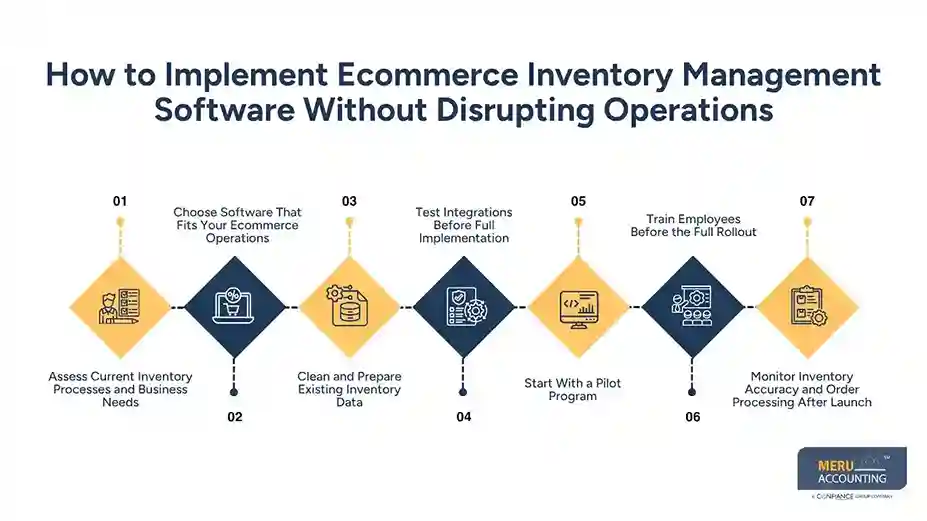
Start With a Pilot Program
Move a small group of goods or one sales site first. Compare system counts with the goods on hand, check order updates, and fix errors before moving the full stock list.
Train Employees Before the Full Rollout
Use real work tasks to teach staff how to log new stock, pick orders, record returns, and report faults. Short written steps can help staff follow the new process during busy shifts.
Monitor Inventory Accuracy and Order Processing After Launch
Check stock counts, open orders, failed data syncs, and cancelled sales each day for the first few weeks. Ask one staff member to log faults and check that each one is fixed before it affects more orders.
Best Practices for a Smooth Inventory Software Implementation
Implement Changes During Low-Order Periods
Use past sales data to find a quiet time for the switch. Avoid major sales events unless the team has tested its backup plan and can keep orders moving if a fault occurs.
Maintain Backup Inventory Records
Save dated copies of stock counts, product data, and open orders before the move. Keep these files safe and limit access so staff can check old records if data goes missing.
Set Clear Stock Reconciliation Procedures
Match system counts with physical stock on a set schedule. Check fast-selling goods more often, note the cause of each gap, and fix the source instead of changing figures without proof.
Create a Rollback Plan for Unexpected Issues
Set rules for when to pause the launch and return to the old process if a major fault occurs. Name the person who can make that call and set steps to track new orders until the system works again.
Track Key Performance Indicators During the Transition
Record stock accuracy, late orders, failed data syncs, and time spent on manual work before launch. Check the same measures after the switch to see if ecommerce inventory management software meets its goals.
How Ecommerce Inventory Management Software Improves Business Operations
Real-Time Inventory Tracking Across Sales Channels
When links work as planned, a sale on one site can update stock on other linked sites. Staff get a clearer view of goods on hand and spend less time checking separate records.
Fewer Stockouts and Overselling Issues
Stock alerts can flag goods that are running low, while timely updates cut the risk of selling items that are no longer in stock. These gains still depend on correct stock counts and working links between sales sites.
Faster Order Fulfillment and Replenishment
Clear stock locations and order lists make it easier to find and pack goods. Reorder alerts can also prompt buyers to place new orders with suppliers before popular items run out.
Better Inventory Forecasting and Cost Control
Past sales, seasonal demand, supplier lead times, and returns can guide buying plans. Ecommerce inventory management software can also flag slow-selling goods that take up space and tie up cash.
Improved Inventory Reporting and Financial Accuracy
Stock reports show units on hand, purchases, returns, and product costs. Firms must still match these records with their books and use the right stock value rules to keep reports correct.
How to Measure the Success of Your Inventory Management Implementation
Inventory Accuracy Rate
Compare the stock count in the system with the count of goods on hand. Divide the number of records that match by the total records checked, then multiply by 100 to get the accuracy rate.
Order Fulfillment Time
Measure the time from order receipt to dispatch before and after the switch. Use the same start and end points for both checks. Review late orders as well as the mean time.
Stockout and Overselling Rate
Track how often buyers order goods that are out of stock and how often the store takes orders it cannot fill. Check each case to find if the cause was a late update, poor demand plan, or supplier delay.
Inventory Turnover and Carrying Costs
Check how often stock is sold and replaced over a set time. Review storage, insurance, and other holding costs to find goods that tie up cash for too long.
System Downtime and Integration Errors
Log outages, failed data syncs, duplicate orders, and missed stock updates. Review repeat faults with the software firm before they affect more sales sites.
How Meru Accounting Provides Inventory and Accounting Services
Stock errors can affect more than order handling. Wrong stock values can also change the cost of goods sold, reported profit, and cash flow. Meru Accounting provides bookkeeping and accounting services, such as account checks, accounts payable and receivable, payroll, tax, and financial reports.
During a system change, firms can match stock reports with book entries to check that sales, purchases, returns, and stock costs go to the right accounts. Outsourced inventory management services can cover agreed stock tasks, while Meru Accounting handles bookkeeping within the agreed scope. Firms should set clear roles, data access rules, and review steps before work begins.
For firms using ecommerce inventory management software, regular checks between stock records and the books can flag gaps before month-end reports are made. This gives owners a clearer view of stock costs and business results.
Our Expert Perspective
The main risk during a software change is moving old errors into a new system while orders keep coming in. A small pilot, a checked stock count, and daily reviews give staff a safer way to make the switch. The true test is not how fast the software goes live, but whether stock records match goods on hand and orders ship on time.
Key Takeaways
- Review stock and order tasks before you pick new software.
- Clean product data and count stock before the move.
- Test sales site, shipping, and accounting links with sample orders.
- Keep backup records and set a clear plan for system faults.
- Track stock accuracy, order time, stockouts, and sync errors after launch.
- Use outsourced inventory management services for agreed tasks when extra help is needed.
FAQs
Clean stock data, test links, train staff, start with a pilot, and keep backup records before the full launch.
Check stock accuracy, order steps, sales site links, warehouse needs, data quality, and staff training needs.
Check physical stock, test live stock updates, and track orders across linked sales sites during the switch.
Yes, outsourced inventory management services can cover stock checks, data reviews, and stock matching during the switch.
Track stock accuracy, order time, stockouts, overselling, system downtime, and data sync errors before and after the switch.
optional anymore
on running the business