Filing taxes is one of the biggest tasks for any business. In the modern business environment, many people choose to file business taxes online because it is faster and easier than paper filing. But before you file business taxes online, you must prepare well. Missing papers or wrong facts can cause delays or fines. This checklist will guide you step-by-step so you can file your business taxes with confidence.
Filing business taxes online means you must be very careful about being correct and complete. Online systems may spot some errors, but they cannot fix all mistakes for you. It’s key to gather all your money records, bills, and tax forms before you start. Being well-organized and having all ready will save you time and cut down stress. With good prep, filing your taxes online can be quick and smooth.
Why Should You File Business Taxes Online?
Saves Time
You do not need to travel or wait in long lines. You can file your taxes from home or the office.
Instant Proof
You get a confirmation right after you file your taxes online.
Catch Mistakes
The software checks your information for errors before you send it.
More Secure
Filing taxes online is safer than mailing paper forms.
File Anytime
You can file your taxes day or night, with no need to follow office hours.
Faster Process
The entire process is smooth and quick when you file online.
Filing taxes online makes the whole process smoother and faster.
What You Need to Do Before You File Business Taxes Online
Gather Your Financial Documents
Before you start, gather all papers about your business income and costs. These include sales slips and bills, bank statements for the full tax year, receipts for business costs, payroll records if you have workers, 1099 forms if you paid contractors, and last year’s tax returns for help. Without these, you can’t fill out your tax forms right.
Verify Your Business Details
Check all your business info with care. Confirm your business name as it is registered. Check your Employer ID Number (EIN) or Tax ID. Verify your business address and phone number. Know your business type, like LLC, S-corp, or sole proprietorship. Wrong info can make your return get turned down.
Select the Right Tax Forms
Not all firms file the same forms. Sole owners usually file Schedule C with their personal tax return. Partnerships file Form 1065. Corporations file Form 1120 or 1120S. Find out if you must file state or local taxes too. Use the right forms when you file business taxes online to avoid delays or errors.
Calculate Your Total Business Income
Add all the money from sales and work. Include any other cash tied to your business. Do not forget any side jobs or freelance work. Reporting your income correctly is key.
List Your Business Expenses Clearly
Costs cut your taxable income. These include rent, bills, office stuff, travel and car costs for work, ads and marketing, fees like legal or tax help, worker pay and perks, and loss in value of business gear. Keep all your receipts.
Check for Tax Deductions and Credits
Many tax breaks help small firms. You may get a home office write-off if you work at home, car costs for business use, energy credits for green power, hiring credits for certain groups, and research and development credits. Use tax software or get help from a pro to find all credits you can claim.
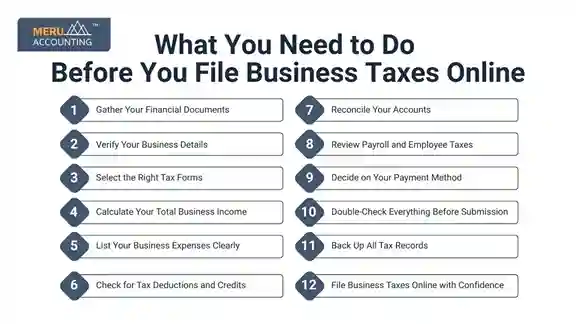
Reconcile Your Accounts
Make sure your bank papers and books match. Look for lost payments or cash in. Fix any errors before you file. Clean books help you avoid audits.
Review Payroll and Employee Taxes
If you have staff, check wages and tax holds. Confirm you paid employer payroll taxes. Check that all W-2 and 1099 forms are correct. Mistakes here can bring fines.
Decide on Your Payment Method
Know your tax due date. Plan to pay online or by mail. Set up estimated tax payments if you must. Paying on time stops fees and interest.
Double-Check Everything Before Submission
Look over all numbers and forms. Make sure no blanks or wrong facts stay. Ask a trusted friend or tax pro to check your work. Small mistakes can cause holds.
Back Up All Tax Records
Save digital copies of your tax forms and return. Keep paper copies for 3 to 7 years. Keep your files neat for future use. Good records help if you get checked.
File Business Taxes Online with Confidence
Use trusted tax tools or IRS-approved sites to file business taxes online easily. Follow step-by-step guides well. File before the due date to skip late fees. Save your confirmation number and email receipt.
Additional Tips for a Smooth Tax Filing Process
Start Preparing Weeks Before the Deadline
Give yourself lots of time to gather all your papers and facts to file business taxes online without stress.
Use Secure Internet Connections
Always file your taxes on a safe and private internet link. Avoid public Wi-Fi to keep your data safe from hackers.
Keep Your Software and Browser Updated
Use the newest versions of tax apps and browsers. This helps you get the best features and keep your data secure.
Use Strong Passwords for Tax Accounts
Make strong and unique passwords for your tax accounts. You can use a password tool to keep them safe.
Take Breaks to Avoid Mistakes
Filing taxes can be tough. Short breaks help you stay sharp and cut down on errors.
Contact the IRS or a Tax Expert If Confused
If you have questions or issues, get help from tax pros or IRS support right away.
Keep Detailed Records Organized
Keep all your bills, receipts, and papers neat and ready all year long. This makes tax time easier.
Double-Check Your Data Entry
Check all your numbers and info twice before you send your return. This helps you avoid big mistakes.
Understand Your Business’s Tax Rules
Know the tax laws that apply to your business at the local, state, and federal levels. This helps you stay safe.
Common Mistakes to Avoid When You File Business Taxes Online
Waiting Until the Last Minute to File
Filing late can cause rushed work and missed tax breaks. Start early to have time to check your work.
Forgetting to Report All Income
Make sure you list all your money made, even cash or side jobs, to avoid fines.
Losing Receipts and Expense Proofs
Keep digital or paper copies of all bills and proofs. You may need them if you get checked.
Filing the Wrong Forms for Your Business
Use the right tax forms for your business type, like sole owner, partner, or company.
Entering the Wrong Business or Bank Details
Check your business ID, bank, and routing numbers carefully to avoid delays.
Ignoring State Tax Requirements
States have their own tax rules. Don’t skip filing state taxes even if you file federal taxes.
Not Reviewing Your Return Before Submitting
Look over your tax return well to catch mistakes or missing facts that cause trouble.
Overlooking Available Deductions and Credits
Find and claim all tax breaks and credits that fit your business to pay less tax.
What to Do If You Make a Mistake After Filing?
Don’t Panic – Mistakes Can Be Fixed
If you make an error after you file business taxes online, you can usually fix it.
File an Amended Return If Needed
Use the right form to fix mistakes in your income, credits, or deductions.
Contact Tax Authorities If Needed
If unsure or you get a letter, contact the IRS or your state tax office.
Keep Notes of Any Changes Made
Write down all fixes and talks with tax offices for your files.
Pay Any Extra Taxes Fast
If you owe more tax after the fix, pay it soon to avoid fees and interest.
Learn From the Mistakes
Think about what went wrong and make your next filing better.
Why Many Businesses Prefer to File Business Taxes Online
Faster Refunds or Processing
E-filing makes the IRS work faster, so you get your refund quicker.
Less Paperwork and Hassle
No need to print, mail, or store paper forms.
Better Accuracy with Software Checks
Tax apps check for errors and missing info to help you file correctly.
Easy Access to Past Filings
Keep your tax files online for quick access when you need them.
Good for the Environment
Filing online cuts down on paper use, which helps the planet.
Saves Money Compared to Paper Filing
Many online tools are low-cost or free, saving on mail and pro fees.
Track Your Return in Real-Time
See where your tax return is in the process and get alerts fast.
Syncs with Your Accounting Software
Some sites link to your books, making filing simple and quick.
Filing your business taxes online is the best way to save time and cut errors. But good prep is key. Use this checklist each year before you file your taxes online. It will help you stay on track, avoid mistakes, and meet deadlines. Keep your records safe and check your details twice. If you need help, ask a tax pro. With the right steps, filing taxes online can be quick and stress-free.
At Meru Accounting, we help businesses file their taxes online on time and right. Our skilled team guides you at each step, making tax filing smooth and easy. Whether you need help with your papers or a last check before you send, Meru Accounting is here to help your business grow strong.
FAQs
Q1: Can I file business taxes online myself?
Yes, many small business owners file their own taxes using online software.
Q2: Is it safe to file business taxes online?
Yes, if you use secure and reputable software, online filing is very safe.
Q3: How long does it take to file business taxes online?
It depends on your records, but many finish within a few hours.
Q4: Can I file business taxes online after the deadline?
You can, but you may face penalties and interest.
Q5: What if I don’t have all my documents ready?
Gather all needed documents before filing to avoid errors.
Q6: Will filing business taxes online save me money?
It can save money on accountant fees and reduce errors that incur penalties.