Picking the right accounting software is one of the most important choices for any business. The right tool helps you track money, pay bills, make reports, and keep your records neat. It also saves time by cutting hand work and making daily financial tasks much easier. FreshBooks and Sage are two well-known accounting tools. Both help make accounting easier, but they serve different types of businesses. One works well for freelancers and service firms, while the other is a better fit for firms that are growing and need more accounting tools.
The best choice depends on your business size, budget, daily work, and long-term goals. Price should not be the only thing you compare. You should also look at features, ease of use, reports, support, and how well the software can grow with your business.
In this blog, we compare FreshBooks and Sage in clear and simple words. You will learn what each platform offers, how they are different, and which one may be the best fit for your business.
What You Will Learn From This Blog
After reading this blog, you will know:
- What FreshBooks and Sage are made to do.
- The key ways these two accounting tools are different.
- Which software has the features your business needs.
- How price, ease of use, and reports compare.
- Which one fits freelancers, small firms, and growing companies.
- How expert bookkeeping can help you get more from your accounting software.
What Is FreshBooks?
FreshBooks is cloud-based accounting software made for freelancers, consultants, service firms, and small businesses. It helps make daily accounting easy, even for people with little accounting knowledge.
Users can make invoices, track costs, log billable hours, take online payments, and create reports from one simple dashboard.
Many owners choose FreshBooks because it has a clean layout and is easy to use. Most daily tasks take only a few clicks. This makes it a good fit for owners who keep their own books.
Key features include:
- Invoice creation
- Auto payment reminders
- Cost tracking
- Time tracking
- Bank links
- Financial reports
- Client records
- Mobile app
One of the best parts of this software is its built-in automation. Users can send repeat invoices, save regular costs, and cut hand entry. This saves time and helps lower mistakes. Since it is cloud-based, users can open their records from almost any place with an internet link. This makes it a smart choice for remote teams and owners who travel often.
Overall, it is a good choice for businesses that want accounting software that is easy to learn, easy to use, and easy to manage
What Is Sage?
Sage is a trusted accounting software platform used by small, mid-sized, and growing businesses around the world. It offers a wider set of accounting tools and helps firms that need more detailed financial control.
Unlike software that mainly focuses on invoices, it gives users stronger accounting tools, detailed reports, budget planning, stock tracking, and tax support.
Main features include:
- General ledger
- Accounts payable
- Accounts receivable
- Bank matching
- Financial reports
- Budget planning
- Cash flow tracking
- Payroll support in some plans
- Stock tracking
Many firms choose Sage because it can keep up as the business grows. They do not have to move to a new system when their accounting work becomes more detailed.
The platform also lets many users work at the same time with different access levels. This works well for firms where owners, staff, accountants, and finance teams all use the same system.
While it has more advanced tools than FreshBooks, it may take new users more time to learn. Even so, many growing businesses feel the added features are worth the extra learning time.
FreshBooks vs Sage: Key Differences at a Glance
Both FreshBooks and Sage help you keep your books in good shape. Each one is made for a different type of work. A quick look at the main points can help you choose the right one.
Who Is It For?
The first option works well for people who work on their own, small service firms, and small teams. It keeps day-to-day bookkeeping easy for owners.
The second option fits more kinds of firms. It works well for small firms, firms that are growing, shops, makers, and firms that need more book tools.
Ease of Use
FreshBooks is easy to learn. Most users can make bills and track costs soon after they sign in.
Sage has more tools, so there is more to learn. New users may need more time to get used to the screens and the way the tool works.
Main Tools
If your firm has basic needs, the first option can do most day-to-day bookkeeping.
If you need more reports, cost plans, stock tools, or more ways to check your books, the second option gives you more help.
As Your Firm Grows
Many small firms pick FreshBooks at the start because it is easy to use.
As work grows and bookkeeping takes more time, many firms move to Sage. It can take on more work and gives you more ways to keep your books in good shape.
optional anymore
on running the business
Core Features Comparison: FreshBooks vs Sage
Price is only one part of choosing accounting software. The tools you use every day affect how fast your work gets done, how right your records stay, and how well your business runs.
Here is a close look at the key features.
Invoicing and Billing
Making invoices is one of the strongest parts of FreshBooks.
Users can:
- Make invoices in minutes
- Change invoice layouts
- Send repeat invoices
- Take online payments
- Send auto payment reminders
- Check invoice status
These tools help save time for businesses that send bills to clients on a regular basis.
Sage also lets users create invoices, but it puts more focus on full accounting. While its billing tools work well, businesses that send many client bills may find the other platform faster and easier to use.
Best choice for invoicing: FreshBooks
Expense Tracking
Both FreshBooks and Sage let users track costs and link bank accounts.
With FreshBooks, cost tracking is quick and easy. Users can:
- Import bank records
- Add receipt photos
- Group costs by type
- Match costs to clients
- Track costs that need to be paid back
The dashboard gives owners a clear view of where money is going without showing too much at once.
Sage offers more detailed cost controls. Businesses can track spending by team, job, or cost center, based on the plan they use.
If your business has simple needs, the software keeps cost tracking fast and easy.
If your business needs deeper financial reviews, Sage gives you more control.
Bank Reconciliation
Bank matching helps make sure your books match your bank records.
FreshBooks links with many banks and brings in new records on its own. This makes bank matching much easier for small business owners.
Users can check bank records, match them with book entries, and spot any issues before they close their books.
Sage gives users more advanced bank matching tools. These work well for businesses that handle many bank records each month. It also offers stronger controls for firms with in-house accounting teams.
If your business has only a small number of bank records each month, it will likely meet your needs.
If your business works with many bank accounts or large numbers of records, Sage may be the better fit.
Financial Reporting
Good reports help owners make smart business choices.
FreshBooks includes useful reports for daily business needs, such as:
- Profit and loss reports
- Cost reports
- Tax reports
- Aging reports
- Payment reports
These reports are easy to read and work well for most freelancers and small businesses.
Sage offers a larger set of reports with more ways to change and sort the data. Businesses can build detailed financial reports, budget reports, cash flow reports, and other reports that help with long-term planning.
If you only need clear reports for daily use, the software gives you the key details in an easy format.
If your business depends on deep financial reviews, forecasts, and full management reports, Sage gives you more reporting tools and greater control.
Payroll Management
Payroll is a key part of running a business. Paying staff on time and keeping tax records right helps build trust and keeps your business in line with tax rules.
FreshBooks offers payroll through partner apps in some areas. This works well for many small businesses that want a simple way to pay staff without adding more work. Payroll data can also link with your books, which helps cut hand entry.
Sage offers stronger payroll tools in some plans and regions. Businesses can manage pay, taxes, deductions, and payroll reports from one system or through its payroll services.
If your business has only a few staff members, it may meet your payroll needs through partner tools.
If your business has more workers or more detailed payroll needs, Sage is often the better long-term choice.
Best choice for payroll: Sage
Inventory Management
Stock tracking is important for businesses that sell goods. FreshBooks is built mainly for service businesses, so its stock tools are basic. Users can add items to invoices and keep a simple item list, but it is not made for full stock control.
Sage gives users stronger stock tools. Based on the version you choose, you can:
- Track stock levels
- Watch item movement
- Manage purchase orders
- Create stock reports
These tools help reduce stock shortages and improve buying decisions.
If your business mainly sells services, it will usually be enough.
If your business runs a store, warehouse, or has a large product list, Sage is the stronger choice.
Best choice for inventory: Sage
Mobile App Experience
Many owners work while meeting clients or traveling. A good mobile app makes it easy to stay on top of daily work.
The FreshBooks app lets users:
- Make and send invoices
- Save receipt photos
- Track time
- Record payments
- View client details
- Check business activity
The app is fast, simple, and made for owners who need quick access away from the office.
Sage also offers mobile access, but the tools available depend on the product and plan. Users can check financial records, approve work, and finish many accounting tasks while away from the office.
Businesses that want a simple mobile app for daily work often choose this app.
Best choice for mobile access: FreshBooks
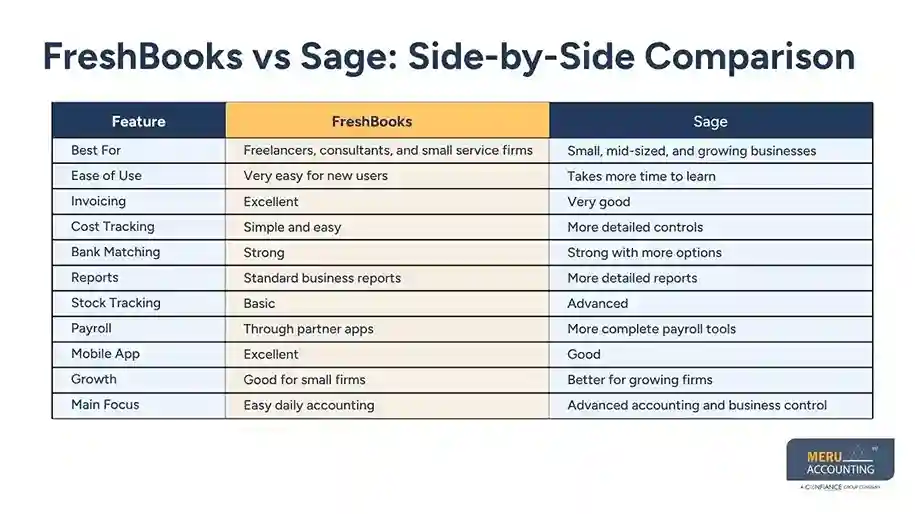
FreshBooks vs Sage: Side-by-Side Comparison
|
Feature |
FreshBooks |
Sage |
|
Best For |
Freelancers, consultants, and small service firms |
Small, mid-sized, and growing businesses |
|
Ease of Use |
Very easy for new users |
Takes more time to learn |
|
Invoicing |
Excellent |
Very good |
|
Cost Tracking |
Simple and easy |
More detailed controls |
|
Bank Matching |
Strong |
Strong with more options |
|
Reports |
Standard business reports |
More detailed reports |
|
Stock Tracking |
Basic |
Advanced |
|
Payroll |
Through partner apps |
More complete payroll tools |
|
Mobile App |
Excellent |
Good |
|
Growth |
Good for small firms |
Better for growing firms |
|
Main Focus |
Easy daily accounting |
Advanced accounting and business control |
How Meru Accounting Helps You Get the Most from FreshBooks and Sage
Choosing between FreshBooks and Sage is only the first step. Getting the most from your accounting software depends on the right setup, good bookkeeping, and steady financial management.
Meru Accounting offers expert bookkeeping services for businesses that use both platforms. Our team helps keep your books right while making sure you use the software to its full value.
Our services include:
- Bookkeeping with FreshBooks and Sage
- Software setup
- Account setup
- Bank matching
- Invoice and cost tracking
- Financial statement preparation
- Payroll bookkeeping
- Accounts payable and receivable
- Month-end closing
- Year-end closing
- Ongoing bookkeeping help
- Custom financial reports
Whether you are starting with FreshBooks, moving to the other platform, or already using either one, Meru Accounting helps keep your books neat, correct, and ready for better business choices.
Our team works with businesses in many fields, giving trusted bookkeeping support that saves time and lets owners spend more time growing their business instead of doing daily accounting.
Our Expert Insight
Pick accounting software based on what your business needs now and what it may need later. FreshBooks is a great choice for freelancers and service businesses that want simple billing and easy bookkeeping. Sage is a better fit for businesses that need deeper accounting, stock control, detailed reports, and room to grow.
Before you decide, review your daily work, reporting needs, team size, and growth plans. Choosing the right software now can help you avoid the cost and effort of changing systems later.
Key Takeaways
- FreshBooks is a strong choice for freelancers, consultants, and small service businesses.
- Sage offers stronger accounting tools for growing businesses and firms with more complex financial needs.
- Both platforms support cost tracking, invoicing, and financial reports.
- The first option stands out for ease of use and client billing.
- The second is stronger in stock tracking, payroll, and advanced reports.
- Think about your business size, budget, industry, and growth plans before choosing accounting software.
- Professional bookkeeping from Meru Accounting can help you get more value from either platform.
FAQs
FreshBooks is a good fit for many small firms and people who work on their own. It is easy to learn, easy to use, and helps you send bills fast. Sage is a good pick if your firm needs more tools or plans to grow soon.
The cost will vary by plan. FreshBooks has low-cost plans that work well for many small firms. The other platform has more plans with more tools, so the cost may be higher based on what you need.
Yes. It has more stock tools than FreshBooks. It is a good fit for firms that sell goods and need to keep track of stock each day.
Yes. You can move from one tool to the other as your firm grows or your needs change. Meru Accounting can help move your data with less risk, less work, and less lost time.
Most new users find FreshBooks easy to learn because the screens are clean and the steps are easy to follow. The other option has more tools and takes more time to learn. It is a good fit for firms that need more as they grow.
optional anymore
on running the business