Payroll may run like clockwork for months, yet a year-end review can still uncover unpaid taxes, incorrect wage entries, or deductions that never made it into the books. These issues often go unnoticed because each payroll run looks fine on its own. A regular payroll reconciliation helps businesses catch these gaps by checking whether payroll figures agree with payment records and accounting entries.
The tricky part is that not every mismatch comes from a payroll mistake. Some are caused by late payments, changes in employee benefits, or entries posted to the wrong accounting period. Knowing how to tell the difference is just as important as finding the error.
In this blog, we’ll look at common payroll reconciliation problems, practical ways to resolve them, and how outsourced payroll reconciliation can help businesses manage the review process with greater accuracy.
What You Will Learn From This Blog
- What payroll reconciliation means and why it matters.
- The 10 most common payroll errors and what causes them.
- How to find and fix payroll gaps before they affect your books.
- How to build a sound review process for each pay cycle.
- How payroll software can help reduce errors.
- When to seek help from an outside payroll team.
What Is Payroll Reconciliation and Why Does It Matter?
Payroll reconciliation is the process of checking payroll records against bank payments, tax records, benefit reports, and accounting entries. It helps confirm that the amount paid to staff matches the amount recorded in your books.
For example, if your payroll report shows $85,000 in net pay but your bank records show $83,500 in payments, you have a $1,500 gap to review. It could be due to a missed payment, a voided check, or an entry error.
A sound review also checks gross pay, tax withholdings, employer taxes, benefit costs, and payroll liabilities. Each item must be recorded in the right amount and in the right period.
Here is why this process matters:
- Accurate books: It keeps payroll costs and liabilities in line with actual payments.
- Correct employee pay: It helps find missed hours, wrong pay rates, and unpaid amounts.
- Tax compliance: It helps spot gaps in tax withholdings and payments before filing dates.
- Better cash flow control: It shows how much cash is needed for payroll and tax payments.
- Reliable reports: It helps keep wage costs and staff expenses correct in financial reports.
Payroll is often one of a business’s highest costs. So, even small errors can affect profit, cash flow, and trust among staff.
optional anymore
on running the business
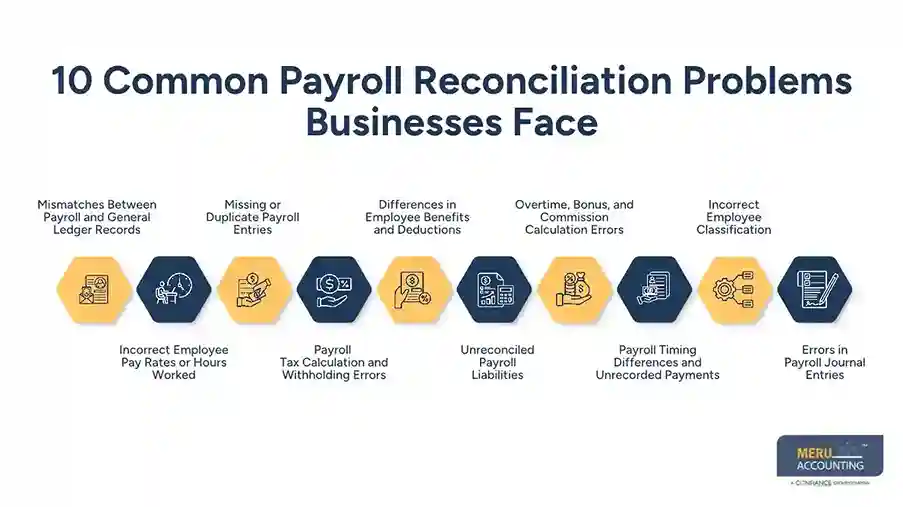
10 Common Payroll Reconciliation Problems Businesses Face
Payroll gaps can occur at many stages, from time tracking to tax filing and journal entries. Here are 10 common issues businesses should watch for.
1. Mismatches Between Payroll and General Ledger Records
This is one of the most common issues. The payroll report may show one wage cost, while the general ledger shows another.
This can happen when payroll entries are posted twice, missed, or sent to the wrong expense account. It can also occur when teams use different dates for payroll runs and journal entries.
How to fix it: Compare the payroll register with the general ledger for the same pay period. Check wage costs, tax expenses, benefit costs, and net pay. Trace each gap to its source and post the right adjustment.
2. Incorrect Employee Pay Rates or Hours Worked
Wrong pay rates or hours can lead to overpayments or underpayments. These errors may occur when a pay raise is not added on time, time sheets are wrong, or approved hours do not match payroll data.
How to fix it: Match time sheets with approved hours and check each employee’s pay rate. Review changes in pay, work hours, and job status before each payroll run. Correct any shortfall or overpayment based on company policy and labor rules.
3. Missing or Duplicate Payroll Entries
A payroll run may be left out of the books or entered twice. This can make wage costs look too high or too low.
Such gaps often arise from manual data entry, failed system syncs, or poor review of payroll journal entries.
How to fix it: Match each payroll run to its bank record and journal entry. Look for duplicate dates, amounts, and reference numbers. Add any missing entry and reverse duplicate entries after checking the source report.
4. Payroll Tax Calculation and Withholding Errors
Payroll tax errors can occur when tax rates, employee details, or tax forms are not up to date. For US employers, this may affect federal income tax, Social Security, Medicare, and state or local taxes.
Wrong tax amounts can lead to short payments, extra payments, or gaps between payroll records and tax filings.
How to fix it: Compare payroll tax reports with tax liability accounts and payment records. Check employee tax forms, wage limits, and tax rates for the period. Review any gaps before filing or making tax payments.
5. Differences in Employee Benefits and Deductions
Health plans, retirement plans, insurance, and other benefits can create gaps if payroll deductions do not match plan records.
For example, an employee may have a $200 health plan deduction in payroll, while the benefit report shows $225. This could be due to a plan change that was not added to payroll.
How to fix it: Match payroll deductions with benefit reports and plan bills. Check new enrollments, plan changes, and employee share amounts. Fix wrong deductions and update records for the next pay cycle.
6. Unreconciled Payroll Liabilities
Payroll liabilities include taxes, benefit deductions, retirement funds, and other amounts that a business owes but has not yet paid.
These accounts should be cleared when payments are made. If they keep showing old balances, the books may not show what the business still owes.
How to fix it: Review each liability account and match its balance with payment records. Find old or unmatched entries, check whether payments were made, and clear them with proper support. Do not write off old balances without finding their cause.
7. Overtime, Bonus, and Commission Calculation Errors
Extra pay can be hard to track when staff work varied shifts or earn sales-based pay. Errors may occur when overtime hours are missed, bonus terms are not applied, or sales data is wrong.
For US employers, overtime pay must also follow the rules that apply to the worker’s job and pay status.
How to fix it: Review approved time sheets, bonus plans, sales reports, and overtime rules. Check that each extra payment is in the right pay period and that the amount matches the terms set by the business.
8. Payroll Timing Differences and Unrecorded Payments
Payroll may be recorded in one period but paid in another. This can cause gaps in month-end reports, mainly when a pay date falls near the end of a month.
For example, wages earned in March may be paid in April. If the cost is not recorded in March, that month’s wage expense may be too low.
How to fix it: Check pay dates against the period in which wages were earned. Record accrued wages where needed and clear them when the payment is made. This helps keep costs in the right period.
9. Incorrect Employee Classification
Wrong employee records can affect pay, tax, and benefit costs. For example, a worker may be listed as an hourly employee instead of a salaried one, or a contractor may be treated as an employee.
How to fix it: Review worker status, pay type, tax details, and job records. Check the facts of the work setup rather than relying only on the label in the system. Ask a payroll or tax expert when worker status is unclear.
10. Errors in Payroll Journal Entries
Payroll journal entries split wage costs, tax costs, benefits, and net pay across ledger accounts. If these entries use the wrong account or amount, the books will not show the right cost.
How to fix it: Review the payroll journal entry against the payroll summary. Check each debit and credit, confirm the right account codes, and trace any gap to the source. Keep support for all changes made.
How to Resolve Common Payroll Reconciliation Issues
Finding a gap is only the first step. Businesses also need a clear way to trace and fix it.
Follow these steps:
- Collect the right records: Gather payroll registers, time sheets, bank statements, tax reports, benefit bills, and ledger entries for the same period.
- Compare payroll totals: Check gross pay, net pay, taxes, benefits, and employer costs against the books and bank records.
- Find unmatched items: Look for missing payments, duplicate entries, wrong amounts, and old liability balances.
- Trace each gap: Check the source data to learn whether the issue came from time tracking, payroll setup, tax details, or manual entry.
- Make the right fix: Correct the payroll record or post a ledger adjustment based on the cause. Keep proof of each change.
- Review the final records: Run the reports again and confirm that all key balances match.
Never make an adjustment just to force the books to balance. Each change should have a clear reason and supporting records.
How to Build an Effective Payroll Reconciliation Process
A regular process can help stop small payroll errors from turning into larger issues. Businesses should set clear rules for each pay cycle and month-end close.
Here are five ways to build a sound process:
- Set a fixed review schedule: Check payroll after each pay run and review open balances at month-end.
- Assign clear roles: Separate payroll prep, payment approval, and final review where possible.
- Use a standard checklist: Review pay, taxes, benefits, liabilities, bank payments, and journal entries each time.
- Keep clear records: Save payroll reports, approvals, payment proof, and notes for each change.
- Track open gaps: Keep a list of unmatched items, who owns each one, and when it must be fixed.
A good process also needs a clear cutoff. Any gap that remains open at month-end should be reviewed and explained before the books are closed.
How Payroll Reconciliation Software Helps Reduce Errors
Payroll software can cut down on manual work and help teams spot errors sooner. Many tools can link payroll data with accounting records, create payroll reports, and keep a record of pay runs.
Some tools also flag odd amounts, missing data, or failed links between systems. This can make reviews faster, but software cannot replace a proper check by a trained person.
When choosing a tool, look for:
- Links with your accounting and time-tracking systems.
- Clear payroll and tax reports.
- A record of changes and approvals.
- Alerts for failed syncs or missing data.
- Access controls to protect employee records.
The right tool depends on your payroll size, staff setup, and reporting needs. Even with a good system, regular human review is still needed to confirm that the books match the source records.
Get Your Payroll Records Back in Sync With Meru Accounting’s Outsourced Payroll Reconciliation
A payroll discrepancy isn’t always easy to trace. A tax balance may remain open after payment, benefit deductions may not match provider statements, or wage expenses may be posted to the wrong period. Finding the number that doesn’t match is one thing; understanding why it doesn’t match is where proper accounting review matters.
At Meru Accounting, we help businesses and CPA firms handle these reviews through our outsourced payroll reconciliation services. Rather than simply comparing payroll totals, we look at the records behind them to help identify the source of discrepancies and keep payroll accounts accurate.
Our payroll reconciliation services cover:
- Payroll-to-Ledger Reconciliation: Matching payroll registers and journal entries with wage, tax, benefit, and net pay accounts.
- Payroll Liability Reconciliation: Reviewing outstanding tax, retirement, insurance, and other payroll-related balances against payment records.
- Payroll Tax Reconciliation: Checking tax withholdings, employer tax expenses, recorded liabilities, and payment entries for differences.
- Employee Deduction Reconciliation: Matching benefit contributions and other deductions with payroll reports and provider statements.
- Payroll Variance Investigation: Tracing unusual amounts, duplicate entries, missing transactions, and unexplained balance changes.
- Payroll Journal Entry Review: Checking account mapping, debit and credit entries, accruals, and adjustments before financial close.
We support small and mid-sized businesses, growing companies, and accounting firms that need reliable help with payroll accounting. Our team brings multi-industry accounting experience and follows review processes to maintain accurate records and clear supporting documentation.
With Meru Accounting, you can add dedicated accounting support without the cost of building a full in-house team in the US. Your finance staff can spend less time tracing payroll differences and more time on reporting, planning, and other core work.
Our Expert Insight
One point businesses should keep in mind is that a payroll difference does not always mean an employee was paid the wrong amount. It may be a timing issue, a tax payment posted in the wrong month, or a benefit cost booked to the wrong account.
For example, if payroll tax is withheld in one month but paid in the next, the tax liability account may still show a balance at month-end. That does not mean the amount is wrong. The key is to check the payment date, the tax period, and the amount due before making any change.
We advise businesses to review both the amount and the reason behind each gap. This helps avoid wrong adjustments and keeps a clear audit trail. It also makes it easier to explain open balances to owners, auditors, and tax teams.
Key Takeaways
- Payroll reconciliation helps keep payroll reports, bank payments, tax records, and ledger entries in line.
- Common issues include wrong pay rates, tax errors, duplicate entries, and old payroll liabilities.
- Each gap should be traced to its source before any change is made.
- A fixed review schedule and clear roles can help prevent repeat errors.
- Payroll software can cut manual work, but it still needs human review.
- Businesses can use outsourced payroll reconciliation when in-house teams need extra time or skill.
FAQs
A payroll reconciliation report should show gross wages, net pay, employee deductions, employer taxes, benefit costs, and outstanding liabilities. It should also include any differences found, adjustments made, and supporting records.
Payroll processing calculates employee pay, deductions, and taxes for each pay period. Payroll reconciliation checks those results against bank records, tax payments, benefit statements, and accounting entries to confirm that the amounts are correct.
Start by checking the payroll register, bank transactions, and general ledger for the same period. Separate timing differences from actual errors, document any open balances, and post supported adjustments before closing the books.
Unresolved payroll differences can lead to incorrect wage expenses, overstated liabilities, inaccurate financial statements, and tax reporting issues. Businesses should investigate the source of each difference rather than force the accounts to balance with unsupported adjustments.
Yes. Businesses can keep payroll processing in-house while hiring an outside accounting team to review payroll reports, reconcile ledger accounts, investigate discrepancies, and check outstanding liabilities. This gives the finance team additional accounting support without handing over the entire payroll function.
optional anymore
on running the business