
One client needs payroll approved by Tuesday, another has staff in three states, and a third finds a pay error just before payday. For an accounting practice, these small issues can pile up fast. The right payroll software for cpa firm work can bring client tasks, pay dates, and records into a clear process instead of leaving staff to chase updates across emails and spreadsheets.
But not every tool suits every practice. The Best payroll accounting software for a firm with 10 small clients may differ from the right choice for a firm serving large employers. This guide compares six options, looks at multi-client features, and shows how to judge the real cost before you commit.
What You Will Learn From This Blog
- Which payroll tools fit different types of CPA firms and their clients.
- How to manage many client accounts without mixing payroll records.
- Which features matter for tax tasks, approvals, reports, and data access.
- How subscription fees, setup costs, and extra charges affect your budget.
- How to choose payroll software for cpa firm needs with fewer workflow gaps.
What is Payroll Software?
Think of payroll software as the system that turns hours worked and pay rates into wages, deductions, and pay slips. Depending on the plan, it can also handle direct deposits, tax calculations, tax filings, and year-end forms.
For a CPA firm, payroll software for cpa firm use must fit the way accountants serve many businesses. Your team may run weekly pay for a shop and monthly pay for a consulting firm, then check both sets of wage costs against their books. Each client’s data, tax details, and pay rules must stay separate.
Key Features to Look for in Payroll Software for CPA Firms
Multi-Client Payroll Management and Centralized Dashboards
A central dashboard should show which clients are ready for payroll, which need approval, and which have missing data. When testing payroll software for cpa firm use, check whether staff can spot late tasks without opening each account one by one.
Automated Payroll Tax Calculations and Filings
Tax tools can work out payroll taxes and handle deposits or filings when these tasks are included in the plan. The Best payroll accounting software should make filing status clear, so your team can see what has been sent and what still needs review.
Accounting Software Integrations and Data Syncing
A payroll run is not complete when staff receives their pay; the costs must also reach the books. Check how the software sends wages, tax liabilities, and deductions to tools such as QuickBooks Online, and how it flags a failed sync.
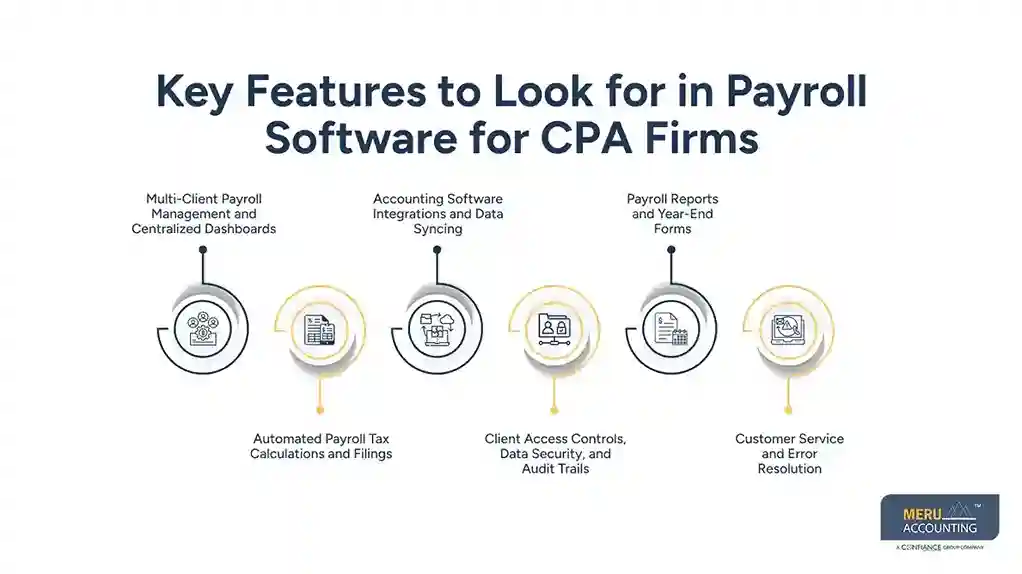
Client Access Controls, Data Security, and Audit Trails
One client should never be able to view another client’s payroll records. For a payroll software for cpa firm setup, client-level permissions should keep employee records separate while allowing authorized staff to manage multiple accounts.
Payroll Reports and Year-End Forms
Useful reports show gross wages, deductions, employer taxes, and net pay by client and pay period. Check whether the Best payroll accounting software can prepare required forms, such as W-2s, and whether filing or printing them costs extra.
Customer Service and Error Resolution
A failed deposit or wrong tax amount needs a clear path to a fix. Before choosing a provider, ask how your team can reach support, what hours it covers, and who handles urgent payroll issues.
optional anymore
on running the business
Best Payroll Software for CPA Firms: Top Solutions Compared
A long feature list does not always mean a tool is right for your clients. The Best payroll accounting software should match the size of the businesses you serve, their current accounting setup, and the level of service they expect. Compare these six options before choosing payroll software for cpa firm use.
Gusto: Best for Small Business Payroll Clients
Gusto offers payroll, tax filing options, employee onboarding, and benefits features for eligible businesses. It may suit firms with small business clients that want staff to access pay details online and managers to run regular pay cycles.
QuickBooks Payroll: Best for QuickBooks-Based Accounting Firms
For clients already using QuickBooks Online, QuickBooks Payroll may reduce the need to enter payroll costs by hand. Check the plan, accountant access, and account links first, as features and fees can differ.
ADP RUN: Best for Complex Payroll Requirements
ADP RUN offers payroll services for small businesses, making it an option for a payroll software for CPA firm setup with tax and HR needs. It may suit clients with more involved pay needs, but firms should review service terms and costs for each business.
OnPay: Best for Straightforward Small Business Payroll
OnPay combines payroll and tax filing features with common HR tasks. It may work well for clients with standard pay cycles, though your team should test its reports, account access, and accounting links before making it a regular part of the workflow.
Patriot Payroll: Best for Budget-Conscious Clients
Patriot Payroll offers plans aimed at small businesses, with different levels of tax filing service. It is worth checking for clients who need to keep costs down, but compare filing coverage and extra fees before making a choice.
Paychex Flex: Best for Payroll Service and Support
Paychex Flex offers payroll and related HR services, making it an option for a payroll software for CPA firm comparison. It may suit clients who want more service options, but the final cost depends on the plan and features selected.
How to Compare Payroll Software for Multi-Client Management
Managing Multiple Client Accounts From One Dashboard
Imagine your team has 15 clients due for payroll in the same week. The Best payroll accounting software should show each account’s status in one place, making it easier to spot missing hours, pending approval, or an unfinished pay run.
Setting Client-Specific Payroll Rules and Permissions
A retail client may pay staff weekly, while a professional firm pays monthly and uses different deductions. Good payroll software for cpa firm use must keep each client’s settings separate and limit who can change rates, bank details, or tax records.
Tracking Payroll Deadlines, Approvals, and Exceptions
A dashboard is only useful if it shows what needs action. Look for alerts for late approvals, missing timesheets, failed payments, and tax dates so your team can deal with issues before they affect payday.
Generating Client-Level Payroll and Tax Reports
Accountants need reports that show each client’s wage costs and tax balances without sorting through unrelated data. The Best payroll accounting software should let staff export reports and match the totals to the correct ledger.
Reviewing Work Across the Firm
When several staff members handle payroll, clear ownership matters. A record of who prepared, checked, and approved each run can make reviews easier and show where a task was missed.
Payroll Software Pricing for CPA Firms: What Does It Cost?
The price shown on a vendor’s website may cover only one business with a small team. Payroll software for cpa firm use can cost more when your practice adds client accounts, employees, tax services, or extra reporting tools.
Monthly Subscription and Per-Employee Pricing
Some providers charge a base monthly fee plus a fee for each employee. Others use flat rates or custom quotes, so ask how the price changes when you add clients or manage seasonal staff.
Accountant Partner Programs, Discounts, and Referral Fees
Some vendors offer accountant programs, partner tools, client discounts, or referral payments. Read the terms to see which features are included and whether the benefits apply to every client account.
Setup, Migration, Tax Filing, and Add-On Costs
Moving to a new system may involve data transfer, ledger mapping, employee setup, and test runs. Ask about extra fees for tax filing, year-end forms, additional states, and HR tools before choosing payroll software for cpa firm needs.
How to Calculate the Total Cost of Payroll Software
Add the base subscription, employee charges, setup work, tax services, and paid add-ons. Then include the staff time spent checking reports and fixing errors to compare the real cost of each option.
Example of a Cost Review
Suppose your firm serves 10 clients with eight employees each. Compare quotes for 10 client accounts and 80 employees, not the advertised price for one small business. The Best payroll accounting software should meet those needs without adding costs that outweigh the time saved.
How to Choose the Right Payroll Software for Your CPA Firm
Review Your Client Base
Start with your current client list, not the vendor’s feature page. Record employee counts, pay cycles, work locations, and common payroll issues to find the features your firm will use most.
Check Tax and Filing Coverage
Confirm which federal, state, and local tax tasks are included and which need extra fees. In the United States, employers remain responsible for meeting their legal duties even when a provider handles payroll tasks.
Test the Accountant Workflow
Ask for a demo that follows a real task: switch clients, review a pay run, correct an error, and export the entries. This is a practical way to judge whether payroll software for cpa firm work fits your team’s daily routine.
Compare Support and Service Terms
Check support hours, setup help, data exports, and cancellation terms. Your team should know how to retrieve records if a client changes providers or closes its account.
Check Data Security and Access
Review how the provider protects payroll data and manages staff permissions. Make sure your firm can remove access when a team member leaves and can limit each client’s view to its own records.
Match the Tool to Your Budget
When evaluating payroll software for cpa firm operations, compare client limits, reporting features, and the cost of managing multiple payroll accounts. The Best payroll accounting software should meet your clients’ needs, fit your budget, and keep the amount of manual work at a reasonable level.
Why Choose Meru Accounting for Payroll and Accounting Services?
Managing payroll for a growing business takes time, from recording salary expenses to tracking payroll taxes and keeping financial records up to date. Meru Accounting provides payroll, accounting, and bookkeeping services to meet these business needs.
- Payroll Processing: We manage payroll tasks based on agreed client requirements, including pay calculations and records from payroll software for CPA firm clients.
- Payroll Tax Records: Our team records payroll tax liabilities and related transactions in the books for accurate financial tracking.
- Payroll and Bookkeeping Integration: We record salary expenses, deductions, and payroll payments in the relevant ledger accounts.
- Accounting Software Expertise: Our experience with these platforms helps businesses assess the best payroll accounting software for their existing accounting systems and reporting needs.
- Financial Reporting: We prepare reports that show payroll expenses alongside other business costs, giving owners a clearer view of their finances.
- Outsourced Service Options: Businesses can assign payroll and related accounting tasks to Meru Accounting based on their needs, team structure, and service requirements.
Our Expert Perspective
Choosing payroll software for cpa firm use should account for each stage, with clear approval records and reliable transfers of payroll data into accounting systems. A pay run may look complete while a missing approval or failed ledger sync remains unnoticed.
Before choosing payroll software for cpa firm use, test two client accounts with different pay schedules. Check the reports, access rules, and accounting entries, then see whether a staff member can spot an unfinished task without asking a manager. This gives your firm a clearer view of how the tool will work in practice.
Key Takeaways
- Choose payroll software for cpa firm needs based on client size, pay cycles, tax rules, and current accounting tools.
- Test multi-client access, client-specific settings, approval tracking, and reports before buying.
- Compare subscription fees, employee charges, setup costs, tax filing, and add-ons.
- Check data security, support terms, and the ability to export records.
- Run a test before moving live payroll to a new system.
- Keep clear review steps because software does not remove an employer’s legal duties.
FAQs
Gusto, QuickBooks Payroll, ADP RUN, OnPay, Patriot Payroll, and Paychex Flex are popular options based on client needs, features, and budget.
CPA firms can manage multiple clients using payroll software with a central dashboard, separate client accounts, approval tracking, and client-level reports.
Payroll software costs vary by provider, with fees based on monthly plans, employee count, tax filing, setup, and extra features.
CPA firms should look for multi-client management, automated tax calculations, accounting links, secure client access, payroll reports, and deadline alerts.
Some plans include automated tax calculations, tax deposits, and filings, but coverage depends on the provider, plan, and tax requirements.
optional anymore
on running the business



