
Payroll mistakes can cost a small business money, time, and trust. A wrong pay rate, missed hour, or tax error can affect both staff and the business. Payroll software for small business can reduce many of these risks by using set rules, stored employee data, and automated payroll steps.
Manual payroll often depends on spreadsheets, repeated data entry, and memory. Each extra step creates a chance for an error. Payroll software can bring employee data, time records, deductions, taxes, and pay runs into one system. The result is a more controlled payroll process with fewer manual checks.
For small firms, the goal is not only to pay staff on time. The goal is to pay the right amount, keep proper records, and meet tax duties. The right payroll system can make these tasks easier while still requiring human review.
What You Will Learn From This Blog
- Why small businesses make common payroll mistakes.
- How payroll software for small business reduces manual errors.
- Which payroll features can make payroll work more reliable.
- How payroll tools can aid tax calculation and filing.
- How automation can improve employee pay accuracy.
- What to check when comparing top payroll software companies.
- When outside payroll help may be useful for a small firm.
How Payroll Software For Small Business Works
Employee Data is Added
The process starts with basic employee data. Payroll staff enters names, pay rates, tax details, bank data, benefits, and other needed records.
Once the data is stored, the system can use it for each pay cycle. Staff should check all records before the first payroll run.
Work Hours are Recorded
Hourly staff need accurate work-hour records. Time data can come from a time clock, timesheet, or linked attendance tool.
The system can use approved hours to calculate regular pay and overtime. Managers should review unusual or missing hours before payroll is processed.
Pay is Calculated
The system uses employee data, hours, pay rates, overtime, deductions, and tax settings to calculate gross and net pay.
A payroll software for small business system can handle these steps with fewer manual calculations. Payroll staff can then review the results before approval.
Taxes And Deductions are Applied
Payroll software can calculate applicable taxes and approved deductions during the pay run. These may include income tax, benefits, retirement amounts, or other deductions.
The exact rules depend on the employee, location, and business. Staff should check that the system settings match the firm’s actual payroll duties.
Payroll is Reviewed
A payroll run should not move straight from calculation to payment without a check. Staff can review gross pay, deductions, taxes, overtime, and unusual changes.
A review can catch errors before employees receive payment. Good payroll software for small business makes these checks easier by providing payroll reports.
Payments and Records are Completed
After approval, the system may send payroll payments through its supported payment method. It can also create pay statements and payroll reports.
The final step is to keep payroll records and post the needed entries to the accounting system. A complete process gives the business a clear record of each pay cycle.
Common Payroll Errors Small Businesses Face
Wrong Employee Details
Payroll depends on correct employee data. A wrong address, tax form, bank detail, pay rate, or deduction can affect a pay run.
Small firms may update records in one file but forget another. A central payroll record reduces the need to enter the same data in many places.
Incorrect Hours or Overtime
Hourly staff often submit time data before each pay run. Errors can happen when hours are copied by hand or overtime is missed.
A payroll system can pull approved time data into payroll. Rules can also flag unusual hours before the pay run is completed.
Missed Pay Changes
Pay rates may change after a promotion, annual review, or change in work terms. A missed update can cause underpayment or overpayment.
Payroll software for small business can keep current pay rates in one record. Changes should still be checked and approved by an authorized person before payroll is processed.
Wrong Tax Withholding
Tax withholding is another area where errors can have serious results. The amount withheld can depend on employee data, pay, and current tax rules.
For U.S. employers, federal withholding is generally based on wages and Form W-4 information. The IRS also requires employers to handle employment tax deposits and reports.
Missed Payroll Deadlines
A payroll error is not always a wrong number. A missed tax deposit, late filing, or late employee payment can also create problems.
Payroll software for small business can provide payroll calendars, reminders, and task alerts. These tools can lower the chance of missed tasks, but the employer remains responsible for checking deadlines and meeting legal duties.
How Payroll Software for Small Business Reduces Payroll Errors
Reduces Manual Data Entry
Manual entry creates more chances for typing mistakes. Payroll software can store employee details and reduce repeated data entry. Fewer repeated entries mean fewer points where wrong numbers or details can enter the payroll process.
Uses Set Payroll Rules
Payroll software for small business can apply set rules for regular pay, overtime, deductions, benefits, and taxes. Correct setup remains important because wrong rules can cause repeated errors across several pay runs.
Flags Unusual Results
Features offered by top payroll software companies may include alerts for unusual pay changes, missing hours, large deductions, or other payroll items. These alerts give staff a chance to check possible errors before payment is approved and sent.
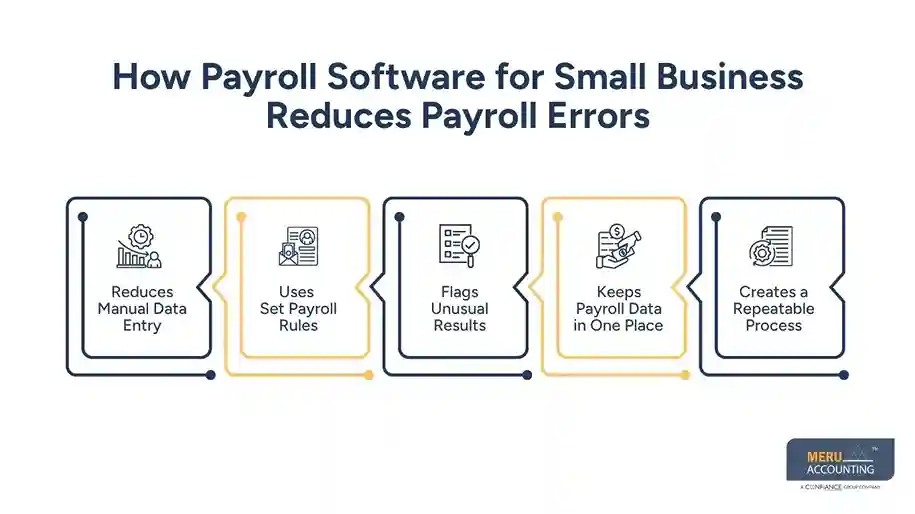
Keeps Payroll Data in One Place
Payroll software for small business can keep employee data, pay rates, deductions, time records, and payroll reports in one system. A central record reduces the need for several spreadsheets and can make payroll checks easier to manage.
Creates a Repeatable Process
A fixed payroll process gives staff clear steps for data checks, approvals, calculations, payments, and reporting. A repeatable process also makes it easier to find where an error began and correct the cause.
Key Features to Look For in Payroll Software for Small Business
Employee Data Management
Payroll software for small business keeps employee details in one record, including pay rates, tax data, benefits, deductions, and payment details. Clear records make updates easier and reduce errors caused by repeated data entry or outdated files.
Time and Attendance Links
Time tracking can send approved work hours into payroll, reducing the need to copy hours between different files. This feature is useful for teams with changing shifts, overtime, or hourly pay.
Tax Calculation Tools
Payroll software for small business can calculate common payroll taxes using employee data and set tax rules. Businesses should confirm tax coverage because payroll duties and rules can vary by location and business type.
Payroll Reports
Top payroll software companies often provide payroll reports that show wages, deductions, taxes, employer costs, and payment totals for review before and after payment. These reports can also assist with month-end accounting and payroll account checks.
Access and Audit Controls
Payroll systems should offer user permissions and records of key changes to protect sensitive employee information. Small firms should limit access to approved staff and check user activity on a regular basis.
optional anymore
on running the business
How Payroll Software Helps With Payroll Tax Compliance
Keeps Tax Data Organized
Payroll tax work requires accurate wage and withholding data. Payroll software for small business keeps key payroll records together for easier checks.
For U.S. employers, payroll taxes may include federal income tax, Social Security, Medicare, and federal unemployment tax.
Applies Current Tax Tables
Payroll systems may update tax tables and calculation rules as part of their service. This can reduce the need to update tax formulas by hand.
Businesses should still confirm that the system covers the tax locations where employees work and meets their tax needs.
Tracks Filing Duties
Some top payroll software companies also provide payroll tax filing features that can help small businesses prepare or submit required forms. This can reduce manual work for a small finance team.
The IRS requires employers to file certain forms based on their situation, including Forms 941, 940, and W-2.
Keeps Payroll Records
Good payroll records can make tax checks and reviews easier. Payroll software for small business can store payroll reports and payment records in one system.
Employers should retain records based on the rules that apply to their business and location.
Provides A Review Trail
A payroll system can show key payroll changes and provide reports for internal checks. This can make unusual payroll amounts easier to find.
Small firms should review payroll reports before approval because automation does not replace human checks.
How Automated Payroll Improves Employee Payment Accuracy
Pays the Correct Base Amount
Employee pay starts with the correct rate and pay type. Payroll software for small business uses stored salary or hourly rates during each pay cycle.
When a rate changes, staff should confirm the new amount before payroll runs. This check can prevent underpayment or overpayment.
Handles Overtime Rules
Overtime can be hard to track when hours are kept in separate files. Many top payroll software companies include time and overtime features that use approved hours to calculate overtime based on configured rules.
Employers should confirm that the settings match the wage laws that apply to their staff. Incorrect settings can still lead to wrong pay.
Includes Approved Deductions
Benefits, retirement plans, insurance, and other deductions can change take-home pay. Payroll software for small business can apply approved deductions during each pay run.
Each deduction should have the correct amount and basis. Staff should check unusual changes before giving final approval.
Reduces Duplicate Payments
Duplicate payments can happen when staff use several payroll files or records. A central system can reduce the risk of paying the same employee twice.
Payment reports should still be checked before funds are sent. A second review can catch duplicate or unusual payments.
How Small Businesses Can Choose Among Top Payroll Software Companies
Check Business Size and Payroll Needs
Not every payroll system fits every small business. A firm should consider staff size, pay frequency, worker types, and payroll needs.
Before choosing among top payroll software companies, list the payroll tasks that need automation and the features required for daily work.
Review Tax Coverage
Tax coverage should be checked before choosing payroll software for small business. Businesses should confirm support for the tax locations where employees work.
The system should also show whether tax filing is included or charged as an extra service.
Check Integration Options
Payroll may need to connect with accounting, time tracking, benefits, or HR tools. Good integration can reduce repeated data entry.
Check whether the needed integrations are included and how payroll data moves between connected systems.
Compare Support And Controls
Payroll issues can arise close to payday, so reliable support matters when selecting payroll software for small business. Businesses should also check user access, security, and audit controls.
Compare support channels, access controls, data protection, and payroll correction options before making a choice.
Review Total Cost
A low monthly price may not show the full cost. Extra fees can apply for employees, tax filing, forms, setup, integrations, or support.
Ask top payroll software companies for the full cost before choosing. Compare the price with the time and work the system can reduce.
Why Choose Meru Accounting?
Payroll Process Review
Meru Accounting can review a small firm’s payroll process and find areas where manual work may cause errors. Our team can check employee data, payroll steps, reports, reconciliations, and approval points.
Payroll Data Checks
Accurate payroll starts with clean source data. We can check pay rates, employee records, deductions, and payroll reports before key payroll runs.
A clear checking process, supported by reliable payroll software for small business, can make payroll work easier to manage and review.
Payroll Tax Assistance
Payroll tax work requires care because filing and payment rules can vary by location and business type.
Meru Accounting can assist with payroll-related tax work based on the agreed scope and applicable requirements.
Payroll and Accounting Coordination
Payroll does not end when employees are paid. Payroll entries also affect books, cash accounts, liabilities, and financial reports.
Our team can coordinate payroll records from payroll software for small business with bookkeeping work so payroll balances are easier to check.
Our Expert Perspective
Payroll software for small business works best when used as part of a clear payroll process. Small firms should not treat automation as a replacement for human review.
A strong process uses correct employee data, approved time records, clear rules, review steps, and timely tax work. Software can handle routine tasks while accounting staff checks unusual items.
Key Takeaways
- Payroll mistakes can come from wrong data, missed hours, tax errors, or late tasks.
- Payroll software for small business can reduce repeated manual entry.
- Automated rules can make regular payroll calculations more consistent.
- Payroll reports can give owners a clear review point before payment.
- Employers still remain responsible for payroll accuracy and tax duties.
- Access controls can reduce unwanted changes to payroll data.
- Businesses should compare top payroll software companies based on features, tax coverage, support, integrations, and total cost.
- Top payroll software companies should be assessed based on the firm’s actual payroll needs.
- Human review remains important even when payroll is automated.
- Meru Accounting can provide payroll and accounting support based on the agreed service scope.
FAQs
Payroll software reduces errors by automating pay calculations, tax deductions, overtime, and employee payments. It also reduces repeated manual data entry.
Payroll software can reduce incorrect payments by using stored pay rates, approved work hours, deductions, and tax data. Businesses should still review payroll before payment.
Common errors include incorrect pay rates, missed overtime, wrong tax deductions, incorrect employee details, duplicate payments, and late payroll processing.
Payroll software can use approved time records and configured overtime rules to calculate eligible overtime pay. The rules should match the laws that apply to the business.
Payroll software can be more consistent for routine calculations because it reduces manual entry and repeated calculations. Accuracy still depends on correct setup and employee data.
optional anymore
on running the business



