QuickBooks for construction contractors gives builders and general contractors a way to track job costs, vendor bills, client payments, and project profits. Construction firms often manage many jobs at once, with different budgets, workers, suppliers, and payment terms. Poor records can lead to missed bills, late payments, and lower profits.
A clear accounting process keeps costs linked to the right job and shows which payments need attention. This blog covers common accounting issues, accounts payable (AP), accounts receivable (AR), job cost tracking, useful software features, and services from construction accounting companies.
What You Will Learn From This Blog
- How QuickBooks for construction contractors tracks job costs and project budgets.
- How to manage vendor bills and subcontractor payments.
- How to track client invoices, retainage, and overdue payments.
- Which reports and integrations can improve cost control.
- When construction accounting companies may be useful.
Introduction to QuickBooks for Construction Contractors
QuickBooks for construction contractors lets builders and general contractors record income and expenses for each project. By setting up clear job names and cost categories, firms can track material purchases, fuel, equipment hire, labor, and other costs. These records give owners a better view of each job’s total cost and income.
Contractors can also compare actual spending with project budgets to spot rising costs before they reduce profit. Accounts payable (AP) records show money owed to vendors, while accounts receivable (AR) records show payments due from clients. Regular reviews of both help firms plan payments, follow up on late invoices, and manage cash flow.
The right setup depends on the firm’s needs and the QuickBooks plan in use. Before choosing a plan or adding connected apps, check whether it offers the required project reports, payroll links, purchase order tools, and expense tracking features. Correct data entry and regular account checks remain key to getting useful results.
Common Accounting Challenges Faced by Construction Contractors
Managing Costs Across Projects
QuickBooks for construction contractors can group costs by job, but staff must select the right project for each entry. Construction accounting companies can help establish consistent job costing methods so contractors can review project expenses and compare costs across jobs.
Tracking Labor and Materials
Wages, cement, tools, fuel, and equipment costs can rise quickly. Match time sheets, supplier bills, and expense records to the correct job.
Handling Late Client Payments
Late payments can leave a firm short of cash for wages and supplies. Send invoices on time, check due dates, and follow up on unpaid balances.
Managing Subcontractor Bills
Check each subcontractor bill against the agreed rate, work completed, and job records. This can reduce payment errors and disputes.
Tracking Retainage and Change Orders
Some contracts allow clients to hold back part of a payment until set work is complete. Record retainage and approved change orders clearly so the amount due is correct.
Accounts Payable (AP) Solutions for Construction Contractors
Organize Vendor Invoices
Record each bill with the vendor name, invoice number, job, amount, and due date. QuickBooks for construction contractors can keep these records in one place for review.
Set Invoice Approval Rules
Assign staff to check bills before payment. Construction accounting companies can also help review vendor bills, maintain payment records, and set up AP processes that match the contractor’s approval requirements.
Avoid Duplicate Payments
Check invoice numbers, dates, and amounts before paying. Review payment records to prevent the same bill from being paid twice.
Track Outstanding Bills
Review AP aging reports in QuickBooks for construction contractors to see which bills are due soon or overdue. This gives owners time to plan payments around expected client receipts.
Reconcile Vendor Statements
Construction accounting companies can review vendor statements and payment records to help contractors resolve discrepancies and keep accounts payable up to date.
Accounts Receivable (AR) Solutions for Construction Contractors
Create Progress Invoices
Bill clients when agreed stages of work are complete. Keep signed contracts and proof of work ready, so each invoice matches the agreed terms.
Record Retainage and Changes
Track retained amounts and approved changes to the contract price. Do not bill for extra work without the required approval.
Follow Up on Late Payments
Construction accounting companies can help contractors maintain updated receivables records and follow a consistent process for tracking overdue invoices and expected payments.
Review Receivables Reports
QuickBooks for construction contractors can provide records for reviewing open invoices and payment status. Use these details to plan spending and identify clients with late balances.
Match Payments Correctly
Apply each client payment to the right invoice. Check short payments and deductions before closing the record, so open balances remain correct.
optional anymore
on running the business
How QuickBooks for Construction Contractors Simplifies Job Cost Accounting
Set Up Jobs and Cost Codes
Create clear project records and cost groups for labor, materials, equipment, and subcontractors. A sound setup makes each job easier to review.
Compare Costs With Budgets
If a job has a material budget of $20,000 and recorded costs reach $17,000 early in the work, check remaining orders before spending more. QuickBooks for construction contractors can make such cost checks easier when transactions are coded correctly.
Track Labor and Subcontractor Costs
Link time records, payroll data, and subcontractor bills to the right job where the selected plan or connected tools allow it. Check for missing hours and costs.
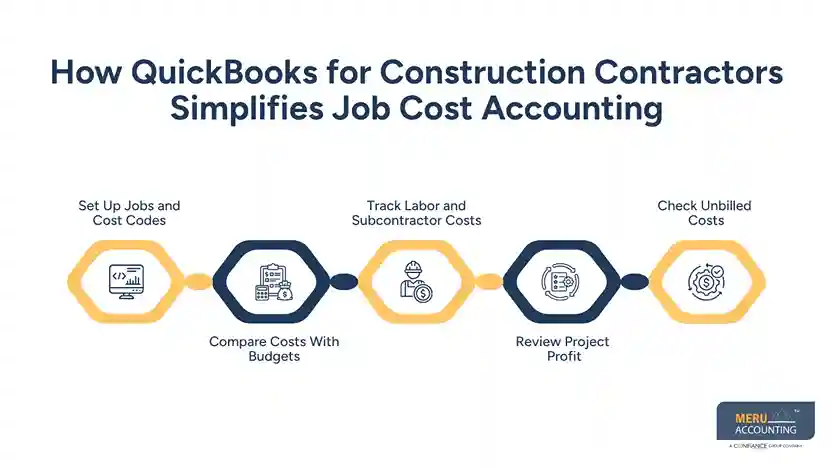
Review Project Profit
Compare job income with recorded expenses to see whether the project is making money. Late bills and unrecorded costs can change the final result.
Check Unbilled Costs
Some costs arise before the related work can be billed. Review unbilled costs against the contract schedule and ask an accountant about complex work-in-progress or revenue rules.
QuickBooks Features and Integrations for Construction Accounting
Use Purchase Orders
Purchase orders record planned purchases before bills arrive when the selected plan or connected tool offers this feature. Match orders with supplier invoices and the right job.
Connect AP Tools
AP tools can capture invoice details, route bills for approval, and prepare payments. Check that data transfers correctly before relying on automation.
Link Time Tracking and Payroll
Time tracking tools record hours by worker or job. Check pay rates, overtime, and job codes before using the data for labor cost reports.
Review Financial Reports
QuickBooks for construction contractors can provide useful income, expense, AP, and AR records. Construction accounting companies review these reports to track overdue payments and rising costs.
Check App Compatibility
Before adding an app, confirm that it works with your QuickBooks plan. Test sample bills, payments, and time entries to check the data.
Why Choose Meru Accounting for Construction Accounting Services
Meru Accounting provides bookkeeping and accounting services for businesses that need accurate records and regular reports. Construction firms can benefit from clear job costs, updated bills, and timely invoice records.
Job Cost Records
Meru Accounting provides bookkeeping services to record income and expenses under the right accounts. Regular checks can flag missing bills and costs assigned to the wrong job.
AP Record Management
Clear AP records show which vendor bills are due and which payments remain open. Meru Accounting provides bookkeeping services based on the agreed scope of work.
AR Tracking
Accurate AR records show unpaid client invoices and past-due balances. These records give owners a clear base for payment follow-ups and cash planning.
Financial Reporting
QuickBooks for construction contractors is most useful when entries are complete and correctly coded. Meru Accounting provides bookkeeping and reporting services to review income, costs, and cash flow.
When comparing construction accounting companies, ask about construction experience, job cost reports, account checks, and the exact services included in the agreement.
Our Expert Perspective
QuickBooks for construction contractors works best when staff record costs and payments on time. A weekly review of job budgets, unpaid bills, and overdue invoices can reveal problems before they affect cash flow. Keep retainage and approved change orders clear, and ask a qualified accountant to review complex contract and tax matters.
Key Takeaways
- Set up each job with clear names and cost groups.
- Record labor, material, and equipment costs under the right job to get more accurate job cost reports in QuickBooks for construction contractors.
- Check vendor bills and due dates before making payments.
- Send progress invoices according to contract terms.
- Track retainage, change orders, and overdue client balances.
- Check software plans and app features before choosing a setup.
- Compare construction accounting companies based on their construction industry experience, job costing methods, and AP/AR services.
FAQs
QuickBooks tracks labor, materials, equipment, and other expenses for each construction project.
Construction contractors can track vendor bills, payment due dates, client invoices, and overdue balances in QuickBooks.
QuickBooks can record retainage and change order transactions through suitable accounts and workflows, depending on the version and setup.
Common challenges include inaccurate job costing, delayed payments, retainage tracking, cash flow gaps, and poor expense records.
Construction accounting companies can provide QuickBooks bookkeeping, job cost tracking, AP/AR management, and financial reporting services.
optional anymore
on running the business