For QuickBooks for landlords, a property-level Profit and Loss (P&L) report can show much more than total income and spending. It can show which rental property earns a profit, which one has high costs, and where cash is being spent. When each property is tracked in the right way, the reports can give a clear view of rental results without mixing data from several properties.
The IRS notes that rental owners should keep records of rental income and expenses, since these records are used to monitor rental activity, prepare financial statements, and support tax returns.
For QuickBooks for landlords, the key is not only to enter each bill or rent payment. Each transaction must also be tied to the right property or tracking category. This is where Property management with QuickBooks can make property-level reporting more useful.
What You Will Learn From This Blog
- What a property-level P&L statement is and why landlords use it.
- How QuickBooks for landlords can separate income and costs by rental property.
- How to set up property tracking for clear monthly and yearly reports.
- Which income and expense types should be assigned to each property.
- How to read property-level profit and spot cost issues.
- Which common data entry errors can make rental reports less useful.
- How Property management with QuickBooks can give landlords a better view of property results.
What Is a Property-Level Profit and Loss Statement?
A Report For One Property
A property-level P&L shows income and expenses for one rental property during a set period. Instead of showing all rental activity together, it gives the owner a separate view of each property.
For QuickBooks for landlords, this can be useful when several houses, units, or buildings are owned under the same business.
Income Minus Expenses
The basic P&L formula is simple: rental income minus operating expenses equals net profit or loss. The report may include rent, late fees, repairs, insurance, taxes, utilities, and other rental costs.
The IRS lists common rental expenses such as advertising, cleaning, insurance, interest, management fees, repairs, taxes, and utilities.
Why Property-Level Data Matters
A total business P&L may show that the rental business made money. It may not show which property earned that profit.
With QuickBooks for landlords, property-level data can show that one house has a strong margin while another has high repair or maintenance costs.
P&L Is Not The Same As Cash Flow
A P&L measures income and expenses based on the accounting method used. It is not the same as a bank balance or cash flow report.
This matters because mortgage payments, loan principal, capital purchases, and depreciation can affect financial reports in different ways.
A Simple Example
Suppose Property A earns $3,000 in rent and has $1,400 in operating costs. Its operating profit is $1,600 before items that may be treated separately.
Property B may also earn $3,000 but spend $2,300. Looking only at total rental income would hide this difference.
QuickBooks for Landlords: How Property-Level P&L Reporting Works
Set Up Each Property
The first step in using QuickBooks for landlords is to create a clear method for identifying each rental property. Depending on the QuickBooks setup, landlords may use classes, locations, customers, or another suitable tracking method.
QuickBooks Online class tracking can be used to track income, expenses, and profitability by a defined segment.
Assign Income Correctly
Rent received from Property A should be linked to Property A. Rent from Property B should be linked to Property B.
This simple rule is central to QuickBooks for landlords because a report is only as useful as the transaction data behind it.
Assign Expenses Correctly
A repair invoice should be linked to the property where the repair took place. The same rule can apply to property insurance, utilities, cleaning, management fees, and other direct costs.
Run The P&L By Property
Once transactions are tagged in a consistent way, a P&L can be run by the selected tracking category. QuickBooks provides a Profit and Loss by Class report for users who track transactions by class.
How Property Management With QuickBooks Supports Property-Level Reporting
Keep Property Data Separate
QuickBooks for landlords works best when the account structure clearly separates income and expenses by property. Each property needs a consistent way to identify its income and costs.
Without this structure, several properties may appear as one combined rental activity.
Track Recurring Costs
Some rental costs repeat each month or year. Examples include insurance, management fees, utilities, software, and property taxes.
When these costs are assigned to the right property, Property management with QuickBooks can give a better view of the cost pattern for each rental unit.
Compare Properties
Property-level reports can be compared side by side. A landlord may see that two properties have similar rent but very different repair, utility, or management costs.
QuickBooks for landlords can make these property-level comparisons more useful by showing where individual properties differ in operating costs.
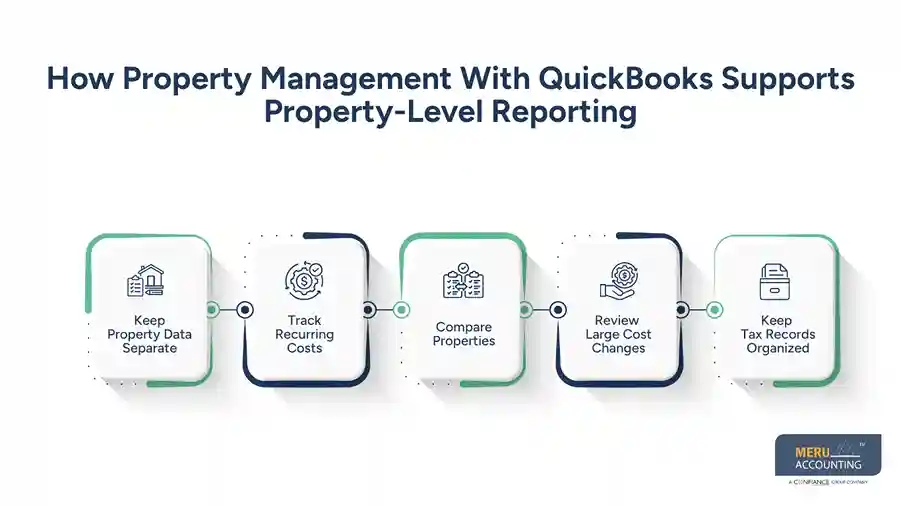
Review Large Cost Changes
A sudden rise in repairs or utilities may be worth checking. It could be a real cost increase, a one-time event, or a transaction that was entered under the wrong property.
Property management with QuickBooks gives landlords a structured place to review these changes.
Keep Tax Records Organized
Well-maintained rental accounting records are also important during tax preparation. The IRS states that landlords should retain records that support the rental income and expenses reported on their tax returns.
However, a QuickBooks report should not be treated as tax advice. Tax treatment can vary by property, ownership structure, personal use, and other facts.
optional anymore
on running the business
What Income And Expenses Should Be Tracked For Each Property?
Rental Income
The main income line is rent received from tenants. Other receipts may also need review, such as tenant-paid expenses, late charges, or other payments tied to the rental.
The IRS states that rental income generally includes amounts received for the use or occupation of property.
Repairs And Maintenance
Repairs should be tied to the property where the work was done. Keep invoices and notes that show what was repaired and why.
Do not assume that every property cost is a repair. Some work may be an improvement and may have different tax treatment.
Insurance And Property Tax
Insurance and property tax can be major annual costs. Recording them under the right property gives the landlord a better view of the cost of owning that property.
For QuickBooks for landlords, these entries also make year-to-year comparisons easier.
Utilities And Management Fees
If the owner pays water, electricity, gas, trash, or similar costs, those expenses should be recorded under the related property when appropriate.
Property management fees should also be assigned to the property or properties they relate to.
Mortgage Interest And Depreciation
Mortgage interest and depreciation need special care. A mortgage payment is not simply an expense equal to the full payment amount.
The IRS treats depreciation as a capital expense used to recover the cost of income-producing property over time.
For QuickBooks for landlords, these accounts should be set up based on the accounting and tax method used by the business and its tax professional.
How To Create A Property-Level P&L Report In QuickBooks
Choose A Property Tracking Method
Start by deciding how each property will be identified in QuickBooks. Class tracking is one option available in QuickBooks Online Plus and Advanced.
The best setup depends on the number of properties and the level of detail the landlord needs.
Create Clear Property Names
Use names that are easy to read, such as “Oak Street House” or “Main Avenue Duplex.” Avoid unclear codes that make reports hard to read.
Clear names make QuickBooks for landlords easier to review when several properties are involved.
Enter Transactions With The Right Property
Each rent payment and direct expense should be assigned to the correct property during entry. Do not plan to sort everything at the end of the year.
Small entry errors can become much harder to fix when hundreds of transactions have already been posted.
Run Profit And Loss By Class
In QuickBooks Online, users who have class tracking can run a Profit and Loss by Class report. QuickBooks states that this report groups income, expenses, and net income by class.
This is one of the main reporting methods used in QuickBooks for landlords when classes are used for property tracking.
Common Property-Level Reporting Mistakes Landlords Should Avoid
Mixing Several Properties
The most common issue is placing income or expenses from different properties into one group.
This makes it hard to know which property produced the income and which property caused the cost.
Using Too Many Tracking Categories
A complex setup can make reports hard to manage. Property names should be clear, and the tracking system should match the way the landlord manages the rentals.
For QuickBooks for landlords, simple and consistent data often gives better results than a large number of confusing categories.
Forgetting Shared Expenses
Some expenses apply to more than one property. For example, an owner may pay for one service that covers several buildings.
The amount should be allocated using a reasonable method that fits the nature of the cost. Keep the basis for the allocation in the records.
Posting Capital Costs As Repairs
With QuickBooks for landlords, property owners can create separate categories for repairs and improvements instead of recording every major expense under routine maintenance.
The IRS distinguishes depreciation from ordinary rental expenses, so landlords should review major property work with their tax professional.
Ignoring Personal Use
If a landlord also uses a rental property personally, some expense deductions may need to be divided between rental and personal use.
The IRS has specific rules for mixed personal and rental use, including limits that can apply in some cases.
How Property Management With QuickBooks Helps Landlords Measure Property Profitability
Compare Net Rental Results
With QuickBooks for landlords, a properly structured property-level P&L can show income, expenses, and the resulting net amount for each rental. This gives the owner a simple way to compare properties.
Property management with QuickBooks becomes more useful when the same reporting method is used for every property.
Find High-Cost Properties
A property may have strong rent but weak profit because of high maintenance, insurance, tax, or management costs.
A property-level report can bring these cost patterns into view.
Watch Monthly Trends
Monthly reports can show whether costs are stable or rising. A sharp change in repairs or utilities may point to a need for further review.
For QuickBooks for landlords, trend review can be more useful than looking at one annual total.
Review Rent Against Costs
Landlords can compare rental income with operating expenses to see how much income remains after normal property costs.
This does not replace a full return calculation because financing, capital spending, depreciation, taxes, and other factors may affect the final result.
Support Better Decisions
A clean property report can give landlords better data for rent reviews, repair planning, budgeting, and property performance checks.
Why Choose Meru Accounting For Rental Property Bookkeeping?
Property-Level Bookkeeping
Meru Accounting provides bookkeeping services that keep income and expenses organized by rental property. This gives landlords a clear record for each property instead of one combined set of figures.
QuickBooks-Based Accounting
For landlords using QuickBooks, Meru Accounting can maintain transaction records within a structured accounting setup. Rent, repairs, insurance, taxes, and other costs can be recorded under the right accounts and property categories when QuickBooks for landlords is structured appropriately.
Regular Account Reconciliation
Bank and credit card transactions need to match the accounting records. We provide account reconciliation services to identify missing entries, duplicate transactions, and differences between books and financial accounts.
Clear Financial Reports
A property-level P&L is more useful when the underlying books are kept in order. At Meru Accounting, we provide financial reporting that gives landlords a clear view of income, expenses, and property-level results.
Records For Tax Review
Rental bookkeeping creates the financial records needed for tax preparation and review. Meru Accounting organizes accounting data while tax treatment remains subject to the landlord’s specific facts and the advice of a qualified tax professional.
Scalable Bookkeeping Services
A consistent accounting structure can make it easier to maintain records across multiple properties without creating a separate accounting process for every property, making QuickBooks for landlords more practical as a rental portfolio grows.
Our Expert Perspective
A property-level P&L is only as reliable as the transactions behind it. If rent is posted to one property and its repair cost is posted to another, the report may show a profit that does not reflect the property’s actual result.
For QuickBooks for landlords, the best approach is to decide how each property will be tracked before entering large volumes of transactions. Once that structure is in place, monthly review and reconciliation can keep the reports accurate and useful.
The goal should not be to create more reports. It should be to create one clear reporting system that answers the right questions: How much did each property earn? What did it cost to operate? Which costs changed? And what is the property’s net result for the period?
For Property management with QuickBooks, this basic discipline can make property-level P&L reporting far more meaningful than a report built only at year-end.
Key Takeaways
- QuickBooks for landlords can provide property-level income and expense reporting when transactions are tracked by property.
- With QuickBooks for landlords, a property-level P&L can show the income, expenses, and net result of a specific rental property.
- Each rent payment should be assigned to the right property.
- Repairs, insurance, taxes, utilities, and management fees should be classified with care.
- Shared expenses may need a reasonable allocation method.
- When setting up QuickBooks for landlords, capital improvements should be recorded separately from ordinary repairs after reviewing their appropriate accounting and tax treatment.
- Personal use of a rental property can change how some expenses are treated.
- Property management with QuickBooks works best when the tracking system is simple and consistent.
- Monthly report reviews can catch errors before they affect annual reporting.
- IRS guidance should be reviewed for tax matters, and complex tax issues should be discussed with a qualified tax professional.
FAQs
Use property-based classes or tracking categories in QuickBooks, assign each transaction to the right property, and run a Profit and Loss report by class.
Yes, QuickBooks can show income, expenses, and net profit for each rental property when transactions are correctly assigned to each property.
Landlords can assign each rent payment to the related property using classes or another suitable tracking method in QuickBooks.
When using QuickBooks for landlords, a rental property P&L can include rent income, repairs, insurance, property taxes, utilities, management fees, advertising, and other applicable operating costs.
QuickBooks lets landlords compare income and expenses by property so they can see which properties have higher or lower net results.
optional anymore
on running the business