QuickBooks for real estate company accounting gives real estate firms a clear way to record sales income, agent commissions, referral fees, and broker payouts. When each property deal has different terms, firms need accurate records to track the money earned and the amount due to each party.
A firm may close several deals in one month, each with a different sale price, commission rate, and agent split. QuickBooks for real estate company records can bring these figures into one accounting system, while regular checks keep bank deposits and agent payouts in line with signed agreements. Real Estate Accounting with QuickBooks also gives owners a clearer view of income, costs, and unpaid balances.
What You Will Learn From This Blog
- How QuickBooks for real estate company accounting records commission income and deal costs.
- How Real Estate Accounting with QuickBooks tracks agent splits, referral fees, and broker payments.
- How to set up accounts for agents, brokers, and property deals.
- How to create a clear workflow from deal closure to final payment.
- How to reconcile commission statements with bank deposits.
- How to avoid common errors and keep monthly reports accurate.
How Real Estate Accounting with QuickBooks Works
Record Each Property Deal
Real Estate Accounting with QuickBooks starts with a clear record of each closed deal, including the sale price, closing date, fee rate, and parties involved. Keep the signed agreement and closing statement with the related accounting entry.
Record Commission Income
QuickBooks for real estate company accounting can record the commission earned from a property sale in the correct income account. The firm should follow its accounting policy and contract terms to decide when the income qualifies for entry.
Track Agent Shares
Record the amount due to each agent or outside broker based on the signed commission agreement. Real Estate Accounting with QuickBooks becomes easier to review when the gross fee, agent split, referral fee, and net amount due appear in clear records.
Match Payments With Deals
Compare each bank deposit with the related closing statement and commission record. If one deposit covers several deals, keep a breakdown that shows the amount linked to each sale.
Review Financial Reports
Run income, expense, and balance reports at month-end to check the firm’s financial position. QuickBooks for real estate company reporting can show open balances and deal costs when staff records each item in the correct account.
optional anymore
on running the business
Key Features to Look for in QuickBooks for Real Estate Company Accounting
Commission and Income Tracking
QuickBooks for real estate company accounting should record sales income, agent shares, referral fees, and broker payouts in clear accounts. Real Estate Accounting with QuickBooks becomes easier to review when gross fees and related costs remain separate.
Class and Location Tracking
Class and location tracking can group transactions by office, team, or service line, depending on the plan. These features give real estate firms a way to compare income and costs across different parts of the business.
Project-Based Cost Tracking
Project tracking can group income and expenses linked to a specific property deal when the selected QuickBooks plan offers this feature. Real Estate Accounting with QuickBooks can then show the costs tied to a deal and the income it earns.
Bank Feeds and Reconciliation
Bank feeds bring bank transactions into QuickBooks for review and matching. QuickBooks for real estate company accounting also needs regular bank reconciliation to check deposits, agent payouts, and outstanding items against bank statements.
Custom Reports and Financial Statements
Look for reports that show commission income, operating costs, unpaid balances, and cash flow. Real Estate Accounting with QuickBooks gives owners clearer financial details when staff reviews these reports each month.
User Access and Audit Records
Role-based access lets firms limit who can view, change, approve, or pay transactions, based on the plan and settings. QuickBooks for real estate company records should also be reviewed for changes and supported by signed agreements, closing statements, and payment proof. — where to fit this section
Why Real Estate Companies Need Accurate Commission Tracking
Prevent Wrong Agent Payouts
A wrong split can lead to overpayments, disputes, or delays. Real Estate Accounting with QuickBooks allows staff to review the agreed rate and each party’s share before a payment is approved.
Keep Cash Flow Clear
A real estate firm must know which commissions have reached its bank and which amounts remain due. QuickBooks for real estate company records can show these balances when staff enter payment dates and review unpaid items.
Record Referral Fees Correctly
Referral deals may involve outside agents or other brokerages. Record each fee as a separate cost and link it to the right deal so the firm’s income and expenses remain clear.
Measure Deal Profit
Gross commission does not equal the amount the firm keeps. Agent shares, referral fees, and other deal costs affect the final result, so Real Estate Accounting with QuickBooks should record each amount in the right account.
Keep Records Ready for Review
Signed agreements, closing statements, invoices, and payment proof create a clear record of each transaction. These files also make it easier to answer questions from owners, accountants, and tax advisers.
How to Set Up QuickBooks for a Real Estate Company
Create a Real Estate-Specific Chart of Accounts
Set up income accounts for sales commissions and referral income, along with expense accounts for agent commissions, referral fees, and other deal costs. QuickBooks for real estate company accounting needs a clear chart of accounts to keep revenue and expenses apart.
Set Up Agents, Brokers, and Vendors
Create separate records for agents, outside brokers, and referral firms that receive payments. Store the right payment details and signed commission terms, while limiting access to private data.
Configure Income, Expense, and Commission Accounts
Record gross commission income separately from agent shares and referral costs. This approach gives Real Estate Accounting with QuickBooks a clearer view of total revenue and the costs linked to each deal.
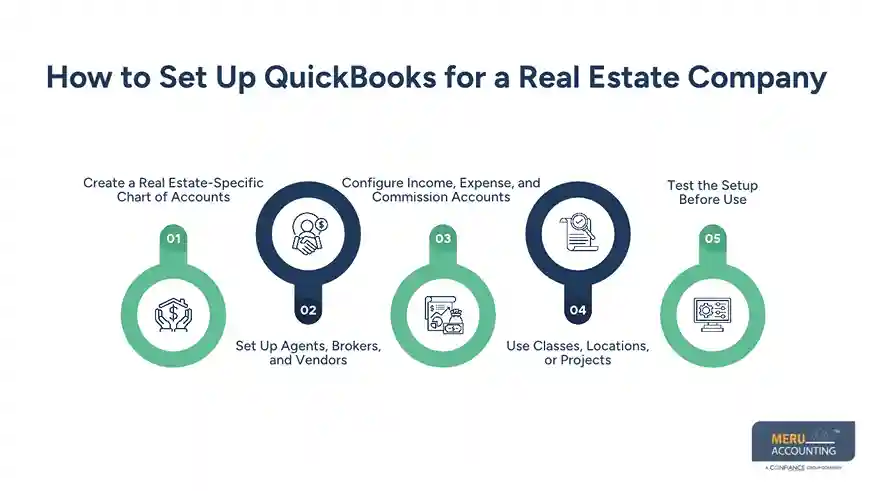
Use Classes, Locations, or Projects
Use classes to group deals by team or service line, locations to compare office activity, or projects to track deal income and costs where the plan allows it. Choose a method that fits the firm’s size and reporting needs.
Test the Setup Before Use
Enter a sample deal and review the resulting income, costs, and open balances. QuickBooks for real estate company records should show the correct figures before staff uses the setup for live transactions.
How to Track Real Estate Commissions in QuickBooks
Record Commission Income From Property Sales
Enter the commission based on the closing statement and the firm’s accounting policy. For example, a 3% fee on a $500,000 sale equals $15,000 before agent splits, referral fees, and other deductions.
Calculate Agent and Broker Commission Splits
Keep the agreed split with each deal and check the figures before payment. If an agent receives 60% of a $15,000 fee, the agent’s share is $9,000, and the firm’s share is $6,000 before other costs.
Track Referral Fees and Brokerage Expenses
Record referral fees as separate costs in QuickBooks for real estate company expense tracking and link them to the related deal. If the firm owes another broker $1,500, record the amount apart from the agent’s share to keep each cost clear.
Record Commission Payments
Enter each payment against the right payable or expense account, based on the original entry. QuickBooks for real estate company records should show the payee, amount, date, and deal reference for each payout.
Review Outstanding Balances
Check unpaid commissions and agent balances at the end of each month. Real Estate Accounting with QuickBooks can show which amounts remain open when staff record payments and clear settled items on time.
How to Set Up Commission Tracking Workflows for Real Estate Transactions
Create a Deal Record
Assign a unique deal ID and save the property address, sale price, closing date, and names of the parties. Use the same ID in the accounting records and closing file.
Check the Commission Agreement
When using QuickBooks for real estate company accounting, review the signed terms for the fee rate, agent split, referral fee, and any special conditions. Do not rely on a verbal note or an old deal template.
Review the Closing Statement
Compare the final closing statement with the expected commission. Record any deduction or change only after checking its source and confirming how it affects the amount due.
Enter and Approve the Figures
Enter the approved figures in QuickBooks and ask an authorised reviewer to compare them with the deal file. Where practical, separate payment approval from payment entry.
Pay Each Party and Close the Deal
Pay each agent or broker under the approved terms, save proof of payment, and update the records in QuickBooks. Mark the deal complete only after staff checks all expected deposits and payouts.
How to Reconcile Real Estate Commissions in QuickBooks
Match Commission Statements With Bank Deposits
Compare the bank deposit with the closing statement and commission record. For example, if a $15,000 fee has a $1,500 referral fee deducted before payment, confirm whether the firm should receive $13,500.
Reconcile Agent Payouts With Agreements
Compare each payout with the signed commission split and approved payment record. QuickBooks for real estate company reconciliation should show the amount due, the amount paid, and any balance that remains open.
Verify Referral Fees and Deductions
Check referral fees, brokerage shares, and other deductions against the deal terms and proof of payment. Real Estate Accounting with QuickBooks should show gross income and related costs rather than hide costs within a net deposit.
Resolve Differences in Commission Records
Common causes include partial payments, duplicate entries, bank fees, timing gaps, and missing deductions. Check the source documents first, then correct the entry with a clear note and approval.
Complete the Bank Reconciliation
Compare the account in QuickBooks with the bank statement for the same period. Review outstanding items and correct errors before you close the month.
Common Commission Tracking Mistakes Real Estate Companies Should Avoid
Recording Only the Net Deposit
A net deposit may hide agent shares or referral costs. Record the gross commission and related costs in line with the closing statement and the firm’s accounting method.
Using One Account for Every Fee
Mixing commission income, agent payouts, and referral fees makes reports harder to review. Use separate accounts and a consistent method for every deal.
Paying Agents Before Checking Terms
An old split or an unapproved change can lead to a wrong payout. When using QuickBooks for real estate company commission tracking, confirm the signed agreement and final closing figures before releasing funds.
Leaving Old Balances Open
Unpaid amounts may remain in the books after a deal ends. Review open receivables and payables each month and confirm whether each amount is still due.
Skipping Monthly Reconciliation
Small errors can build up when staff do not check bank records and deal files. Set a monthly review date and assign clear duties for each step.
Best Practices for Real Estate Accounting with QuickBooks
Use One Deal Reference
Give each sale a unique ID and use it in accounting entries, closing files, and payout notes. This makes it easier to find all records linked to one transaction.
Set Clear Approval Rules
Define who can enter deal data, approve commission amounts, release payments, and review the books. A clear process reduces the risk of errors and unauthorised payouts.
Review Reports Each Month
Review commission income, agent payables, referral costs, and bank balances at month-end. QuickBooks for real estate company reports are more useful when staff review open items and act on errors.
Keep Proof of Each Entry
Store signed agreements, closing statements, invoices, and payment records in a secure place. Limit access to private client and agent details.
Ask an Accountant to Review the Setup
Commission terms and tax rules can vary by contract and location. Ask a qualified accountant to review the chart of accounts, income timing, and tax records before relying on reports for key decisions.
Why Choose Meru Accounting for Real Estate Accounting Services?
Meru Accounting provides accounting and bookkeeping services for real estate firms that need clear records of property income, agent commissions, referral fees, and broker payouts. Our team can set up QuickBooks for real estate company records, review account structures, and create a clear process for deal entries and month-end checks.
QuickBooks Setup and Review
We review the chart of accounts, tracking fields, and reports to match the firm’s work. The setup keeps commission income and deal costs in the right accounts.
Commission and Payout Records
We record approved commission figures and agent payouts against the related deal documents. Clear records make it easier to review open balances and payment history.
Bank and Account Reconciliation
We compare bank activity with recorded deposits, payouts, and deal statements. We flag differences for review before the books are closed.
Monthly Financial Reports
We prepare reports that show income, expenses, and open balances for review. These records give owners a clearer view of the firm’s financial position.
Our Expert Perspective
Commission tracking works best when every deal follows the same steps, from signed terms to final bank reconciliation. QuickBooks for real estate company accounting can record the figures, but reliable reports depend on sound account setup, accurate source documents, and regular review.
A useful practice is to check one closed deal from start to finish each month. Compare its signed agreement, closing statement, accounting entries, and payment proof. This check can reveal gaps before they affect other deals.
Key Takeaways
- QuickBooks for real estate company accounting can record commission income, agent shares, referral fees, and payouts.
- Real Estate Accounting with QuickBooks needs clear income, expense, and payable accounts.
- Keep signed agreements and closing statements with each deal record.
- Use a unique deal ID to link income, costs, and payments.
- Reconcile bank deposits and agent payouts each month.
- Review open balances and correct errors before closing the books.
- Ask a qualified accountant to review complex commission terms and tax matters.
FAQs
To set up commission tracking with QuickBooks for real estate company accounting, create commission income and expense accounts, record agent splits, and link each entry to the property deal and signed agreement.
Calculate the commission from the sale price and agreed rate, then record each agent’s share, referral fee, and brokerage amount in QuickBooks.
Match commission statements with bank deposits, agent payouts, referral fees, and signed agreements to find and correct differences.
QuickBooks can record commission transactions by agent using suitable tracking fields and reports, while staff calculates splits from each agent’s agreement.
Use clear commission accounts, assign a unique ID to each property deal, record all payouts, and reconcile the books every month.
optional anymore
on running the business