Imagine a property owner has three rental properties, one bank account, two credit cards, and dozens of bills coming in each month. The rent comes in. A plumber gets paid. Property tax is due. Insurance renews. A tenant gets a refund. Then the owner opens the profit and loss report. But there is one problem: which property actually made money? That is where QuickBooks for real estate management becomes useful.
The goal is not simply to put every transaction into QuickBooks. The real goal is to build the books so that rent, repairs, bills, fees, and other costs can be traced back to the right property.
Without that structure, a business can have accurate-looking books but weak property-level data. A $5,000 repair may be recorded correctly as an expense, yet the owner may still have no clear view of which property paid for it.
Property-level accounting fixes that gap. It gives owners and managers a way to look at the full business and then drill down into each property.
What You Will Learn From This Blog
- How to structure QuickBooks for real estate management when several properties are involved.
- How to decide which QuickBooks tracking method fits your property portfolio.
- How to record rent, repairs, bills, and shared costs by property.
- How bank and credit card reconciliation can uncover errors.
- Which common accounting mistakes can distort property profit.
- How QuickBooks for real estate businesses can be used for cleaner monthly reporting.
QuickBooks For Real Estate Management: Start With The Property, Not The Transaction
The Real Problem Is Not Data Entry
A property business can have hundreds of transactions each month. The hard part is knowing where each transaction belongs.
If rent from five properties enters one bank account, the bank balance alone tells very little. QuickBooks for real estate management becomes more useful when income and expenses are organized around individual properties rather than viewed only as business-wide transactions.
One Business Can Have Many Profit Stories
Suppose Property A brings in $12,000 in rent and has $4,000 in costs. Property B brings in $9,000 but has $7,500 in repairs.
At the total business level, both may look fine. At the property level, the picture is very different.
Property Profit Is More Than Rent
Rent is only one part of the result. Insurance, repairs, property tax, utilities, management fees, supplies, interest, and other costs can change the true result.
This is why QuickBooks for real estate management should be built around the way the owner wants to review the business.
The Same Bank Account Can Serve Several Properties
There is no rule that says every property must have a separate bank account just to get useful accounting data.
One bank account can serve several properties if transactions are recorded with clear property details and reviewed on a regular basis.
How To Set Up QuickBooks For Property-Level Accounting
Start With A Clean Chart Of Accounts
Do not begin by creating an account for every bill. Start with the major income and cost groups the business needs.
Rent income, repairs, insurance, property tax, utilities, management fees, interest, and other common items can have clear accounts.
Give Each Property A Clear Name
Property names should follow one format throughout the books.
For example, use “Oak Street,” “Maple Apartments,” and “River View” instead of changing the name each time a transaction is entered.
Use Classes For Property Tracking
For QuickBooks for real estate management, classes can be useful when the main goal is to compare income and expenses across properties.
For example, a repair bill can be posted to “Repairs” and assigned to the class for the property where the work took place.
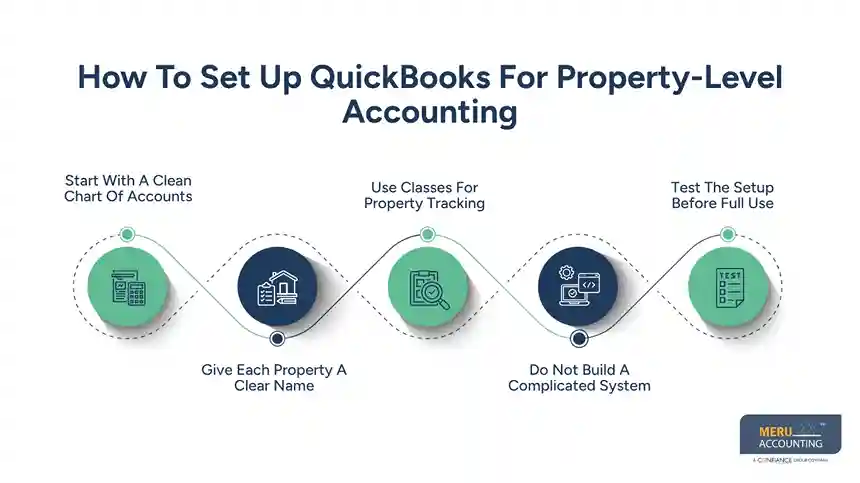
Do Not Build A Complicated System
More tracking fields do not always mean better accounting when setting up QuickBooks for real estate management.
If staff must choose from too many classes, locations, accounts, and tags, errors become more likely. The setup should contain only the fields that serve a real reporting need.
Test The Setup Before Full Use
Before entering a full month of transactions, test a few common cases.
Enter rent, a repair bill, a utility payment, a bank fee, and a shared cost. This simple test can reveal whether QuickBooks for real estate businesses is actually producing the property-level information needed for monthly reporting.
optional anymore
on running the business
How To Track Income And Expenses By Property In QuickBooks
Start With Rental Income
In QuickBooks for real estate management, each rent payment should carry enough detail to show which property earned it.
This matters even more when several properties use the same bank account. The bank may show one deposit, while the accounting records need to show how that deposit should be split.
Put Repairs Where They Happened
A $3,000 plumbing bill for Property A should not sit in a general expense bucket with no property detail.
This approach is especially important for QuickBooks for real estate businesses, where the same expense category may be used across several properties.
Treat Shared Costs Differently
QuickBooks for real estate management can also be structured to track costs that cover more than one property without assigning the entire expense to a single building.
For example, an insurance policy may cover three buildings. Instead of assigning the full amount to one property, the business can use a consistent allocation method that reflects the actual coverage or business rule.
Watch Large Projects
A new roof, major remodel, or building upgrade should not automatically be posted like a small repair.
Some costs may need different accounting or tax treatment. The IRS notes that improvements to rental property can have different treatment from ordinary repair costs.
Compare Property Results Month To Month
QuickBooks for real estate management becomes more useful when property-level reports are compared with earlier periods.
If repair costs jump from $2,000 to $11,000, that change deserves a closer look. It may be a real event, a large project, or an accounting error.
Bank And Credit Card Reconciliation For Real Estate Properties
The Bank Balance Is Not The Final Answer
A QuickBooks balance and a bank statement can differ for valid reasons, such as checks that have not cleared.
That is why reconciliation matters in QuickBooks for real estate management. It checks whether the transactions in the books agree with the activity shown by the financial institution.
Credit Cards Need The Same Review
Real estate managers often use cards for hardware, supplies, travel, maintenance items, and other purchases.
Each charge should be checked for the correct account and property before the credit card account is closed.
Reconciliation Can Expose Duplicate Entries
Imagine a $750 plumbing payment is entered manually and then imported through the bank feed.
The bank has one payment. QuickBooks now has two.
A reconciliation review can bring that type of error to light.
Old Transactions Deserve Attention
An old unreconciled check is not just an annoying item on a report.
It may mean the check was never cashed, the transaction was entered twice, or the original entry was posted to the wrong account.
Make Reconciliation Part Of The Month-End Close
A property report should not be treated as final while key bank and card accounts remain unchecked.
A monthly close gives the business a set time to review transactions, clear differences, and prepare property-level reports as part of QuickBooks for real estate management.
Common QuickBooks Accounting Mistakes In Real Estate Management
Mixing Two Properties In One Expense
This is one of the easiest errors to make.
A manager may enter five repair bills under “Repairs” but forget to identify the related properties. Total expenses are right, but property profit is wrong.
Using Owner Spending As A Business Expense
An owner may use a business card for a personal purchase by mistake.
In QuickBooks for real estate management, the transaction should be reviewed and classified separately rather than automatically recorded as a property expense.
Treating Every Payment As An Expense
A payment does not always mean an expense.
Loan principal, owner contributions, transfers, and other transactions can affect cash without being normal operating costs, so QuickBooks for real estate businesses should distinguish these transactions from regular property expenses.
Recording Improvements Like Small Repairs
A $200 repair and a $40,000 building improvement should not be treated as the same type of cost without review.
The accounting and tax treatment can differ, so large projects should be checked before they are classified.
Trusting Reports Without Reviewing The Inputs
QuickBooks can produce a polished report from incorrect entries.
This is an important consideration when using QuickBooks for real estate management because the software can report exactly what was entered, even when a transaction has been assigned to the wrong property.
QuickBooks For Real Estate Businesses: Best Practices For Accurate Records
Build Reports Around Real Questions
QuickBooks for real estate businesses should answer questions that owners actually ask.
How much did each property earn? Which property had the highest cost? What changed this month? Which vendor was paid the most?
Keep Property Names Consistent
A property should not appear as “Oak St,” “Oak Street Property,” and “Oak Rental” in different parts of the books.
For QuickBooks for real estate management, one consistent naming rule makes property-level reports much easier to read and compare.
Review Unusual Changes
A sudden rise in repairs, utilities, insurance, or management fees should be checked.
The change may be correct, but a quick review can catch duplicate entries, wrong classifications, or missing property details.
Keep Supporting Records
Receipts, invoices, bank statements, contracts, and other records should be kept with the accounting records.
The IRS states that taxpayers should keep documents that support income, deductions, and other items reported on tax returns.
Do Not Let Software Replace Review
QuickBooks for real estate management can organize accounting data, but it cannot decide whether a transaction was entered correctly.
Human review still matters for unusual costs, shared expenses, large projects, loans, and owner transactions.
Why Choose Meru Accounting?
Bookkeeping By Property
Meru Accounting provides bookkeeping services for real estate businesses with multiple properties, income streams, vendors, and operating costs.
QuickBooks Accounting
For businesses using QuickBooks for real estate management, Meru Accounting provides accounting services based on the client’s existing QuickBooks structure and reporting needs.
Bank Reconciliation
Bank and credit card transactions can be reviewed against the accounting records so differences, duplicate entries, and missing transactions can be identified during the accounting cycle.
Monthly Financial Reports
Meru Accounting provides financial reports that can be organized around the reporting needs of the real estate business, including property-level income and expenses.
Consistent Accounting Records
QuickBooks for real estate management works best when the same accounting rules are followed month after month. Meru Accounting provides accounting services with a focus on consistent transaction records and regular account review.
Our Expert Perspective
The biggest issue we see in multi-property accounting is not usually a missing feature in the software. It is a weak process.
A business may have QuickBooks, bank feeds, reports, and plenty of transaction data, yet still struggle to answer a basic question: “How did this property perform this month?”
The fix is often simple. With QuickBooks for real estate management, decide what must be tracked by property, use the same method for every transaction, reconcile the accounts, and review the reports before calling the month complete.
That approach makes QuickBooks for real estate businesses more useful because the reports are built from consistent records rather than last-minute corrections.
Key Takeaways
- QuickBooks for real estate management should be set up around the properties you need to measure.
- One bank account can serve several properties when transactions are clearly assigned.
- Rent and expenses should carry the right property detail.
- Shared costs need a consistent allocation method.
- Bank and credit card reconciliation should be part of the monthly close.
- Large repairs and improvements need careful review before classification.
- A clean chart of accounts gives QuickBooks for real estate management a stronger foundation for clear property-level reporting.
- QuickBooks for real estate businesses is most useful when reports answer real business questions.
- Accounting software records transactions, but the quality of the report depends on the quality of the entries.
FAQs
Use property classes or other tracking fields to record each property’s rent, expenses, and financial activity separately.
You can track multiple properties by assigning each property’s income and expenses to separate classes, locations, or suitable tracking categories.
Yes, QuickBooks can track rental income and expenses by property when each transaction is assigned to the correct property.
Set up a clear chart of accounts and use consistent property-level tracking for rent, repairs, utilities, taxes, and other costs.
Reconcile bank and credit card accounts monthly to identify missing, duplicate, or incorrectly recorded property transactions.
optional anymore
on running the business