

Using QuickBooks Online for small businesses gives a simplified way to handle finances, track expenses, and generate reports in real time. Effective financial planning helps any small business grow. However, many business owners find accounting hard and time-consuming. In such a case, using QuickBooks Online for small businesses is considered very helpful.
What You Will Learn from This Blog
By reading this blog, you will learn:
- Why QuickBooks Online for small businesses is a popular accounting choice for managing business finances.
- How QuickBooks bookkeeping helps automate daily accounting tasks and reduce manual work.
- The key features of QuickBooks Online, including invoicing, bank transaction syncing, reporting, and mobile access.
- How real-time financial reports and dashboards support better business decisions.
- Best practices for setting up and using QuickBooks Online to keep your bookkeeping accurate and organized.
Introduction to QuickBooks Online for Small Businesses
QuickBooks is a cloud-based tool, and hence, this permits users to access it from anywhere. Considering this, using QuickBooks Online for small businesses helps you track sales, send invoices, and check expenditures all in one place. One of the biggest advantages of this is that you do not need to be an accounting professional, as it is very easy to use.
How Using QuickBooks Online For Small Businesses Empowers Them
QuickBooks Online puts all your financial work in one place. You don’t need to use many apps or do math by hand. Everything is linked together, which makes your job easier. Here’s how using QuickBooks Online for small businesses empowers them:
- Saves Time: It handles daily tasks for you. So, you can have enough time to develop your business.
- Fewer Mistakes: It does the math and checks things for you. This means fewer errors.
- Better Decisions: You can see your money details anytime. This helps you plan and decide with confidence.
With QuickBooks bookkeeping, small businesses can automate recordkeeping, organize transactions, and reduce manual accounting work.
You can also provide access to the team members and your account professionals. They can log in from anywhere. It’s safe, fast, and made for today’s fast-moving business world.
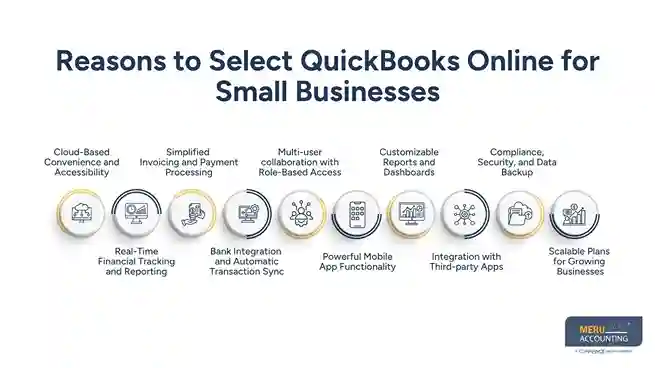
Reasons to Select QuickBooks Online for Small Businesses
Here are some key reasons why you should select QuickBooks Online for small businesses:
Cloud-Based Convenience and Accessibility
- Use It Anywhere: You can log in from any device. Use your laptop, tablet, or phone and start doing your work, no matter where you are.
- Updated in real-time: Your data stays the same on all devices. It updates in real time.
- No Need to Install: You don’t have to install any software or update it manually.
This setup is great for busy business owners. You can always remain in touch with your work.
Real-Time Financial Tracking and Reporting
- Instant Reports: Using QuickBooks Online for small businesses lets you see your financial reports fast. With just a few clicks, you can check your profit and loss, cash flow, or balance sheet.
- Informed Decisions: You get real-time info. When using QuickBooks Online for small businesses, it is not required for users to wait till the end of the month. Users can keep their business on track and can also make quick decisions.
Simplified Invoicing and Payment Processing
- Professional Invoices: Make and send neat bills using easy and customizable templates. You can also add your logo and other details.
- Multiple Payment Options: Customers can pay by bank, card, or app, which saves time and is easy for them.
- Automated Reminders: You can set reminders for late payments. It saves you from sending follow-ups every time.
Efficient invoicing and payment processing make collecting money faster and easier.
Bank Integration and Automatic Transaction Sync
- Secure Connections: Link your bank and credit card accounts securely to QuickBooks Online.
- Daily Imports: Transactions are automatically imported and categorized, reducing manual data entry.
- Easy Reconciliation: Match and approve transactions with minimal effort, ensuring your records are accurate.
This feature significantly reduces the time spent on QuickBooks bookkeeping by automatically importing and organizing transactions.
Multi-user collaboration with Role-Based Access
- Team Access: Grant access to your accountant, bookkeeper, or team members with customized permissions.
- Data Security: You decide who can see sensitive information. Give team members the right roles to protect sensitive info.
- Real-Time Collaboration: You do not have to share files again and again. Your team can log in and work together at the same time.
Working together in this way saves time. It also helps everyone to stay updated and do better as a team.
Powerful Mobile App Functionality
- On-the-Go Management: Use your phone to track income and expenditure. Send invoices and check reports anytime.
- Receipt Capture: Take a quick photo of a receipt. Attach it to the right expense. It keeps your records accurate.
- Stay Connected: You can check your business information from anywhere. It works whether you are at home or at work.
The app helps you stay on top of things, even when you are not at your desk.
Customizable Reports and Dashboards
- Tailored Insights: Customize reports to show what matters most to your business.
- Graphical Dashboards: Include charts and graphs to represent financials visually.
- Scheduled Reporting: Reports come to your inbox on their own. You do not have to send them each time.
These insights make QuickBooks bookkeeping more accurate and help business owners monitor financial performance with confidence.
Integration with Third-party Apps
- Expand Functionality: While using QuickBooks Online for small businesses, you can connect it with many apps. It works with PayPal, Stripe, Shopify, and CRM tools.
- Streamlined Workflows: Integration cuts down on double work. It also helps your business operate more efficiently.
This flexibility helps you build a setup that fits your business. You can pick the tools you need. Make changes as you grow.
Compliance, Security, and Data Backup
- Bank-Level Security: Using QuickBooks Online for small businesses provides strong encryption methods to keep your data safe.
- Automatic Backups: Your data is securely backed up automatically to keep it protected at all times.
- Regulatory Compliance: QuickBooks helps you follow tax rules and get ready for audits with easy-to-use tools and reports.
You feel stress-free when you come to know that your financial data is secure and compliant.
Scalable Plans for Growing Businesses
- Flexible Pricing: You can choose from plans that suit your business size and needs.
- Easy Upgrades: Upgrade to more advanced features as your business grows, without switching systems.
- Add Users and Features: Scale up by adding more users or integrating new tools as needed.
This scalability ensures that using QuickBooks Online for small businesses remains a valuable tool in your entire business journey.
Tips for Getting Started with QuickBooks Online for Small Businesses
Starting with QuickBooks Online for small businesses is easy. Here are some quick tips to help you begin:
- Choose the Right Plan: Think about what your business needs. Then choose a plan that fits.
- Link Your Bank Accounts: Connect your bank to QuickBooks. It will save time and cut down on manual work. This is one of the first steps toward efficient QuickBooks bookkeeping because it keeps your financial records updated automatically.
- Set Up Your Chart of Accounts: You can create a list of your income and costs. This helps you stay organized.
- Make Your Invoices Your Own: Add your logo and set your payment terms. It makes your brand look sharp.
- Add Your Accountant: Invite your accountant to join. It is easier to work together and keep things correct.
- Try the Mobile App: Use the app to check your books from anywhere. It is handy when you are on the move.
- Run Basic Reports: Look at reports like profit and loss. It shows how your business is doing.
These steps will help you begin properly and in the right direction. They give you a strong base to use QuickBooks Online for small businesses with ease.
QuickBooks Online is the right choice for small businesses. It helps you track your money, send invoices, and see how your business is performing. It saves time and keeps your work accurate and organized. With clear reports and real-time data, you can make better choices for your business easily. With cloud access, QuickBooks Online ensures you can monitor your cash flow anytime, anywhere. It also simplifies QuickBooks bookkeeping by automating everyday accounting tasks and keeping financial records organized.
At Meru Accounting, we specialize in helping small businesses with QuickBooks Online. We help small businesses from the very start, setting up the system the right way. With our QuickBooks bookkeeping services, you will get the most from QuickBooks and keep your business running smoothly and error-free.
Our Expert Insight
At Meru Accounting, we have worked with businesses of different sizes to implement and manage QuickBooks solutions. From our experience, businesses gain the most value from QuickBooks Online for small businesses when it is set up correctly with an organized chart of accounts, connected bank feeds, and consistent bookkeeping practices. Combining automation with regular account reviews makes QuickBooks bookkeeping more accurate, reduces manual errors, and provides reliable financial reports that support informed business decisions and long-term growth.
Key Takeaways
- QuickBooks Online for small businesses simplifies accounting by automating invoicing, expense tracking, and financial reporting.
- QuickBooks bookkeeping reduces manual data entry through automatic bank transaction syncing and reconciliation.
- Cloud-based access allows business owners and accountants to collaborate securely from anywhere.
- Real-time reports and customizable dashboards help monitor cash flow and business performance more effectively.
- Third-party integrations improve workflow efficiency by connecting QuickBooks with popular business applications.
- Built-in security, automatic backups, and scalable plans make QuickBooks suitable for growing businesses.
- Proper setup and regular bookkeeping practices help businesses maximize the benefits of QuickBooks Online and maintain accurate financial records.



