
QuickBooks to Zoho Books migration has become a common step for growing businesses that want better control, pricing, and flexibility in their accounting systems. As companies expand, their financial tools must keep up with higher transaction volumes, reporting needs, and compliance demands.
This blog explains everything you need to know about QuickBooks to Zoho Books migration, including challenges, benefits, timing, and a clear process you can follow. It is written with a strong focus on accuracy, clarity, and real-world use.
QuickBooks to Zoho Books migration is now a key business decision that impacts reporting, tax filing, and daily operations. Many businesses move due to rising costs and limited flexibility. A successful switch requires proper planning, clean data, and a clear process to avoid financial errors.
What You Will Learn From This Blog
- Understand the key reasons behind the QuickBooks to Zoho Books migration for growing businesses
- Learn about common problems businesses face before starting the migration process
- Explore the main benefits of switching to Zoho Books for scaling companies and understand how it compares in a zoho vs xero scenario.
- Identify the right time to move from QuickBooks to Zoho Books
- Follow a clear step-by-step process for smooth and accurate migration
- Review real business use cases to see practical results
- Gain expert insights for safe, error-free, and well-planned migration
Why Businesses Are Choosing QuickBooks to Zoho Books Migration Today
Rising Software Costs
Many businesses report increasing subscription fees with QuickBooks. QuickBooks to Zoho Books migration helps reduce ongoing costs without losing key features.
Need For Better Automation
Manual data entry slows down accounting teams. Zoho Books offers automated workflows that save time and reduce errors.
Integration With Business Tools
Modern businesses use CRM, inventory, and payroll systems. Zoho Books connects easily with other tools, making operations smoother.
Improved Compliance And Tax Handling
Accurate tax reporting is critical for avoiding penalties. Zoho Books supports structured tax handling aligned with compliance needs.
Flexibility For Growing Businesses
Scaling businesses need adaptable systems. QuickBooks to Zoho Books migration allows better customization as operations expand.
Key Challenges Businesses Face Before QuickBooks to Zoho Books Migration
Data Inconsistencies
Old records may contain errors or missing entries. Cleaning data is essential before starting the QuickBooks to Zoho Books migration.
Lack Of Proper Planning
Many businesses rush into migration without a roadmap. This often leads to duplicate entries or incomplete transfers.
Complex Chart Of Accounts
A poorly structured chart of accounts creates confusion. It must be reviewed and simplified before migration.
Integration Issues
Existing tools may not sync easily with new software. Planning integrations early avoids disruption after migration, especially when deciding between systems in a zoho vs xero evaluation.
Limited Technical Knowledge
Not all teams have experience with accounting software migration. Professional support can reduce risks and ensure accuracy.
Benefits of QuickBooks to Zoho Books Migration for Scaling Companies
Cost Efficiency
Zoho Books offers competitive pricing plans. This helps businesses control expenses as they grow.
Automation Of Daily Tasks
Recurring invoices, reminders, and bank feeds can be automated. This reduces manual workload and improves accuracy.
Better Financial Reporting
Clear and customizable reports support better decisions. QuickBooks to Zoho Books migration improves financial visibility.
Multi-User Access
Teams can collaborate in real time. This improves coordination between finance and operations teams.
Scalability And Flexibility
Zoho Books adapts to business growth. It supports changing needs without major system changes.
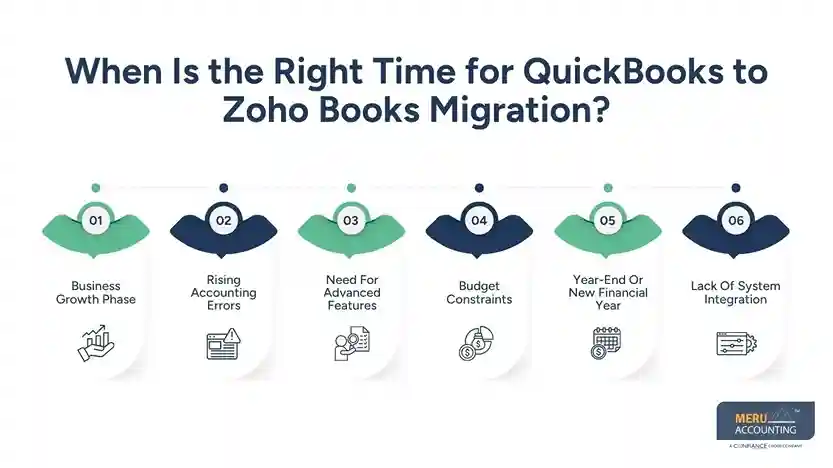
When Is the Right Time for QuickBooks to Zoho Books Migration?
Business Growth Phase
When transaction volume increases, systems must handle more financial data. Migration helps maintain accuracy and control during rapid business expansion.
Rising Accounting Errors
Frequent errors indicate system limits or too much manual data entry. Switching systems can improve data accuracy and overall reporting reliability.
Need For Advanced Features
Businesses often require stronger reporting tools and better process automation. Zoho Books offers features that support growing operational and reporting needs.
Budget Constraints
High software costs can reduce overall business profit and cash flow stability. QuickBooks to Zoho Books migration can lower expenses and improve cost control, especially when compared through a zoho vs xero pricing analysis.
Year-End Or New Financial Year
Migration is easier at the start of a clean financial reporting period. This helps maintain accurate records and simplifies account reconciliation tasks.
Lack Of System Integration
Disconnected tools create data gaps and slow down daily operations. Migration helps connect systems and improves data flow across business functions.
Understanding the Core Differences: Zoho vs Xero vs QuickBooks
Feature | Zoho Books | Xero | QuickBooks |
Ease Of Use | Simple interface, easy for small teams to learn | Clean design, but may need some learning time | User-friendly but can become complex with growth |
Pricing Structure | Affordable plans with strong features | Mid-range pricing with add-ons | Higher cost, especially with advanced features |
Automation | Strong automation for invoices, reminders, workflows | Good automation but limited in lower plans | Automation available but often needs upgrades |
Integration Options | Works well with Zoho apps and third-party tools | Strong third-party integrations | Wide integrations but some require extra cost |
Reporting Features | Custom reports with clear dashboards | Advanced reports but may need setup | Strong reporting but complex for new users |
Scalability | Suitable for growing small to mid-size businesses | Good for small to mid-size companies | Scales well but cost increases significantly |
Inventory Management | Built-in inventory features in many plans | Basic inventory, may need add-ons | Available but limited in lower plans |
Tax Compliance | Supports structured tax handling | Good tax features for global users | Strong tax tools, especially in the US |
Customer Support | Email, chat, and phone support | Online support, limited phone options | Strong support but depends on plan |
Best For | Businesses looking for value and automation | Businesses needing global integrations | Businesses already using QuickBooks ecosystem |
Step-by-Step QuickBooks to Zoho Books Migration Process
Evaluate Current Data
Review all financial records to ensure accuracy and completeness before migration. Remove duplicate entries and fix errors to avoid issues later.
Export Data From QuickBooks
Download reports, customer data, vendor lists, and all transaction records. Ensure all important financial data is included and properly formatted.
Set Up Zoho Books Account
Create your Zoho Books account and configure essential system settings. Define tax rules, currencies, and financial structure based on needs.
Import Data Into Zoho Books
Upload cleaned and verified data into the Zoho Books system carefully. Check that all records are mapped correctly without missing fields, regardless of insights gained from earlier zoho vs xero comparisons.
Reconcile Accounts
Match bank balances with financial statements after completing the migration. This step ensures accuracy and prevents future reporting issues.
Test And Validate
Run financial reports and review data for any visible errors. Confirm that the system is working properly across all modules.
Backup Data Before Migration
Create a secure backup of all QuickBooks financial records before migration. This ensures data safety and recovery if any issue occurs.
Customize Chart Of Accounts
Adjust account categories to match Zoho Books structure and reporting needs. A clean chart of accounts improves clarity and financial reporting accuracy.
Configure Integrations
Connect Zoho Books with CRM, payroll, and other business applications. Proper integration improves workflow and reduces manual data entry work.
Train Team And Users
Provide training to staff on using Zoho Books features and tools. This helps teams adapt quickly and reduces operational disruptions.
Real-Life Use Cases of QuickBooks to Zoho Books Migration
Small Retail Business Expansion
A retail business faced rising software costs, frequent manual errors, and limited reporting visibility while using QuickBooks. As transaction volume increased, managing daily entries became difficult and time-consuming.
After QuickBooks to Zoho Books migration, the company reduced software expenses, improved automation, and gained clearer financial reports, which aligned better compared to their earlier zoho vs xero evaluation. This helped them track sales, manage inventory better, and support steady business growth.
E-commerce Business Integration Needs
An online store struggled with disconnected systems for accounting, inventory, and customer data management. This caused delays in order tracking and financial reporting. After QuickBooks to Zoho Books migration, the business achieved better system integration and smoother data flow across tools.
Zoho Books connected easily with their CRM and inventory systems, helping improve accuracy, save time, and manage operations more efficiently.
How Meru Accounting Simplifies QuickBooks to Zoho Books Migration
Detailed Data Review
Meru Accounting reviews financial records to ensure accuracy before migration begins.
This step helps identify errors and ensures complete and reliable data transfer.
Structured Migration Process
At Meru Accounting, we followed a clear and planned step-by-step migration process carefully. This approach reduces risks and prevents common data transfer issues.
Software Expertise
Our team of certified experts has strong experience in both QuickBooks and Zoho Books systems. This ensures a smooth transition without confusion or operational delays.
Custom Setup And Configuration
Accounts, taxes, and reports are configured based on business requirements.
This improves usability and supports accurate financial reporting after migration.
Ongoing Support
Post-migration support is provided to resolve issues and answer queries quickly.
This helps businesses continue operations without delays or disruptions.
Our Expert Perspective
From a practical standpoint, the QuickBooks to Zoho Books migration is not just about moving data. It is about improving how financial information is managed and used for decisions.
Businesses that plan their migration carefully often see fewer errors and better reporting within the first few months, especially when decisions are supported by a clear zoho vs xero comparison.
Working with experienced professionals can help avoid data loss, incorrect mappings, and compliance risks. A structured approach ensures that the migration supports long-term business goals rather than creating short-term disruptions.
Key Takeaways
- QuickBooks to Zoho Books migration helps reduce costs
- Proper planning is essential for accurate migration
- Clean data ensures better results after migration
- Zoho Books offers strong automation and reporting, which often stands out in a zoho vs xero comparison
- Migration is best done at the start of a financial period
- Expert support can reduce risks and improve outcomes
FAQs
Export data from QuickBooks, clean it, and import into Zoho Books. Reconcile accounts and test reports to ensure accurate migration.
You can transfer customers, vendors, invoices, bills, and the chart of accounts. Bank transactions and balances can also be moved with proper mapping.
Migration time depends on data size and the complexity of the records. Small businesses may take days, while larger ones may take weeks.
Common errors include duplicate entries and incorrect account mapping. Missing transactions can also occur without proper data review.
Yes, it helps small businesses reduce costs and improve efficiency. It also offers better automation and reporting for growth.