
Restaurant bookkeeping becomes easier to manage when you know exactly what needs to be tracked and where each transaction belongs. Sales, food purchases, payroll, inventory, rent, delivery fees, and other costs all play a part in your restaurant’s financial picture. The way you record these items can also affect how clearly you can see your revenue, expenses, and profit. A restaurant bookkeeping template can give you a practical framework for organizing these numbers. It can show you what to record, how to group transactions, and which details to review as you keep your books.
For some restaurants, a simple spreadsheet may be enough. Others may need a more detailed setup that works with their accounting software. The starting point is understanding what a useful template should contain and how its accounts should be structured. In this guide, we’ll cover restaurant bookkeeping templates, walk through a sample bookkeeping for restaurant businesses, explain the bookkeeping chart of accounts for a restaurant, and show how to use these tools in your regular bookkeeping process.
What You Will Learn From This Blog
In this blog, you will learn:
- What a restaurant bookkeeping template is and what it can track.
- The key sales, cost, and cash items to add to a template.
- A simple example of a restaurant bookkeeping setup.
- What a bookkeeping chart of accounts for a restaurant should cover.
- How to use a template each day, week, and month.
- When a sheet may no longer meet your needs.
What Is a Restaurant Bookkeeping Template?
A restaurant bookkeeping template is a ready-made sheet or file that helps you log and sort your financial data. It can be made in Excel, Google Sheets, or a similar tool. A basic template may have tabs for sales, costs, bills, cash, bank data, and a profit and loss view. You can set each tab to match the way your restaurant works.
For a small shop, a simple sheet may be enough to start. For a busy site with high sales, many staff, more than one site, or many sales apps, a more robust system may be needed.
The main goal is not to make a fancy sheet. The goal is to keep your books clear, true, and up to date.
A good template can help you:
- Track daily sales.
- Sort costs by type.
- Check cash and bank data.
- Track food and drink costs.
- Review labor costs.
- Record bills and fees.
- Prep data for tax work.
- Review profit and cash flow.
It is also key to keep proof for each entry. Save bills, receipts, bank data, POS data, and other source docs that back up your books.
What Should a Restaurant Bookkeeping Template Include?
The right setup will vary by site, but most restaurant bookkeeping templates should track a few core areas.
Sales and Income
Start with all sales made by the restaurant. This may include:
- Dine-in sales
- Takeout sales
- Cash sales
- Card sales
- Online orders
- Delivery sales
- Catering sales
- Gift card sales
If your POS gives you a daily sales report, use it as a key source for your sales data. Do not just enter one bank deposit as total sales. A bank deposit may be net of card fees, tips, or other items.
Food and Beverage Costs
Food and drink costs can take up a large share of sales. Your sheet should make it easy to track costs by type.
You may use groups such as:
- Food
- Meat and seafood
- Produce
- Dairy
- Dry goods
- Beer, wine, and spirits
- Soft drinks
- Kitchen supplies
This makes it much easier to see which cost areas rise over time.
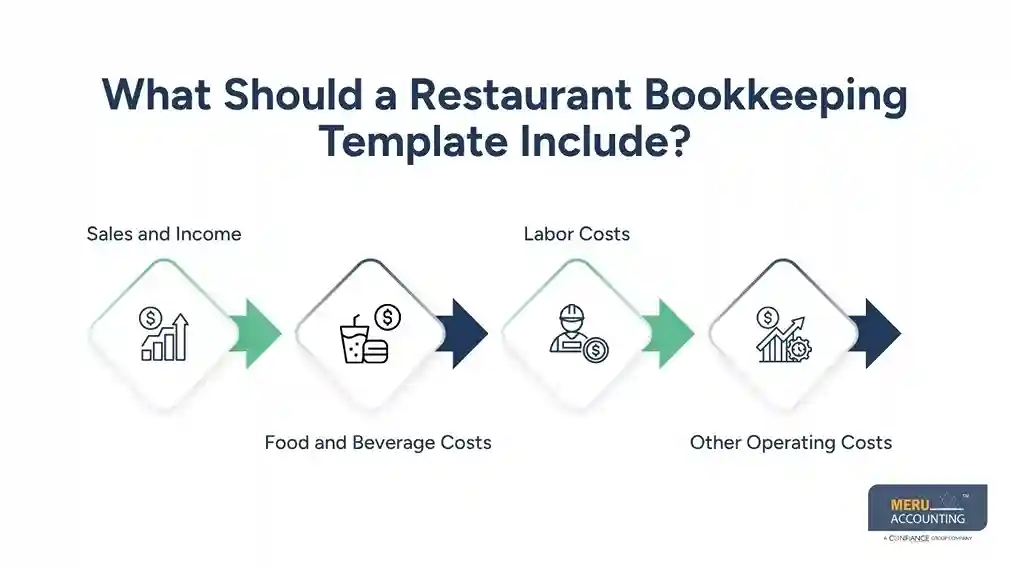
Labor Costs
Labor is another key cost for most restaurants. Track wages, payroll taxes, benefits, and other staff costs in clear groups.
Keep payroll data apart from owner draws or other payments. This helps keep reports clean and makes it easier to check labor costs against sales.
Other Operating Costs
Your template should also have room for costs such as:
- Rent
- Power and gas
- Water
- Repairs
- Cleaning
- Insurance
- Ads and promo
- POS fees
- Card fees
- Delivery app fees
- Small tools and gear
- Office costs
The goal is to make each cost easy to find and review.
Restaurant Bookkeeping Template: Example
A simple restaurant bookkeeping template sample may look like this:
Date | Type | Detail | Sales | Cost | Paid By |
Jan. 2 | Sales | POS sales | $4,500 | — | Mixed |
Jan. 2 | Food | Food buy | — | $1,050 | Bank |
Jan. 3 | Labor | Payroll | — | $2,100 | Bank |
Jan. 3 | Fees | Card fees | — | $135 | Bank |
Jan. 4 | Rent | Monthly rent | — | $3,000 | Bank |
This is only a basic view. A real setup should have more detail based on your needs.
For example, you may split sales into cash, card, online, and delivery sales. You may also split food costs into meat, produce, dairy, and dry goods.
A sample bookkeeping for restaurant use should also show how the data moves from source records into your books. Your POS report can support sales entries. Vendor bills can support food costs. Payroll reports can support labor entries. Bank and card records can then be used to check the entries.
A more useful template:
Date | Account | Description | Income | Expense | Payment Method | Reference |
Jan. 2 | Food Sales | POS daily sales | $4,500 | — | Mixed | POS-001 |
Jan. 2 | Food Cost | Produce purchase | — | $450 | Bank | INV-101 |
Jan. 2 | Food Cost | Meat purchase | — | $600 | Bank | INV-102 |
Jan. 3 | Payroll | Weekly payroll | — | $2,100 | Bank | PAY-001 |
Jan. 3 | Card Fees | Credit card fees | — | $135 | Bank | FEE-001 |
Jan. 4 | Rent | Monthly rent | — | $3,000 | Bank | RENT-001 |
This link between source data and the books is important. It helps reduce errors and gives you a clear audit trail.
optional anymore
on running the business
Bookkeeping Chart of Accounts for a Restaurant
A chart of accounts is a list of accounts used to sort all money activity. It is the base of your bookkeeping system.
A bookkeeping chart of accounts for a restaurant will often have five main groups:
1. Assets
Assets are items the business owns or controls. They may include:
- Bank accounts
- Cash on hand
- Accounts receivable
- Food stock
- Kitchen gear
- Furniture
- Leasehold upgrades
2. Liabilities
Liabilities are amounts the business owes. They may include:
- Accounts payable
- Credit card payables
- Sales tax payable
- Payroll tax payable
- Loans
- Other short-term debt
3. Equity
Equity shows the owner’s stake in the firm. It may include:
- Owner investment
- Owner draws
- Retained earnings
4. Revenue
Revenue accounts track money earned from sales. A restaurant may use:
- Food sales
- Beverage sales
- Catering sales
- Delivery sales
- Other sales
5. Costs and Expenses
These accounts track the costs of running the site. They may include:
- Food cost
- Beverage cost
- Payroll
- Payroll taxes
- Rent
- Utilities
- Insurance
- Repairs
- Marketing
- Card fees
- Delivery fees
- Cleaning
- Supplies
Do not make the chart too broad or too deep. If all food costs sit in one line, you may miss useful trends. If you make too many small accounts, the books can become hard to use.
The best chart is one that gives you enough detail to make good choices without adding work that has no clear value.
How to Use a Restaurant Bookkeeping Template
Once the sheet and chart are set up, use them on a set plan.
Record Sales Each Day
Start with the POS report. Check sales by payment type and make sure the totals match the source report. Do not wait until month-end if daily data is easy to get. Small errors are much easier to find when they are fresh.
Enter Bills and Costs
Add vendor bills, payroll costs, rent, fees, and other costs as they occur. Put each item in the right account. Keep copies of bills and receipts with your records.
Match Bank and Card Data
Check the books against bank and card data. This process is known as reconciliation. If the numbers do not match, look for missing entries, duplicate entries, fees, or timing issues.
Check Food and Labor Costs
Review food and labor costs against sales. A rise in sales does not always mean a rise in profit. For example, sales may grow while food waste, labor hours, or delivery fees grow at a faster rate. A regular review can help you spot this early.
Review Reports Each Month
At month-end, review your profit and loss report, balance sheet, and cash flow data. Look for changes in sales, food costs, labor, rent, fees, and other key costs. Compare the current month with past months when useful.
Update the Template as the Business Changes
Your books should grow with your business. If you add a second site, a new delivery channel, or a new type of service, update the account setup as needed. Do not keep using a sheet just because it worked when the business was small.
Restaurant Accounting Services by Meru Accounting
Meru Accounting helps restaurant owners keep their financial records in order and get useful reports from their books.
Our restaurant accounting services can help with tasks such as:
- Daily and monthly bookkeeping
- Bank and card reconciliation
- Sales and expense tracking
- Accounts payable support
- Profit and loss reports
- Chart of accounts setup
- Financial data review
- Ongoing book cleanup
The aim is not just to enter data. It is to give you books you can use to see the health of the business and make sound choices.
If your current sheet takes too much time, has many errors, or does not give you a clear view of profit, it may be time to move to a more robust setup.
Our Expert Insight
One of the most common bookkeeping issues we see in restaurants is treating the daily bank deposit as the same thing as daily sales. These numbers are often different. A POS report may show gross sales, discounts, tips, taxes, refunds, and payment fees, while the amount that reaches the bank may be lower. Delivery platforms can create another gap because their fees may be taken out before the restaurant receives its payout.
That is why we recommend building the bookkeeping process around the source of the transaction, not just the bank activity. POS reports should support sales, payroll records should support labor costs, vendor bills should support purchases, and bank records should be used to confirm that the money actually moved. This approach makes the books more useful. It also gives restaurant owners a better way to spot issues such as missing sales, duplicate entries, unrecorded fees, or differences between POS and bank data.
The goal of a restaurant bookkeeping template is not to make the books look organized. It is to make sure the numbers tell the same story across the POS, bank, payroll, and accounting records.
Key Takeaways
- A restaurant bookkeeping template helps organize sales, costs, cash, and other key data.
- A good template should cover sales, food costs, labor, bills, fees, and operating costs.
- A clear bookkeeping chart of accounts for a restaurant helps sort data and build useful reports.
- Use POS reports, bank data, bills, payroll reports, and receipts to support your entries.
- Reconcile bank and card data on a set schedule.
- Review food, labor, and other costs against sales.
- Update your setup as your restaurant grows.
- A spreadsheet can work for some small restaurants, but more complex firms may need accounting software or expert help.
FAQs
The best method depends on the restaurant’s size, sales volume, and accounting needs. Small restaurants may use a spreadsheet, while growing restaurants often benefit from accounting software.
Restaurants typically use POS reports to record daily sales by payment type, such as cash, credit card, and online orders. Sales tax, tips, refunds, and fees should also be handled correctly.
A restaurant chart of accounts is a list of accounts used to organize income, food costs, payroll, operating expenses, assets, liabilities, and equity. It helps create clear financial reports.
Food costs are tracked by recording food purchases and, when inventory is used, accounting for beginning and ending inventory. This helps show the restaurant’s actual food cost.
Yes. A bookkeeping template can work well for a small restaurant with a manageable number of transactions. As the business grows, accounting software or professional bookkeeping support may be more practical.
optional anymore
on running the business



