
Choosing the right tax accounting software for small business can make tax work clearer and easier to manage. Small firms need a tool that can track sales, costs, tax data, and key records with care. The right system can also cut down on data entry and make tax time less tense.
Still, not every tool fits every firm. A sole trader may need a basic tax tool, while a firm with staff, stock, or more than one tax form may need more features. The best choice should match the firm’s size, tax needs, budget, and skill level.
The IRS states that firms can use any record system that clearly shows income and costs. Electronic tax and book tools must also keep records that are complete, true, and easy to access.
What You Will Learn From This Blog
- How tax accounting software for small businesses can make tax records easier to manage.
- Which key features to check in small business tax software, including tax forms, expense tracking, bank feeds, reports, and data security.
- How to compare software options based on cost, ease of use, tax needs, and business size.
- Which common mistakes to avoid when choosing tax software for your business.
- When professional tax support may be a better choice for complex returns, tax notices, or changing business needs.
Why Small Businesses Need Tax Accounting Software
Better Record Control
Tax accounting software for small businesses gives firms one place to track key tax data. Sales, costs, bills, and tax records can stay in one system.
Fewer Manual Tasks
Manual data entry can take time and may lead to errors. A good tool can pull bank data, sort costs, and use set tax rules.
Easier Tax Prep
Tax work gets hard when records sit in many files. A tax tool can keep data in order and make key reports easier to find.
Clear Tax Data
Small firms need to know what they earn and spend. A good tax tool can show key tax data by set time spans.
Better Record Storage
The IRS notes that tax records must back the income and costs shown on a return. Good software can store data and source files in one place.
Key Features to Look for in Small Business Tax Software
Tax Form Support
Good small business tax software should fit the tax forms your firm needs. Check if the tool covers your firm type, tax needs, and state filing needs.
Expense Tracking
The tool should let you log costs with ease. Look for clear ways to sort costs and keep proof such as bills and receipts.
Bank Feeds
Bank feeds can pull new bank data into the system. Such a tool can cut down on data entry and make bank checks easier.
Tax Reports
Tax reports should be clear and easy to read. Check if the tool can give the tax data your tax pro may need.
Data Security
Tax data is private and must be kept safe. Check for data locks, user roles, backup rules, and safe data storage before you buy.
How to Choose the Best Tax Accounting Software for Small Business
Know Your Tax Needs
Start by listing the tax work your firm has now before choosing small business tax software. Include sales tax, income tax, payroll tax, forms, and state tax work where they apply.
Check Business Fit
The best tax accounting software for small business should fit your firm type and size. A freelancer may need less than a firm with staff and stock.
Test Ease Of Use
A tool may have many features but still be hard to use. Try a demo or free plan before you make a paid choice.
Review Data Links
Check if the tool can link with your bank, book system, payroll tool, or other key apps. Good links can cut the need for repeat data entry.
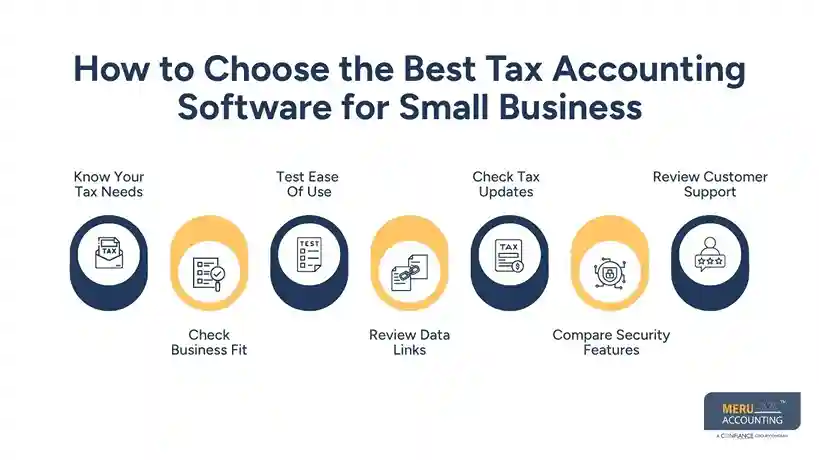
Check Tax Updates
Tax rules can change by year, state, and firm type. Ask how the vendor updates forms, rates, tax rules, and filing tools.
Compare Security Features
Tax records may include bank details, income data, and other private data. Check user access, data backup, login security, and other safety controls before choosing a tool.
Review Customer Support
Good support can matter when you face setup or tax data issues. Before choosing tax accounting software for small business, check whether the vendor offers phone, chat, email, or help guides when needed.
optional anymore
on running the business
Best Tax Accounting Software for Small Business: What to Compare
Features And Tax Forms
When you compare tax accounting software for small business, first check the forms and tax work each tool can handle. More features do not mean a better fit.
Ease And Setup
Look at how long setup may take and how much skill users need. Simple small business tax software may be a better pick than a large system with tools your firm will not use.
Cost And Value
Compare the full price, not just the base plan. Check add-ons, extra users, state filing fees, payroll fees, and paid support.
Reports And Export
Good reports can save time at tax time. Check if you can export tax data and reports in a form your tax pro can use.
Support And Help
Support can matter when a tax form or rule is not clear. Check chat, phone help, help files, and the hours when support is open.
Common Mistakes to Avoid When Choosing Tax Accounting Software
Choosing By Price Alone
The lowest price may not give the tools your firm needs. A cheap plan can cost more if key tax forms or reports need paid add-ons.
Buying Too Many Tools
A large plan can add cost and make work harder. The right tax accounting software for small business should include useful features without adding tools that your team rarely needs.
Ignoring Data Quality
Good software cannot fix poor data. If sales, costs, or bank data are wrong, the tax output may also be wrong.
Forgetting Data Access
Do not choose a tool without checking how you can get your data out. A firm should know how to export and retain key records if it leaves the tool.
Missing Tax Limits
Tax accounting software for small business can support tax work, but business owners still need to review applicable tax rules and records. The IRS says firms remain responsible for records that support income and deductions.
How Much Does Tax Accounting Software Cost?
Free Plans
Some small business tax software options offer free plans with basic tax or bookkeeping tools. Free plans may have limits on forms, users, state returns, or support.
Monthly Plans
Many tax accounting software for small business options use monthly pricing, with costs changing based on users and available features. Costs can rise when a firm adds users, payroll, stock tools, or more tax forms.
Filing Fees
Some tools charge extra for state tax returns or certain filing needs. Read the price page with care before you pick a plan.
Add-On Costs
Payroll, receipt tools, live help, and extra reports may cost more. Add all such fees to the yearly cost before making a choice.
Total Cost
The best small business tax software is not always the one with the lowest fee. Compare price with time saved, tax fit, support, and the amount of work your staff can do.
When Should You Consider Professional Tax Accounting Services?
Complex Tax Needs
Even reliable tax accounting software for small business may not be enough when a company has multiple entities, assets, employees, or complex tax rules. Software alone may not cover each case with enough care.
Tax Notices
A tax notice can need more than data entry. A tax pro can review the notice, check the records, and guide the next step.
New Business Structure
A change in entity type can affect tax work. Get advice before making a major tax choice rather than relying only on software prompts.
Limited In-House Skill
A small firm may not have a tax expert on staff. Professional help can fill that gap while the firm keeps its own records up to date.
Need For Review
Although tax accounting software for small businesses can organize and prepare tax information, professional review can help identify errors before filing. That extra check can be useful before a return is filed.
Why Choose Meru Accounting For Tax Support?
Tax-Focused Guidance
Meru Accounting can review tax data and help firms manage key tax tasks. Our team can work with the firm’s records and tax needs.
Clear Work Process
Our work can follow a set process for data review, tax prep, checks, and final review. Clear steps make it easier to track what has been done.
Book And Tax Support
Tax work often starts with clean books. Meru Accounting can assist with bookkeeping and tax work so key data stays in one flow.
Expert Review
Tax accounting software for small business can be useful for daily work, but expert review still has value. Our team can check records and flag areas that may need more care.
Flexible Support
Small firms can have tax needs that change as they grow. Meru Accounting can provide tax and accounting support based on the firm’s needs.
Our Expert Perspective
Good software should fit the tax work, not just look rich in features. Start with the forms, records, reports, and tax tasks your firm needs today.
Our view is simple: use software for routine work and use expert review when the tax case gets hard. Firms using tax accounting software for small business should also keep source records, since the IRS requires records that support income, costs, and tax claims.
Key Takeaways
- Pick software based on your tax needs, not price alone.
- Check tax forms, bank links, reports, and data export tools.
- Review all monthly, yearly, filing, and add-on fees.
- Keep source files that back income and costs.
- Use expert tax help for complex tax cases.
- Test the tool before making a long-term choice.
FAQs
Tax accounting software for small business is a tool that records tax data and can aid tax prep, reports, and record storage.
Small business tax software may be enough for simple cases, but complex tax work may need review by a tax pro.
Check tax forms, price, ease of use, bank links, reports, data safety, support, and tax updates.
The cost can range from free plans to paid plans, with extra fees often charged for state filing, payroll, or added tools.
Tax accounting software for small businesses can handle many routine tasks, but it does not replace expert advice for complex tax needs.
optional anymore
on running the business



