


Managing tasks and time across many jobs can get hard. With Xero Projects, you gain control over work, cost, and time. It helps your team stay on track and keeps your clients happy. Let’s explore how projects in Xero bring better results with smart tracking tools and clear reporting.
Why Tracking Projects in Xero Matters
Project tracking helps small firms improve control and reduce waste. When you use projects in Xero, your data stays live and clear. You get full access to real-time costs and time tracking.
It Shows the Real Cost
You know how much a task eats into your budget. This helps you charge your client the right amount. It brings fair pay and better cash flow.
No More Missed Hours
Many teams forget to record time. Xero tracks time with simple tools. So, you don’t lose hours that you should bill.
Boosts Client Trust
When you show your clients clear reports, they trust you more. Xero lets you share clean reports with ease.
Brings Faster Billing
Time is money. Xero lets you send bills fast with all task data in place. It makes clients pay on time.
Helps with Team Tasks
Each team member sees what to do and by when. It keeps work smooth and clear.
Xero projects help keep track of time and tasks. They also support fair and quick billing. That means more money and fewer problems.
Top Features of Xero Project Accounting
Xero project accounting is full of tools that help both big and small firms. You get control over jobs and costs from start to end.
Time Tracking
Track how long a job takes. Enter time on the go with the mobile app. It works for all users.
Task and Cost View
See each job, task, or cost in one view. It helps you keep track of all your tasks.
Simple Invoicing
You can make bills right from your project. Add time and costs to get a full bill in no time.
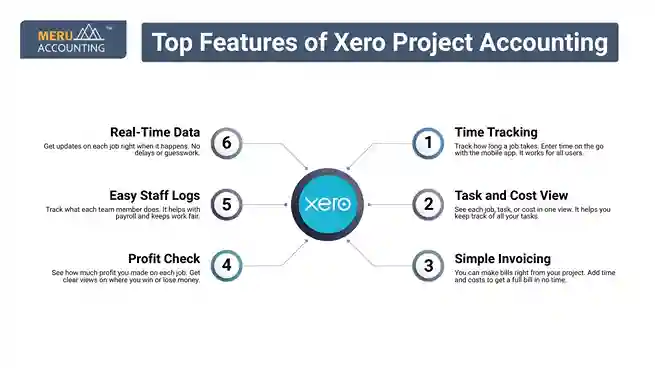
Profit Check
See how much profit you made on each job. Get clear views on where you win or lose money.
Easy Staff Logs
Track what each team member does. It helps with payroll and keeps work fair.
Real-Time Data
Get updates on each job right when it happens. No delays or guesswork.
Projects in Xero make work easy. You can check progress, plan tasks, and act fast with the right tools.
How to Set Up and Use Projects in Xero
Setting up projects in Xero is easy. You don’t need to be a tech expert. Take these steps to begin with ease.
Step 1: Enable Projects
Log in to your Xero account and turn on Projects. Add users who need access to job-tracking tools. Choose user roles and access levels for control. Start from the “Projects” menu on your dashboard. You’re ready to begin tracking new jobs.
Step 2: Add a New Project
Click on “New Project” and enter key job info. Set project name, client, start, and due dates. Add budget estimates if needed for tracking. Attach notes or files for client work. The project is now ready to add tasks.
Step 3: Add Tasks and Time
Break down work into clear tasks. Assign each team member with time estimates. Let the team log time for each small task. Get alerts when logged time exceeds the budget. Track daily progress with visual time graphs.
Step 4: Add Costs
Input all expenses related to the project. Link receipts, travel, and supply costs per task. Match costs to budget items for clean reports. Ensure no cost gets lost or misplaced. Use cost data to plan better next time.
Step 5: Bill Clients
Pull time and cost data into invoices. Send bills directly from the project screen. Add notes to show what each charge covers. Clients see value in detailed work logs. Faster invoicing means faster payments.
Xero project accounting is simple to use. It fits all skill levels and helps keep projects on track.
Benefits of Using Xero Projects for Small Businesses
Xero projects are perfect for small teams with limited resources. It brings transparency, control, and cost savings to every job.
Better Cash Flow
With time logs and fast bills, your cash moves in faster. No more waiting weeks to get paid.
Saves Time
No need to copy data into other tools. Xero does it all in one place.
Cuts Costs
You don’t pay for tools you don’t use. Xero gives you what you need at a fair price.
Makes Teams Work Better
Each team member knows their role. Work flows smoothly and fast.
Boosts Growth
Track which job brings profit. You can then take on more of that work.
Mobile Friendly
Use the mobile app to check work on the go. You don’t need to sit at a desk.
Projects in Xero help small teams stay strong, clear, and fast. It adds to profit and peace of mind.
Common Challenges and How Xero Projects Solve Them
Small firms face tracking problems that slow growth. Xero project accounting helps solve these with smart tools and features.
Missed Time Logs
Many staff members forget to log hours. With Xero, logging time is easy with a phone or the web.
Hidden Costs
Sometimes small costs go untracked. Xero helps link each cost to a task or job.
Late Invoices
Xero lets you make bills fast from job data. No delay means faster payment.
Poor Job Scope
Xero gives a clear view of what work is due. This avoids scope creep.
Team Confusion
Everyone sees what’s next. That keeps your team on track.
No Job Reports
You get job data and results with one click. It helps you improve.
Wrong Job Prices
See how much you made or lost. It helps set the right price for future work.
Tips to Maximize Efficiency with Xero Project Accounting
To get the best from Xero project accounting, you must use it correctly. These tips can help.
Use Daily Logs
Don’t wait till the end. Let your team log time each day.
Review Each Job Weekly
See how your jobs are doing. Fix issues early.
Set Job Budgets
Always set a time and cost cap. It keeps your job in line.
Tag Tasks Well
Use clear task names. It helps find data fast.
Train Your Team
Make sure all users know how to use Xero tools.
Use the App
Track jobs from your phone. You don’t need to be in the office.
Link to Your Bank
Let Xero match costs with bank feeds. It saves time and reduces errors.
With the right use, Xero projects can boost both speed and value in your firm.
At Meru Accounting, we help you set up, use, and grow with Xero. We set up your Xero projects based on your goals. We show you how to cut costs using Xero’s smart tools. Our setup helps you see real job profits with ease. We use trusted ways to keep your data safe. Meru Accounting makes your Xero setup smooth. You get better use of your tools, and your work becomes sharp and strong.
FAQs
- Is Xero Projects part of my Xero plan?
No, it’s an add-on. You pay extra, but the value it brings is worth it.
- Can I track time with my phone?
Yes, Xero’s mobile app lets you log time and tasks while on the go.
- Does Xero Projects help with billing?
Yes, it pulls time and costs to build clear, fair bills for clients.
- Will it work for remote teams?
Yes, since Xero works online, all team members can log tasks anytime.
- Can I get reports per project?
Yes, you get job reports that show time, cost, and gains.


