Choosing the right accounting software can save your business time, money, and work. Wave accounting software is a popular choice for small businesses because it is free accounting software with many tools that help manage money. On the other hand, paid accounting software gives advanced tools for businesses that need more control and more setup options.
This blog will compare Wave accounting software and paid accounting software in detail, so you can choose the one that best fits your business.
What You Will Learn From This Blog
- What Wave accounting software is and how it helps small firms and people who work for themselves keep track of cash.
- The main ways Wave accounting software and paid accounting software are not the same.
- The key tools, good points, and weak points of free and paid accounting software.
- How to pick the right accounting software for your firm, budget, and day-to-day work.
- How auto tools, safe data, help, and tax tools can shape your choice of accounting software.
- Big mistakes to stay away from when you pick accounting software for your firm.
What is Wave Accounting Software?
Wave accounting software is a web-based tool made for small firms and self-employed people. It is free software that helps you send bills, track costs, and keep basic books. Since it runs on the web, you can sign in on any device and keep up with your cash from most places.
This makes it a good pick for those who want to get set up fast with no cost for software. It has a clean and easy look, so you can start work in just a few minutes. It works well for small work groups that do not need high-end tools. The app also gives clear reports that help you see money in, money out, and day-to-day costs with ease.
What is Paid Accounting Software?
Paid accounting software has a monthly or yearly fee. Common examples are QuickBooks, Xero, FreshBooks, and Zoho Books. These tools give more features such as payroll, stock tracking, and custom reports, making them ideal for medium or large firms that need strong financial control. Paid tools can also link with CRM, payment systems, and online store tools to make work easier. They offer strong data safety and better backup options, which help protect key business data. Most paid tools also give fast and direct help to solve any issues with ease.
Main Difference Between Wave Accounting Software and Paid Accounting Software
- It is free to use, while paid accounting software requires a subscription.
- Paid software usually includes advanced features and automation.
- It is simple and user-friendly for small businesses, while paid software suits companies with complex needs.
- Support options and integrations are generally better in paid tools.
Advantages of Wave Accounting Software
- Free to Use: The biggest advantage of Wave accounting software is that it is free accounting software with no monthly fees.
- Easy to Learn: Its clean and simple design makes it easy for beginners to understand.
- Cloud-Based Access: No downloads or installations are required — just log in and work.
- Built-in Invoicing: Send professional invoices directly from the platform.
- Receipt Scanning: Capture and upload receipts instantly from your phone.
- Perfect for Small Scale: Best suited for freelancers, consultants, and very small businesses.
Advantages of Paid Accounting Software
- Advanced Features: Handles payroll, inventory, tax reports, and custom analytics.
- Better Customer Support: Offers live chat, phone support, and dedicated account managers.
- Wide Integrations: Connects with CRMs, e-commerce platforms, payment gateways, and more.
- Automation: Automates invoice reminders, expense categorization, and bank reconciliation.
- Scalability: Grows with your business as your needs expand.
Limitations of Wave Accounting Software
- Limited Advanced Tools: No in-depth inventory or payroll for all countries.
- Basic Reporting Only: Reports are simple and not highly customizable.
- Slower Support: Support is mostly email-based and can be slower than paid tools.
- Not Ideal for Complex Businesses: May not handle advanced accounting needs.
Limitations of Paid Accounting Software
- Cost: Monthly or yearly subscriptions can be expensive.
- Complexity: Some software may have a steep learning curve.
- Paying for Unused Features: Small businesses might not use all the included tools.
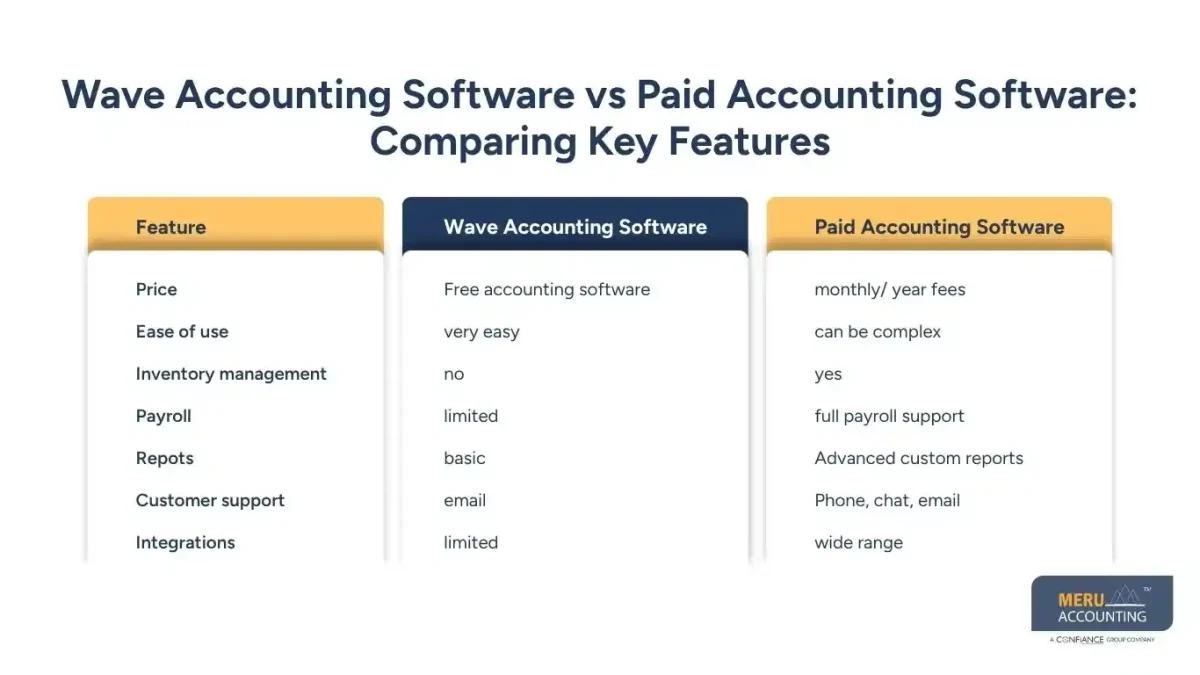
Wave Accounting Software vs Paid Accounting Software: Comparing Key Features
Feature | Wave Accounting Software | Paid Accounting Software |
Price | Free accounting software | Monthly/Yearly fees |
Ease of use | Very easy | Can be complex |
Inventory management | No | Yes |
Payroll | Limited | Full payroll support |
Reports | Basic | Advanced custom reports |
Customer support | Phone, chat, email | |
Integrations | Limited | Wide range |
When Should You Choose Wave Accounting Software?
- For Freelancers and Solopreneurs: Perfect for sending invoices and tracking small-scale expenses.
- For Startups on a Budget: No subscription cost means more money for other priorities.
- For Service-Based Businesses: Best for consultants, coaches, and small service providers.
- For Businesses with Few Transactions: Ideal if your monthly transactions are minimal.
When to Choose Paid Accounting Software
- For Medium and Large Businesses: Handles complex needs like payroll, tax filing, and inventory.
- For Product-Based Companies: Tracks stock, suppliers, and purchase orders.
- For Multi-Location Operations: Manages accounts across different branches.
- For Businesses Needing Deep Insights: Advanced analytics and forecasting help make better decisions.
Additional Comparison Factors
- Security: Both options use encryption, but paid software may offer more backup and recovery tools.
- Mobile Access: Wave has a mobile app for invoicing and expenses; paid software offers more mobile features.
- Data Migration: It’s possible to switch from Wave to paid software as your business grows.
- Customization: Paid software allows more customization in invoices and reports than Wave.
Common Mistakes To Avoid While Choosing Accounting Software
Not Planning for Growth
Many small firms pick free tools like Wave without thinking of future needs. Later, they find it can’t handle advanced tasks.
Focusing Only on Price
Price counts, but picking a tool just for being free or cheap can mean missed features and more costs later.
Not Checking Integration Options
If your free accounting software can’t link with your CRM, payment app, or stock system, you may waste time on hand work.
Overlooking Data Security
Picking a tool without strong safety checks can put your money and data at risk.
Ignoring User Feedback
Skipping reviews from other owners can lead to free accounting software that does not fit your field.
Skipping Trial Periods
Paid tools often give free trials — skipping them means you lose a chance to test before you pay.
The Role of Automation in Accounting
- Time-Saving Benefits: Automation takes care of repeat jobs like bank match and pay alerts, saving hours each month.
- Reducing Human Error: Letting the tool do the math helps you avoid costly slips.
- Better Cash Flow Management: Auto alerts for due bills can help keep your cash steady.
- Payroll Automation: Paid tools often run payroll on their own, cutting down on hand work.
- Expense Categorization: Automation can sort costs into groups without you typing each one.
How Customer Support Impacts Your Choice
- Speed of Response: Paid tools may reply in minutes; Wave replies can take more time.
- Types of Support: Wave uses email; paid tools may give phone, chat, or on-site help.
- Learning Resources: Paid tools offer video guides, docs, and live talks to help you learn fast.
- Dedicated Account Managers: Some paid plans give you a set manager for quick fixes.
- Multi-Language Support: Paid tools often work in many tongues, great for global teams.
Cost Analysis Over Time
- Short-Term Costs: Wave is free to start, good for firms with small budgets.
- Long-Term Value: Paid tools cost more but can save money with better speed and features.
- Upgrade Considerations: Moving from Wave to paid tools later may incur data migration costs.
- Payment Flexibility: Some paid tools let you pay each month or year. Wave stays free.
- Add-On Costs: Free tools may still charge for pay runs or card pay services.
User Experience Differences
- Interface Design: Wave has a clean, simple look, great for new users.
- Feature Navigation: Paid tools have more options. They can feel heavy at first but give more power later.
- Mobile App Experience: Wave has basic mobile tools. Paid apps often give more mobile features.
- Accessibility: Cloud tools work on any device. Paid tools may also work offline.
- Customization: Paid tools have more design choices for bills and reports than Wave.
Compliance and Tax Filing Support
- Tax Calculation Tools: Paid tools have built-in tax calculators for many regions.
- Wave Tax Features: Wave has basic tax tracking but may not cover hard tax rules.
- Local Compliance: Paid tools update with local tax laws to help avoid fines.
- Audit-Ready Reports: Some paid tools can make audit-ready reports in seconds.
- Filing Assistance: Some paid tools let you file taxes right from the app.
Future Trends in Accounting Software
- AI-Powered Accounting: AI is now used to predict cash flow and spot strange transactions fast.
- Cloud-First Platforms: Cloud tools like Wave are now common in the industry.
- Mobile-First Features: More apps are built to work best on phones and tablets.
- Blockchain in Accounting: Future tools may use blockchain for safer records.
- Voice Command Integration: Some apps test voice commands to add data and run reports.
Final Tips Before Choosing
- Make a Feature List: Write down the features you must have before comparing options.
- Test Before Buying: Use free trials of paid software to see if it works for your business.
- Plan for 2–3 Years Ahead: Choose software that will work as your business grows.
- Check Hidden Costs: Even Free accounting software can have charges for certain services.
- Train Your Team: Make sure your staff knows how to use the software effectively.
Wave accounting software works best for freelancers, startups, and small service firms. Paid accounting tools are better for medium to large firms with complex needs. The right choice depends on your budget, needed features, and growth plans. Meru Accounting we help you pick the right software, set it up, and manage it with ease. Our team works with both free and paid options to fit your needs. With our help, you save time, improve accuracy, and focus on growing your business.
optional anymore
on running the business
Our Expert Insight
Choosing the right accounting software is about more than just cost. While Wave accounting software gives small businesses an easy and free way to handle daily accounting tasks, paid accounting software offers more advanced features that support growing businesses. The best choice depends on your current needs, future plans, and the level of control you want over your finances. At Meru Accounting, we help businesses evaluate their requirements, choose the right accounting solution, and make the most of their software to improve accuracy, save time, and support long-term growth.
Key Takeaways
- Wave accounting software is a free cloud-based solution designed for freelancers, startups, and small businesses.
- Paid accounting software provides advanced tools such as payroll, inventory management, automation, and detailed reporting.
- Businesses should compare features, support, security, and integrations before making a decision.
- Choosing software that can grow with your business helps reduce future migration challenges.
- Automation and strong reporting features can improve efficiency and support better financial decisions.
- Selecting the right accounting software depends on your budget, business needs, and long-term growth plans.
FAQs
Yes, it’s free, but payment processing has small fees.
Only in limited regions with basic features.
Yes, if your business needs advanced tools.
Yes, data can be exported and imported.
Wave accounting software is simpler and free for freelancers.