
Ever spend hours matching bank deposits to sales, chasing unpaid invoices, or sorting through receipts just to close your books? These tasks can slow down your business, even when you already use accounting software. The right Xero addons can help automate routine work, connect your business tools, and make it easier to keep your financial records up to date.
The key is knowing which tools are worth using. Some help manage bills and expenses, while others handle payment tracking, inventory, or online sales. In this guide, we’ll cover the best options, what to look for, and how to choose tools that fit your business without adding extra cost or complexity.
What You Will Learn From This Blog
- What Xero addons are and how they work.
- Why businesses use connected tools to manage their books.
- How to choose the right tools for your needs and budget.
- Which features matter when you compare apps.
- Common mistakes to avoid when adding tools to your accounting setup.
- How professional accounting support can help you get more from Xero.
What Are Xero Addons and How Do They Work?
Xero addons are apps and tools that connect with Xero accounting software to extend its core features. They can help with tasks such as expense tracking, inventory, payroll, payment collection, and sales reporting. Rather than moving all your work to a new system, you can connect tools that fit your current setup.
For example, a retail business may use an inventory app to track stock while Xero records the related sales and costs. An online store may connect its sales platform to help match orders, fees, refunds, and payouts with its accounting records.
These Xero accounting add ons may share data through a direct connection or an approved third-party integration. The data that moves between systems depends on the app, its settings, and the permissions you grant. Some apps sync data in near real time, while others update it on a set schedule or need manual review.
Before you connect an app, check which data it sends to Xero, whether it can create duplicate entries, and how it handles errors. A working connection alone does not ensure that your books are correct. You still need to review the records and reconcile your accounts.
optional anymore
on running the business
Why Do Businesses Use Xero Addons to Improve Accounting Workflows?
For growing businesses, Xero accounting add ons can help reduce manual work and keep key financial tasks moving. As a business grows, manual tasks can slow down the finance team. Connected apps can help reduce this burden and make key records easier to manage.
- Reduce manual data entry
Tools can send invoices, bills, sales, and expense data to Xero. This can save time spent on repeated entry and lower the risk of typing errors.
- Improve payment tracking
Payment tools can help track invoices, customer balances, and overdue bills. Your team can see which payments have cleared and which need follow-up.
- Keep records in sync
A well-set-up integration can help keep sales, stock, and payment data aligned across systems. This is useful when you manage orders through more than one sales channel.
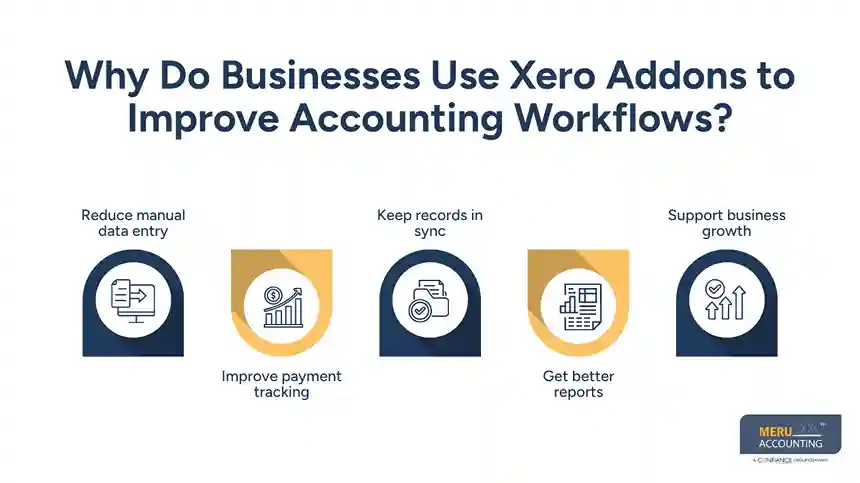
- Get better reports
Some apps add reports on stock levels, project costs, cash flow, or sales trends. These details can help you spot rising costs and make better business decisions.
- Support business growth
When transaction volumes rise, the right tools can help you handle more work without adding the same amount of manual effort. Still, you should review the cost and value of each app as your needs change.
How to Choose the Right Xero Accounting Add ons for Your Business
Choosing Xero accounting add ons based on popular names alone can lead to extra costs and a more complex workflow. Start by looking at the tasks that take the most time or cause the most errors.
- Identify your main problem
List the tasks that need the most effort. You may spend too much time chasing unpaid invoices, entering receipts, matching online sales, or tracking stock. Choose an app that solves a clear problem rather than adding features you may never use.
- Check Xero compatibility
Review the app’s Xero connection and confirm that it supports the features you need. Check whether the integration can send and receive the right data and whether it works with your Xero plan.
- Compare total costs
Look beyond the monthly fee. Some apps charge based on users, transaction volume, locations, or extra features. Include setup, training, and support costs when comparing options.
- Review ease of use
A tool should make work easier, not add more steps. Look for a clear interface, useful support guides, and a setup process your team can manage.
- Check data security and access
Review the app’s privacy terms, security controls, user permissions, and data handling practices. Give each tool only the access it needs.
- Test before a full rollout
Start with a small set of records and check how the data appears in Xero. Confirm that invoices, payments, taxes, and account codes are mapped correctly before relying on the integration for all transactions.
Key Features to Look for in Xero Addons
The best app for your business should fit your workflow and work well with your current accounting setup. Use these features as a checklist when comparing Xero accounting add ons options.
- Reliable data sync: The app should move the right data to Xero with clear rules for updates and errors.
- Automation: Look for features that reduce repeat work, such as receipt capture, bill entry, or payment matching.
- Useful reports: Choose tools that give you details you can act on, such as overdue balances, stock costs, or cash flow trends.
- Clear error alerts: The app should flag failed syncs, missing data, and other issues that need review.
- Access controls: User roles and permissions should help protect financial records.
- Scalability: Check whether the app can handle more transactions, users, or sales channels as your business grows.
- Good support: Clear help guides and timely support can make setup and troubleshooting easier.
Also, check how the app handles refunds, credit notes, tax rates, and duplicate records. These details matter because small sync errors can affect account balances and financial reports.
Common Xero Addons to Improve Accounting in Your Business
Different apps solve different accounting problems. The right choice depends on the tasks you want to improve and the other systems you use.
- Hubdoc for bills and receipts
Hubdoc helps collect bills and receipts and extract key details from documents. This can cut down on manual data entry and help keep supporting records in one place. It may suit businesses that handle many supplier bills and expense receipts.
- Dext for expense and document management
Dext helps capture and process receipts, bills, and other financial documents. It can help reduce the time spent gathering records and preparing them for bookkeeping. Check its current Xero integration features and plan limits before choosing it.
- ApprovalMax for bill approvals
ApprovalMax adds structured approval steps for bills and other financial transactions. It can help businesses set spending rules, assign approvers, and keep a record of decisions. This can be useful when several people need to review costs before payment.
- Synder for online sales and payment data
Synder helps sync sales and payment data from supported platforms into accounting software. It can be useful for online sellers who need to account for sales, fees, refunds, and payment deposits. The setup should reflect how each sales channel and payment service handles transactions.
- A2X for ecommerce accounting
A2X helps ecommerce businesses summarize sales and settlement data from supported platforms for accounting. It can help separate sales, fees, refunds, and other items that make up a payout. This is useful because a bank deposit often reflects several transactions rather than one sale.
- Inventory tools for stock control
Businesses that sell physical products may need a stock management app that connects with Xero. These tools can help track stock levels, purchase orders, and inventory costs. Before choosing one, check how it handles cost of goods sold, returns, and stock adjustments.
- Stripe for payment collection
Stripe can help businesses accept online payments and manage payment activity. When used with a suitable Xero integration, it can also help match payment data with accounting records. Review how the connection records fees, refunds, and payouts to avoid treating a net deposit as total sales.
App features, pricing, and integration limits can change. Check each provider’s current documentation and test the connection before you rely on it. You may need only one or two apps to improve your workflow; adding more tools does not always lead to better results.
How Meru Accounting Can Help You Improve Your Xero Workflow
A connected app can save time, but only when transactions sync correctly and your books reflect what actually happened. Meru Accounting helps businesses keep their Xero records in order, resolve discrepancies, and maintain a clear view of their finances.
Our accounting services include:
- Bookkeeping and Reconciliation: Record transactions and reconcile bank and credit card accounts.
- Accounts Payable and Receivable: Track bills, invoices, payments, and overdue balances.
- Financial Reporting: Prepare monthly reports to help you review income, expenses, and cash flow.
- Catch-Up and Cleanup Bookkeeping: Correct past errors and bring your books up to date.
- Accounting Workflow Support: Review how connected apps and payment platforms feed data into Xero.
With experience across industries and accounting platforms, we adapt to your existing systems and processes. Whether you need ongoing bookkeeping or help fixing gaps in your records, our team can help you maintain reliable books and make informed business decisions.
Our Expert Insight
One detail businesses often overlook when choosing Xero addons is how each app handles the same transaction. For example, if an ecommerce platform and a payment app both send sales data to Xero, the same sale may be recorded twice. This can inflate revenue and make bank reconciliation harder.
Before enabling a new integration, check which system serves as the main source for sales, fees, refunds, and payouts. Run a test for a complete sales cycle, then compare the entries in Xero with the original platform reports and bank activity. This helps catch duplicate entries and gaps before they affect your monthly financial reports.
Key Takeaways
- Xero addons extend core accounting features and help automate selected tasks.
- The right apps can improve payment tracking, expense management, reporting, and sales reconciliation.
- Choose tools based on your business needs, budget, security, and current software.
- Test data syncs and review account mappings before automating large volumes of transactions.
- Regular reconciliation and accurate bookkeeping remain essential, even when apps handle routine work.
- Professional accounting support can help you maintain clean records and get more value from your software.
FAQs
A2X and Synder are options for syncing sales and payment data from supported ecommerce platforms. Compare how each handles fees, refunds, and payouts before choosing one.
Many third-party apps charge a separate fee, even if you already pay for Xero. Check the app’s pricing, user limits, transaction caps, and any extra charges for features you need.
Yes, if the app supports your software and Xero plan. Before connecting it, check which data syncs, whether the connection works both ways, and if you need a separate integration tool.
Duplicate entries can overstate sales or expenses and affect account balances. Review the app’s sync settings, identify the source of the duplicate entries, and correct them in line with your accounting records.
Compare its monthly cost with the time it saves, errors it helps prevent, and tasks it replaces. For example, an app that cuts hours of manual sales reconciliation may offer more value to a high-volume online store than to a business with few monthly transactions.
optional anymore
on running the business



