
Having good bookkeeping software matters for every business. It shows where the cash comes in from, where it goes out, and what is left at the end. When books are accurate and up to date, owners can make correct decisions with little or no stress. Xero, a cloud-based accounting software tool, helps firms keep track of day-to-day work. It can reduce manual work, speed up bank reconciliation, and give a clear view of cash flow. With the right setup, Xero can save time and help keep books in good shape. Do you need some easy Xero tips for managing your finances better?
In this blog, you will find simple Xero tips that can help with better bookkeeping and sound financial management. These ideas work for new users and for teams that already use Xero but want a smoother flow.
What You Will Learn From This Blog
This blog will show you how to:
- Use Xero for daily bookkeeping
- Set up Xero in a smart way
- Keep financial records accurate
- Save time with simple steps in Xero
- Use reports for better financial management
- Avoid common Xero bookkeeping mistakes
- Get more value from expert help
The goal is to make Xero easier to use and easier to trust.
Understanding Xero and Its Role in Modern Bookkeeping
The old method of bookkeeping used to take a lot of time. It used papers and sheets for manual entries. That made the process slower and more prone to errors. Using modern bookkeeping software like Xero gives firms a central place to maintain financial data. It pulls in bank data, store bills, tracks due sums, and helps with reports. Since it runs on the cloud, users can log in from work, home, or on the go.
This is the modern way of bookkeeping. Owners do not need to wait for the month-end. They can see what is going on in real time. That helps them spot gaps, track spending, and plan with more care. Xero bookkeeping also helps teams work from the same set of books. That means fewer mix-ups and less repetitive work.
Getting Started with Xero Bookkeeping the Right Way
A good start can lead to better results over time. Before you add a large amount of data, take time to set up Xero the right way. A proper setup can help reduce errors, save time, and make daily bookkeeping much easier.
Set Up the Chart of Accounts
The chart of accounts is the base of your bookkeeping system. It groups your income, expenses, assets, debt, and equity into clear sections.
Keep your chart of accounts simple and useful for your business. Do not add too many groups at the start. A clean setup makes Xero easier to manage and helps create clear financial reports.
Link Bank Feeds
Bank feeds are one of the best tools in Xero. When you link your bank account, new entries flow into the system on their own.
This cuts down on manual entry, saves time, and helps keep your financial records up to date. Check bank feeds often to make sure all entries come in the right way.
Set User Access
Not all team members need the same level of access. Some may only need to add bills, while others may need to send invoices or view reports.
Set user access with care. This helps keep financial information safe and lowers the risk of unwanted changes.
Import Past Data
If you are moving from another accounting system, import past data to keep a full record of your business activity.
This helps with year-to-year checks and gives you a clear starting point for future work.
A strong setup helps you get more value from the Xero tips covered later in this blog.
Essential Xero Tips for Accurate Financial Records
Accurate financial records are key to good financial management. The following Xero tips can help keep your books neat and correct.
Reconcile Bank Entries Often
Bank reconciliation means matching entries in Xero with entries on your bank statement.
Regular reconciliation helps find missing entries, extra entries, and coding errors before they become bigger problems. Weekly checks are often better than waiting until the end of the month.
Use the Same Coding Method
Create a clear method for recording income and expenses. Use the same code for the same type of entry whenever possible.
This helps keep financial records organized and makes financial reports easier to read.
Keep Business and Personal Spending Separate
Avoid mixing business and personal spending. Use separate bank accounts and cards for business use.
This keeps financial records clean and makes tax work easier. When business and personal costs are mixed, bookkeeping becomes harder and takes more time.
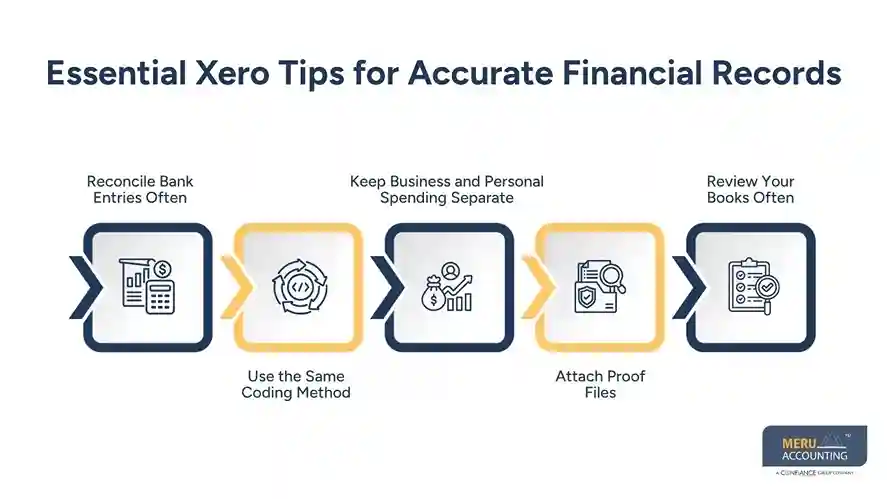
Attach Proof Files
Attach receipts, bills, invoices, and other proof files to the right entries in Xero.
Keeping proof files with matching entries makes reviews, audits, and tax work much easier. It also helps answer questions if they come up later.
Review Your Books Often
Do not wait until year-end to check your records. Review key entries and account balances often.
Regular checks help find issues early and make them easier to fix before they affect financial reports.
Xero Tips for Streamlining Daily Bookkeeping Tasks
Xero can help cut down on manual work and save time. These Xero tips can help simplify your daily bookkeeping tasks.
Use Repeat Bills and Invoices
If you send the same invoice or receive the same bill each month, set it up as a repeat entry. This saves time, reduces repeat work, and helps keep due dates on track.
Set Up Bank Rules
Bank rules allow Xero to sort entries based on rules you choose. These rules reduce manual entry, improve speed, and help keep records consistent.
Use Receipt Capture Tools
Many businesses lose time looking for paper receipts. Xero allows users to upload receipts and store them online. This keeps records neat and makes expense tracking easier.
Create a Weekly Bookkeeping Plan
Set aside time each week to review entries, complete bank reconciliation, and check bills and invoices. A set plan helps keep records current and prevents work from building up.
Track Open Bills and Invoices
Xero helps track unpaid bills and customer invoices. Review open balances often to improve cash flow and reduce the risk of missed payments.
Good cash flow is a key part of strong financial management.
Using Xero Reporting Features for Better Financial Management
Bookkeeping is more than entering data. It is also about learning from the numbers. Xero reports help turn financial information into useful facts.
Review Profit and Loss Reports
A profit and loss report shows income, expenses, and profit for a set period. Review this report often to spot trends, track costs, and measure business results.
Check the Balance Sheet
The balance sheet shows assets, debt, and equity. Reviewing the same regularly helps business owners understand the financial state of the business and track long-term strength.
Monitor Cash Flow
Cash flow is one of the most important parts of financial management in any business. A business may seem profitable on records but still face cash shortages. With the help of Xero reports, you can track cash coming in and going out, making planning easier.
Use Custom Reports
Each business has its own needs. Xero allows users to tailor reports and focus on key areas. Custom reports can give a clear view of teams, jobs, products, or expense groups.
Compare Results Over Time
Compare current results with past months or past years. This helps spot trends, track growth, and support better business decisions. These reports turn financial information into useful facts for better financial management.
optional anymore
on running the business
Common Xero Bookkeeping Mistakes to Avoid
Even with good tools, mistakes can still happen. Avoiding common errors helps keep records accurate and up to date.
Delaying Bank Reconciliation
Waiting too long to complete reconciliation can make gaps harder to find and fix. Regular reconciliation helps keep financial records accurate and financial reports reliable.
Using the Wrong Account Code
Wrong codes can affect financial reports and create issues during tax work. Use clear coding rules and follow them each time.
Ignoring Financial Reports
Some business owners focus only on data entry and never review reports. Financial reports provide useful facts that can help with decisions and business plans.
Failing to Keep Proof Files
Missing receipts, invoices, and bills can create problems during audits or tax reviews. Keep proof files and attach them whenever possible.
Giving Too Much Access
Give staff access only to the areas they need for their work. This helps protect financial information and reduces the risk of errors.
Avoiding these mistakes can help businesses get more from Xero bookkeeping and maintain strong financial records.
Meru Accounting's Xero Bookkeeping Services
At Meru Accounting, we help businesses keep their books neat, accurate, and ready to use. Our Xero bookkeeping services are designed to improve speed, accuracy, and financial control.
Our services include:
- Xero setup
- Bank reconciliation
- Accounts payable support
- Accounts receivable support
- Expense tracking
- Financial reporting
- Payroll bookkeeping support
- Month-end close support
- Year-end close support
Our team works closely with clients to help keep records accurate and up to date.
We also help businesses with Xero tips to improve daily work, reduce manual tasks, and support better financial management.
Our Expert Insight
Many businesses buy accounting software and expect quick results. While the software helps, success also depends on good work habits and steady use. In our experience, businesses get the best results when they perform reconciliation often, keep records up to date, review reports regularly, and save proof files.
Small steps taken on a regular basis can lead to big gains over time. A well-run Xero system can save hours each month, improve accuracy, and build trust in financial data. That is why many of the best Xero tips are simple habits that teams follow every week.
Key Takeaways
- Xero helps simplify bookkeeping work.
- A proper setup supports accurate financial records.
- Bank reconciliation should be done often.
- Bank rules and repeat entries can save time.
- Financial reports provide useful facts.
- Cash flow should be tracked closely.
- Avoiding common mistakes improves accuracy.
- Xero bookkeeping supports better financial management.
- Expert support can help businesses get more from Xero.
FAQs
Start with a clear chart of accounts, link bank feeds, set user access, and complete bank reconciliation on a regular basis.
Most businesses benefit from weekly reconciliation. Businesses with a high number of entries may choose to reconcile daily.
Xero helps save time, improve accuracy, track cash flow, and keep financial records in one place.
Yes. Xero provides financial information, reporting tools, and automation features that support better financial management.
Outsourcing can help businesses save time, improve accuracy, reduce workload, and gain support from experienced bookkeeping professionals.