Choosing the right accounting software can change how you manage your business. With many tools on the market, two names often stand out: Xero and Waveapp. Business owners need to decide which one best fits their needs. This xero vs waveapps comparison will help you make a smart choice between two popular accounting platforms. Whether you run a startup or a small business, finding a tool that suits your budget and needs is key.
What You Will Learn From This Blog
- A complete understanding of the xero vs waveapps comparison to help you make an informed business decision.
- Key differences between Xero and Waveapps, including features, pricing, and ease of use.
- How both platforms perform in terms of scalability, integrations, and long-term business suitability.
- Practical use cases for freelancers, startups, and growing businesses to identify the right fit.
- How to match accounting software with your current operations and future growth plans.
- Insights into evaluating accounting tools beyond pricing, focusing on functionality, flexibility, and financial control.
What is Waveapps? A Simple Overview
In the xero vs waveapps discussion, Waveapps is a free accounting software built for small businesses and freelancers. It’s easy to use, quick to set up, and doesn’t cost a thing. Many solo business owners pick Wave because they get solid features without paying.
Free Accounting and Invoicing Tools
Waveapps gives you full access to key tools without charging you. You can send custom invoices, record income and expenses, and check reports.
Simple Dashboard with No Learning Curve
Wave comes with a clean, simple dashboard. Even if you don’t know accounting, you can still use it with ease. The platform helps you handle your finances without confusion.
Unlimited Bank Connections
Wave apps let you connect as many bank accounts as needed. This helps track every business transaction in real-time, keeping your records complete and up to date.
Built-in Receipt Scanning
You can use the app to take pictures of your receipts. It stores them in the system, so you won’t lose them. This feature makes tracking expenses fast and simple.
Basic Payroll Support
Waveapp supports payroll in select countries. It handles tax filings and direct deposits for small teams. It’s not as advanced as other systems, but it works well for basic needs.
What is Xero? Key Features and Functions
In the xero vs waveapps comparison, Xero is a cloud-based accounting software platform made for small to mid-sized businesses. It is known for its strong features and integrations. Unlike Wave, Xero is a paid tool but offers more depth and control.
Full-Featured Accounting Dashboard
Xero’s dashboard gives you a detailed view of your business finances. From cash flow to bank balances, you can manage it all in one central place.
Real-Time Bank Feed and Reconciliation
Xero connects to your bank and updates your transactions automatically. Reconcile your records daily and make decisions using the most current data available.
Invoicing with Automation
Xero offers smart invoicing tools. Set up automatic payment reminders, and recurring invoices, and track which clients have paid, all in a few clicks.
Strong Reporting Tools
Xero provides over 50 financial reports. Customize them by period, category, or project to get better insights into business performance.
Unlimited Users
Unlike many platforms, Xero allows unlimited users on all plans. Each user can have custom permissions based on their role in the company.
Over 1000 App Integrations
In the xero vs waveapps comparison, Xero integrates with inventory, CRM, time-tracking, and payment apps. These integrations help businesses build a fully connected financial ecosystem.
Xero vs Waveapps: Pricing and Budget Fit
Pricing is a big factor when comparing Xero vs Waveapps. Wave offers free core accounting features, making it perfect for budget-conscious users.
Feature | Waveapps | Xero |
Cost Structure | Free for core features | Paid plans starting from $29/month |
Payroll | An optional paid add-on in limited regions | Full-featured payroll in higher-tier plans |
Ideal User Type | Freelancers and solo users | Small to mid-sized businesses |
Free Trial | Always free | Free 30-day trial available |
Cost Flexibility | No contracts or subscriptions | Monthly subscription with tiered pricing |
Xero vs Wave comparison shows a clear difference in cost. If you only need basic accounting, Wave wins. But if you want advanced features, Xero gives more value for the price.
Xero vs Wave: Ease of Use and User Experience
In the xero vs waveapps comparison, both platforms aim to make accounting easy, but they differ in design and flow.
Feature | Waveapps | Xero |
Interface Simplicity | Beginner-friendly and clean | Professional layout with guided features |
Learning Curve | Very low, ideal for non-accountants | Slight learning curve for full feature access |
Setup Time | Quick setup, ready in minutes | Guided setup with more custom settings |
Navigation | Basic and easy to follow | Modern UI with deeper control tools |
Customization | Limited options | High customization for workflows and users |
Wave vs Xero: Features and Functional Tools
Let’s break down the tools in the xero vs waveapps comparison to understand what each platform offers.
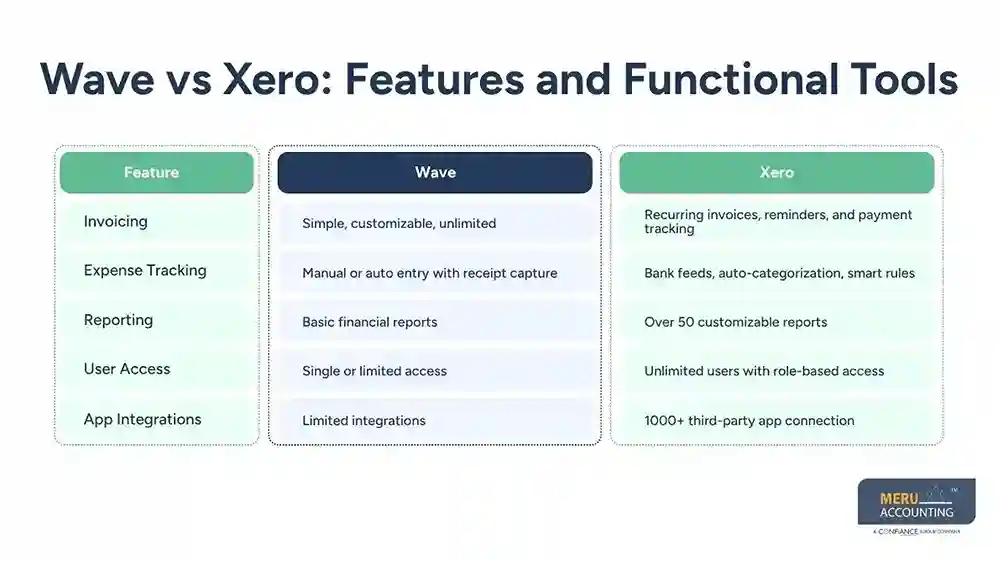
Feature | Wave | Xero |
Invoicing | Simple, customizable, unlimited | Recurring invoices, reminders, and payment tracking |
Expense Tracking | Manual or auto entry with receipt capture | Bank feeds, auto-categorization, smart rules |
Reporting | Basic financial reports | Over 50 customizable reports |
User Access | Single or limited access | Unlimited users with role-based access |
App Integrations | Limited integrations | 1000+ third-party app connections |
Wave vs Xero: Integration, Scalability, and Support
Business needs to grow over time. Let’s see how these tools handle future growth and tech support.
App Integration Support
Wave apps connect with a few apps but lack broad third-party support compared to other accounting software like Xero. Xero integrates with over 1000 tools, including CRMs, payment systems, and eCommerce.
Scalability for Growing Teams
Waveapps suits freelancers or solo entrepreneurs. If your team grows, Xero’s flexible roles and user management scale better with business expansion.
Customer Support Access
In the xero vs waveapps comparison, Wave provides email support and a basic help center. Xero offers 24/7 support, an extensive knowledge base, and a global user community for quick help.
In the xero vs waveapps scalability comparison, Xero comes out ahead. It can handle more users, more data, and more processes as your business grows.
Which One Should You Choose: Xero or Waveapp?
Now let’s answer the big question in the xero vs waveapps decision: Which one should you choose?
Choose Wave If:
- You are a freelancer or run a micro business.
- You want free accounting tools with no subscription cost.
- You do not require advanced financial reporting or detailed analytics.
- Your accounting needs are limited to basic invoicing and expense tracking.
- You operate with a low volume of transactions and simple workflows.
- You prefer a simple, easy-to-use platform with minimal setup requirements.
Choose Xero If:
- You plan to grow your business and need a scalable accounting solution.
- You require advanced features such as detailed reporting and financial insights.
- You want seamless integration with a wide range of business applications.
- You need multi-user access with defined roles and permissions.
- You deal with higher transaction volumes requiring automation and efficiency.
- You require support for multi-currency accounting and international operations.
How Meru Accounting Helps You Choose Between Xero and Waveapps
For businesses evaluating the xero vs waveapps decision, the right choice depends on size, complexity, and future growth plans. Meru Accounting helps evaluate these factors by analyzing business operations, transaction volume, and reporting needs.
Based on this assessment, startups and freelancers may be guided toward Waveapps for its simplicity and cost-effectiveness, while growing businesses are often recommended by Xero for its advanced features and scalability.
We also support end-to-end implementation, including software setup, chart of accounts configuration, and migration from other accounting systems.
Along with this, we help integrate your accounting software with payroll, CRM, and tax tools to ensure smooth financial operations, improved accuracy, and better control as your business grows.
Our Expert Perspective
From our expert perspective in the xero vs waveapps evaluation, selecting between Xero and Waveapps is ultimately about financial maturity rather than software features alone. Many businesses tend to underestimate how quickly accounting needs evolve once operations expand, multiple stakeholders get involved, or financial reporting becomes decision-driven.
In practical scenarios, simplicity often drives the initial choice, which is why Waveapps is commonly adopted at the early stage. However, over time, the real differentiator is how well a system supports structure, accountability, and financial visibility across the organization.
Instead of focusing only on tools and pricing, the more sustainable approach is to evaluate how each platform influences financial discipline, data accuracy, and decision-making consistency as the business grows.
Key Takeaways
- In the xero vs waveapps comparison, Waveapps is ideal for freelancers and micro businesses needing free, simple accounting tools.
- In the xero vs waveapps comparison, Xero is better suited for growing businesses requiring advanced financial management.
- Pricing is the biggest differentiator, but scalability matters more long-term.
- Waveapps offers simplicity, while Xero offers control and automation.
- Xero supports stronger integrations and multi-user collaboration.
- Waveapps has limited reporting and scalability compared to Xero.
- Business growth should be the main factor when choosing between the two.
- The right choice depends on current needs and future expansion plans.
FAQs
Yes, Wave gives you core tools like invoicing, expense tracking, and basic reports for free. You’ll only pay if you add extras like payroll or payment processing.
Xero works well for teams and growing businesses. It allows unlimited users, offers powerful reports, and connects with over 1,000 apps. This makes it a great choice if you plan to scale.
Waveapps is easier for beginners, while Xero has a slightly steeper learning curve due to advanced features.
Yes, both tools connect to your bank accounts. Xero offers real-time updates and smart matching. Wave also lets you link many accounts to track all your transactions.
Wave is a better fit for most freelancers looking for simple accounting software. It’s free, easy to set up, and covers the basics. Xero works better if you need more features as your business grows.
optional anymore
on running the business