Online sales can span many states, sales sites, and payment tools. Accountants for online businesses track the tax due on each sale and tie that tax to cash and tax filings. A small gap can grow when sales run through a store site, a market site, and more than one payment tool.
U.S. sales tax rules also vary by state. After the 2018 South Dakota v. Wayfair case, states could require remote sellers to collect tax even when they had no store or other site in that state. The U.S. Government Accountability Office (GAO) found that states use different rules for economic nexus, tax thresholds, exemptions, and marketplace sales.
For this reason, sales tax work needs more than a tax rate check. It also needs clean sales data, proper account entries, and regular reconciliation.
What You Will Learn From This Blog
- How sales tax errors can start in an online store.
- How sales data can be checked across sales sites and payment tools.
- How an online business tax accountant can review tax due, tax paid, and tax filed.
- How online business accounting services can set up checks for new sales.
- How accountants for online businesses can find gaps between sales reports, bank data, and tax reports.
- When a sales tax issue may need a state tax expert or CPA.
What Do Accountants for Online Businesses Do?
Sales and Tax Review
Accountants for online businesses check sales, tax, refunds, fees, and cash. They can map each sale to the right state and tax code.
Nexus and State Review
Nexus is the link that can make a seller subject to a state tax rule. Accountants for online businesses can track sales by state and flag areas that need review.
Tax Code Checks
A product may be tax-free in one state but taxable in another. An online business tax accountant can review tax codes, rates, product rules, and sale types before tax is booked.
Tax Return Tie-Out
The tax amount in the books should tie to the tax return and the amount due. Accountants for online businesses can list gaps and trace them to the source.
Data Flow Review
Online business accounting services can check how sales data moves from a store or market site to the books. This can show if tax, fee, refund, or payout data is lost.
Common Sales Tax Errors in Online Businesses
Wrong State Tax
A seller may charge tax based on the wrong state or rate. This can happen when tax settings are old or when a sale has the wrong ship-to code.
Tax on Exempt Sales
Some sales may be exempt, but the rule must be checked by state and sale type. An online business tax accountant can review the reason for each exempt sale.
Tax Missed on Direct Sales
A market site may collect tax for a seller, while the seller’s own site may not. Online business accounting services can split these sales so the tax due is clear.
Refund Tax Errors
A refund may return the sale but not the tax. Accountants for online businesses can check that the sale, tax, and refund all move to the right account.
Fee and Payout Errors
A marketplace may send a net payout after fees and tax. If the book entry uses only the bank amount, gross sales and tax can be wrong.
How Accountants for Online Businesses Identify and Correct Sales Tax Errors
Start With Source Data
Accountants for online businesses first pull sales, tax, refunds, and payout data. The goal is to find the first point where the amount goes off.
Match Sale to Payout
A $100 sale may lead to a $92 bank payout after fees and tax. Accountants for online businesses can match the gross sale, tax, fee, and net cash.
Check State Totals
Sales are grouped by ship-to state and, where needed, local tax area. This gives a clean base for a tax due check.
Fix the Book Entry
An error may need a journal entry, a data fix, or a change in the sales feed. The fix should link to the source record so it can be checked later.
Check the Next Tax Filing
After a fix, the tax return and tax payment should be checked again. An online business tax accountant can also review past periods when the same error was used more than once.
Reconciling Sales Tax Collected Across Multiple Online Sales Channels
Build One Sales Map
Accountants for online businesses can list each sales channel, payment tool, tax role, and payout bank. This shows which source owns each part of the sale.
Separate Gross Sales
A bank deposit may be net of fees, refunds, and tax. Online business accounting services should book gross sales and each related item on its own line.
Track Tax by Source
Tax collected on a store site may be paid by the seller, while a market may collect it for the seller. The tax report must show this split.
Match Monthly Totals
Accountants for online businesses can compare channel sales reports with the general ledger each month. Large gaps should be checked before a tax return is filed.
Keep a Clear Audit Trail
Keep sales reports, tax settings, refund logs, payment reports, and filed returns in one set place. This gives the tax team a clear path from sale to filing.
optional anymore
on running the business
How an Online Business Tax Accountant Handles Sales Tax Reconciliation Issues
Find the Gap
An online business tax accountant compares sales, tax collected, tax paid, refunds, and fees. The aim is to find both the amount and the cause.
Test a Sample
A small set of orders can be checked by hand. Accountants for online businesses can use this test to see if the same issue affects many orders.
Check Past Periods
If an issue began in an old month, past tax reports may need a check. The tax team can then see if an amended return or other state action may be needed.
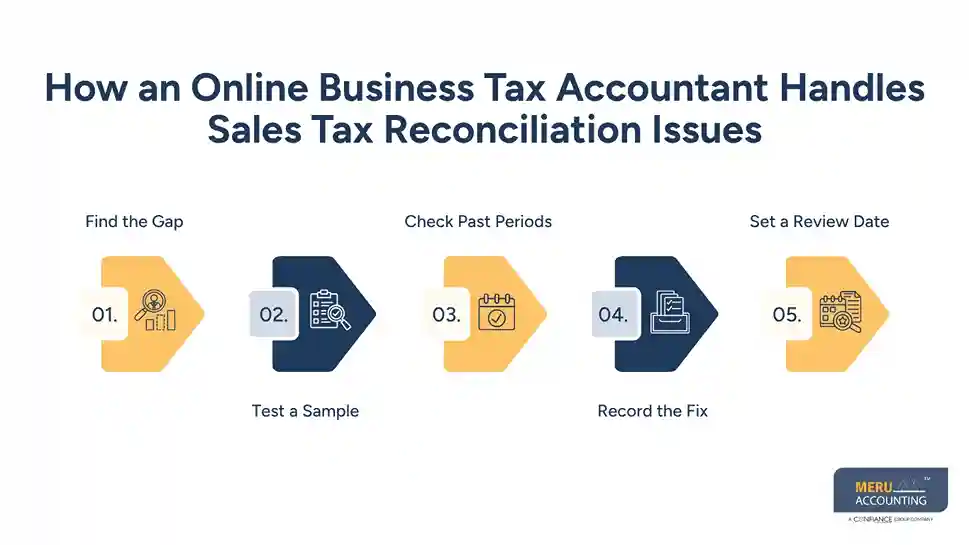
Record the Fix
Each fix should show what was wrong, what was changed, and why. Online business accounting services can keep this log with the tax work papers.
Set a Review Date
Rules, products, and sales areas can change. Accountants for online businesses can set a monthly or quarterly tax review based on the size and tax risk of the shop.
Using Online Business Accounting Services to Prevent Future Sales Tax Errors
Set Clear Tax Rules
Online business accounting services can set rules for state, product, sale type, and market channel. Clear rules cut down manual work and make errors easier to spot.
Use Monthly Checks
Accountants for online businesses can run a monthly tie-out of sales, tax, refunds, fees, and bank cash. A set check is more useful than a check done only at tax time.
Review New States
New sales can create new nexus needs. An online business tax accountant can review state sales data and check if a new filing duty may apply.
Watch Marketplace Changes
Marketplace tax rules can vary by state, and the party that must collect tax can differ. GAO found that most states with statewide sales tax had adopted marketplace rules, but the rules and thresholds were not the same across states.
Keep Source Files
Online business accounting services should retain sales reports, tax reports, payment data, refunds, and filed returns. Good source files make review and audit work easier.
How Meru Accounting Manages Online Sales Tax Reconciliation
Review Sales Channel Data
Meru Accounting reviews sales data from different online channels to identify sales, refunds, tax collected, and payout amounts. This gives a clear base for the reconciliation process.
Match Tax With Sales
Our team checks whether the tax amount recorded in the accounts matches the tax shown in sales reports. Accountants for online businesses can then trace gaps to a specific channel or transaction type.
Check Refund and Fee Entries
Refunds and platform fees can change the amount received in the bank. Meru Accounting checks these entries separately so gross sales, sales tax, fees, and net payouts are recorded correctly.
Review State-Level Data
Sales tax duties can differ by state and may depend on factors such as sales volume and nexus. Our team can organize sales by state so the relevant tax data is ready for review.
Keep Reconciliation Records
Meru Accounting can maintain reports that show the source data, tax amount, adjustments, and final balance. This creates a clear record for monthly review and tax filing work.
Our Expert Perspective
For online sellers, sales tax work is not just a tax task. It is also a data task. In our view, a sound review starts with the sale and then follows the tax, fee, refund, payout, book entry, and return.
Accountants for online businesses should also keep tax law review separate from book data checks. A clean book entry does not prove that the tax rule is right. The tax rule, sales data, and filed return should each be checked.
Key Takeaways
- Accountants for online businesses can trace sales tax from the sale to the tax return.
- Sales tax errors can come from wrong state rules, missed tax, refund gaps, or net payout data.
- Monthly reconciliation can find gaps before a tax filing is due.
- An online business tax accountant can review past periods when an error spans more than one filing.
- Online business accounting services can set checks for sales, tax, fees, refunds, and cash.
- State rules differ, so tax work should be checked against the rules for each place where the seller has a filing duty.
FAQs
Accountants for online businesses compare sales, tax, refunds, payouts, and tax returns to find and correct sales tax errors.
Online businesses reconcile sales tax by matching sales and tax reports from each store, marketplace, payment tool, and accounting system.
An online business tax accountant checks tax collected, tax paid, refunds, and filed returns to find and resolve reconciliation gaps.
Online business accounting services can use regular sales tax checks, state reviews, account reconciliations, and clear sales data records to reduce errors.
Sales tax reconciliation shows whether the tax collected, recorded, paid, and reported by an online business matches its sales data.
optional anymore
on running the business