Payroll can look simple until three things happen at once: a worker’s hours change, a tax rule needs attention, and the books must close. For a small firm, that can turn payday into a long checklist. The best payroll software for small business should cut that work without making the books hard to check.
For an accounting firm, there is one more test. The team may run payroll for many firms, each with its own staff, tax needs, pay dates, and chart of accounts. In that case, the best payroll software for small business needs to fit the client and the accountant. Good payroll management software should link the pay run to the wider book work.
What You Will Learn From This Blog
- What makes the best payroll software for small business a good fit.
- Which payroll tools matter most for small firms.
- How six well-known payroll tools compare.
- What an accounting firm should check when it runs payroll for many clients.
- How payroll data should tie to the General Ledger.
- How to compare cost, tax work, access, and accounting links.
- Where payroll management software fits into a multi-client process.
Best Payroll Software for Small Business: What Should You Look For?
Payroll That Fits the Business
A firm with five salaried workers has a different need from a firm with 40 hourly workers. The best payroll software for small business should fit pay types, pay dates, staff count, and the way the firm keeps its books.
Tax Work
Tax work needs care. The best payroll software for small business should work out taxes, handle the right forms, and show what is due. Staff should still check worker data and tax setup before a pay run.
Accounting Links
Payroll does not end when money reaches a worker. The wage, tax, and benefit data must also reach the books. Effective payroll management software can make that path easier to trace.
Clear Reports
A pay total alone is not enough for an accountant. The team may need wage, tax, deduction, benefit, and liability data to check the run and close the books.
User Access
A firm may have one person who runs payroll and another who checks it. Client users may have a third role. Payroll management software should let the firm set these rights with care.
Growth
A client may add staff, pay types, or new states. The best payroll software for small business should still fit when that happens. A cheap tool can become costly if the firm has to move systems after one year.
optional anymore
on running the business
Key Features of Payroll Software for Small Businesses
Employee Payroll Processing
The best payroll software for small businesses should handle salary, hourly pay, overtime, bonuses, and deductions. A good pay run should also give staff a clear view of the final figures before they approve it.
Payroll Tax Calculations and Filing
Tax work is one of the main jobs a payroll tool must do well. Payroll management software can work out tax and file forms, but the firm still needs to check worker status, tax setup, and due dates.
Time, Attendance, and Overtime Tracking
A worker may have 40 hours one week and 47 the next. If those hours are typed in by hand, an error can reach payroll. Time links can move approved hours into the pay run with less repeat entry.
Payroll Reports and Recordkeeping
Effective reports let staff see what was paid and what was withheld. Payroll management software should also make old reports easy to find when an accountant needs to check a past pay run.
Accounting Software Integration
The best payroll software for small business should work with the accounting tool already in use. A clean link can send payroll data to the books and reduce the need to type the same figures twice.
Employee Self-Service
Workers often need pay slips, tax forms, or pay data. A self-service area lets them find these records on their own. That leaves payroll staff free to deal with checks that need more care.
Best Payroll Software for Small Business: Top Solutions Compared
QuickBooks Payroll
QuickBooks Payroll can make sense for a client that already uses QuickBooks for its books. Payroll and accounting sit close to each other, so the team can review the pay run and related book data in one main system.
For the best payroll software for small business, this is a strong fit when the client wants its payroll and books to work side by side. It may be less useful to a firm that does not use QuickBooks.
Gusto
Gusto combines payroll with tax, time, benefits, and worker tools, making it suitable for small firms that want several tasks in one system.
It can be a good fit for businesses that value simple payroll work and need integrations with accounting tools such as QuickBooks and Xero.
ADP RUN
ADP RUN provides payroll, tax, and HR tools for small firms, with broader plans for businesses that need more HR features.
It may suit growing companies, but firms should compare plan costs with the features they actually need before choosing it.
Paychex Flex
Paychex Flex combines payroll, tax work, reports, time tracking, and HR tools, along with links to accounting systems.
It can suit businesses that need more than basic payroll, but plan features and total costs should be compared with other options.
Rippling
Rippling connects payroll with HR and other workforce tools, which can suit businesses managing several employee-related tasks.
It may be better for firms with broader HR needs than very small businesses with simple payroll requirements.
OnPay
OnPay focuses on small firms and offers payroll, tax filing, reports, worker access, and accounting links. It also has tools for accountants that work with more than one client.
For a firm seeking the best payroll software for small business, OnPay is worth a look when multi-client work is part of the job.
Best Payroll Management Software for Multi-Client Payroll Accounting
Managing Payroll For Multiple Businesses
Running payroll for one client is not the same as running it for 20. Each firm may have its own workers, tax setup, pay date, and chart of accounts.
The best payroll software for small business should make it easy to move from one client to the next. Payroll management software should also keep each client’s records apart.
Client-Level Payroll Data and Access
An accountant may need full access to one client and limited access to another, so each account should have clear user roles and separate records.
A well-structured system makes these permissions easy to manage and lowers the chance of changing the wrong client’s payroll data.
Payroll-To-General-Ledger Reconciliation
If a payroll report shows $30,000 in wages and $3,000 in employer tax, the accountant should match those figures with the related General Ledger entries.
Clear payroll reports and accounting records make it easier to spot missing entries, wrong amounts, or balances that need further review.
Multi-Client Reporting and Review
An accounting team may review several pay runs near month-end, so reports should be easy to find, compare, and check across different client accounts.
A clear reporting setup saves time when reviewing wage totals, tax liabilities, deductions, and other payroll figures for each business.
Approval Workflow
A simple process can move from collecting hours to checking data, reviewing pay, approving the run, checking tax figures, and posting the final entries.
Using the same review steps for each client creates a clear work path while still allowing changes for different pay rules and business needs.
Audit Trail
A client may ask about a pay change from six months ago. The team should be able to find the old pay run and related report without a long search.
The best payroll software for small business should keep useful past records. Payroll management software with clear logs can make old payroll checks easier.
How to Choose the Best Payroll Software for Small Business
Number Of Employees and Clients
Look at workers and client count. A system that works for one 10-person firm may not suit an accounting team with 20 payroll accounts.
The best payroll software for small business should fit the full load, not just one client’s staff count. Payroll management software should also make client work easy to split.
Payroll Tax Requirements
Check where each client has workers. One-state payroll may be simple, while multi-state payroll can bring more tax work.
Choose a system that fits those needs and clearly shows which tax services are included in each plan.
Integration With Accounting Systems
Ask what happens after the pay run. Can the system create a journal, map wage and tax accounts, and match entries with payroll reports?
A good accounting link should fit the existing book system instead of creating another manual task for the team.
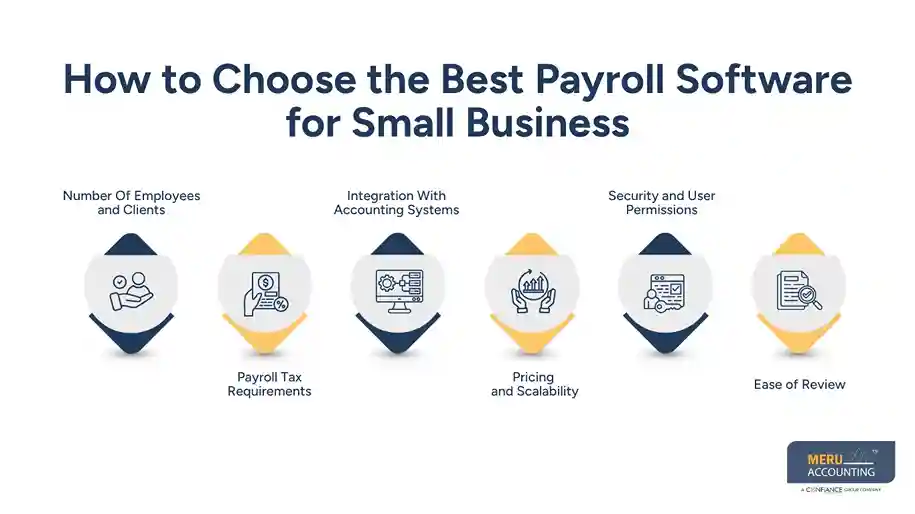
Pricing and Scalability
Check more than the base price. Look at worker fees, tax services, time tools, and HR add-ons.
The total cost should remain practical as staff numbers grow, especially when extra features or service fees are added.
Security and User Permissions
Payroll data needs care. Check who can run payroll, who can approve it, who can edit worker data, and who can see reports.
The best payroll software for small business should give clear access rules. Payroll management software used by an accounting firm needs this even more.
Ease of Review
Run a sample pay cycle before buying. Can staff spot a wrong pay rate? Can they find the tax report? Can they trace the payroll entry to the GL?
If not, it may not be the best payroll software for small business, even if the tool has many features.
optional anymore
on running the business
Pros And Cons Of Using Payroll Software For Small Business
Pros
Less Repeat Work
The best payroll software for small business can cut repeat entry when payroll links with time and accounting tools. Staff can spend less time typing the same data into more than one system.
Better Payroll Records
Pay runs, tax forms, and reports can stay in one place. Payroll management software can make it easier to find a past record when a client asks a question.
Easier Client Review
For an accounting firm, payroll management software can give staff one place to run, check, and report on client payroll.
Cons
Cost Can Rise
More workers and more tools can raise the bill. The best payroll software for small business should be judged by total cost, not only its entry price.
Bad Data Still Causes Bad Pay
Software can process a wrong pay rate just as fast as a right one. Payroll management software still needs good source data and a human check.
More Features Can Mean More Work
A small client may not need a large HR platform. The best payroll software for small business should fit the work instead of adding tools that no one uses.
Meru Accounting’s Multi-Client Payroll Services
Payroll Data Check
We can review wage, tax, deduction, and benefit data before it reaches the books. This can also include a check for large changes from the last pay run.
Payroll Reconciliation
Meru Accounting can match payroll reports with the General Ledger and review payroll tax and liability balances. This gives the team a clear link between payroll and book data.
Multi-Client Payroll Review
Each client needs its own review path. Our team can work with client-level payroll data and keep the checks tied to the needs of each business.
Payroll Reports
We can review wage, tax, benefit, and liability reports as part of month-end work. This can flag gaps before they affect the final books.
Accounting Software Work
The best payroll software for small business still needs a sound book process. Meru Accounting can pair payroll review with bookkeeping, account checks, and month-end work.
Client-Focused Process
Every client has its own pay rules, staff, tax needs, and book setup. We c
Our Expert Perspective
Choosing payroll software should start with the actual work, not just the feature list. Map the process from employee data and paychecks to tax records and the final General Ledger entry, then test a sample pay run to see how well the system fits that flow. Even with automation, keep a human check for new workers, unusual pay changes, tax balances, and GL entries, especially when one accounting team manages payroll for several clients.
Key Takeaways
- The best payroll software for small business should fit staff size, pay type, tax needs, and the accounting system.
- QuickBooks Payroll can fit firms that already use QuickBooks.
- Gusto can suit small firms that want payroll with worker and HR tools.
- ADP RUN and Paychex Flex can fit clients with wider payroll needs.
- Rippling can suit firms that want payroll tied to HR and other business tools.
- OnPay is worth checking for small firms and accounting teams with many clients.
- Multi-client payroll needs clear access, client separation, reports, and review steps.
- Payroll should be checked against the General Ledger after each pay cycle.
- Payroll management software should make the payroll-to-book flow easy to trace.
FAQs
The best payroll software for small business depends on employee count, tax needs, accounting integrations, budget, and payroll features.
Small-business payroll software should offer payroll processing, tax calculations, payroll reports, accounting integration, employee access, and secure user controls.
The best payroll software for accounting firms should provide multi-client access, separate client data, payroll reports, accounting links, and clear review workflows.
Yes, many payroll platforms can connect with accounting systems to transfer payroll data and reduce duplicate data entry.
Payroll software can organize separate client accounts, payroll records, user access, reports, and payroll-to-General-Ledger checks in one workflow.
optional anymore
on running the business