Cloud based inventory management lets businesses track stock, sales, purchases, and product costs from one online system. It records stock changes as orders come in, goods arrive, or customers return items. When linked with accounting software, it also keeps stock records and financial data in line.
For small firms, online sellers, and large warehouses, the right system can cut manual work and reduce stock errors. This guide reviews the best tools, key features, accounting links, and costs to help you choose a system that fits your business.
What You Will Learn From This Blog
- How cloud based inventory management works and why it matters.
- Which inventory tools suit small firms, online sellers, makers, and wholesalers.
- How inventory records connect with QuickBooks, Xero, Zoho Books, Tally, and NetSuite.
- Which features, costs, and risks to check before you buy.
- How to choose a system that fits your stock needs and budget.
What is Cloud Based Inventory Management and How Does It Work?
Cloud based inventory management uses online software to track goods, orders, purchases, and stock levels in one central system. Staff can access updated records from approved devices without relying on a single office computer.
When a customer places an order, the system adjusts stock based on the order status and set rules, while new stock receipts and customer returns update the available quantity. Shared records give sales, purchasing, and warehouse teams a clear view of stock across locations, reducing the risk of selling items that are no longer available.
Cloud based inventory management also links stock activity with accounting records, reports, and alerts. Depending on the software and setup, sales invoices, supplier bills, tax details, and stock costs can sync with accounting systems.
Managers can track stock value, identify fast-moving products, review pending purchase orders, and set low-stock alerts to plan new orders on time. These features provide a clearer view of stock movement and business costs while reducing manual data entry and errors.
Key Features to Look for in Cloud Inventory Management Software
The best cloud inventory management software should match your stock process, sales channels, and accounting needs.
Real-Time Tracking Across Sales Channels
Look for stock updates across your website, shop, and online marketplaces through your cloud based inventory management system. Check how the system handles cancelled orders, refunds, and items held for open orders.
Accounting Software Integrations
Check for links with QuickBooks, Xero, Zoho Books, Tally, or NetSuite, based on your current accounts. Confirm which records sync and whether the link is built in or needs an extra app.
Multi-Warehouse Stock Control
Choose a tool that tracks stock by site, shelf, or bin if you run more than one warehouse. Stock transfers should show both the sending and receiving locations.
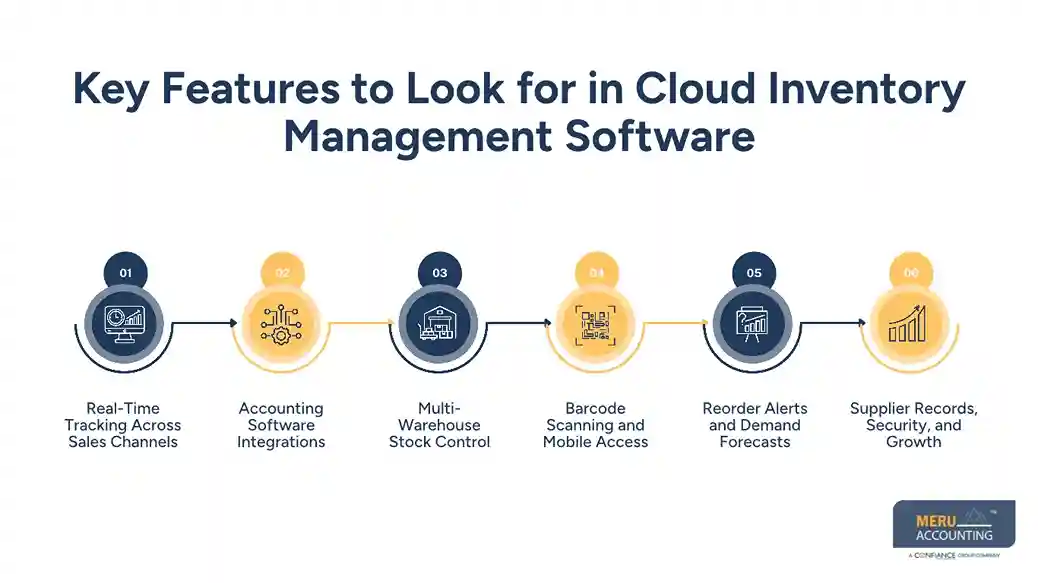
Barcode Scanning and Mobile Access
Barcode scans can speed up stock counts, goods receipt, and order picking. Mobile access in cloud based inventory management lets staff check items on the shop floor or in the warehouse.
Reorder Alerts and Demand Forecasts
Low-stock alerts flag items that may need a new order. Forecast tools use past sales and other data to estimate demand, but staff should review unusual trends before buying more goods.
Supplier Records, Security, and Growth
The system should store supplier details, purchase costs, due dates, and audit logs. Check user access rules, backups, uptime, and API options before you commit.
Best Cloud Based Inventory Management Software for Real-Time Tracking and Accounting Integration
The best cloud based inventory management tool depends on your stock volume, sales channels, warehouse needs, and accounting system. Some tools suit small businesses with basic stock needs, while others offer advanced features for manufacturers, wholesalers, and large firms. Before choosing, compare stock updates, accounting links, order limits, reporting features, and total costs to find the right fit for your business.
Zoho Inventory
Zoho Inventory suits small businesses, online sellers, and growing firms that need stock control and order tracking. It offers links with Zoho Books and other business apps, with additional accounting integrations available based on the setup.
Businesses can track stock across locations, manage purchase orders, and monitor sales orders from one system. Check plan limits, regional features, and integration terms before buying.
Cin7 Core
Cin7 Core suits businesses that sell through several channels or need stock, purchasing, and production tools in one system. It offers features for order management, warehouse control, supplier records, and stock planning.
Its accounting links include QuickBooks Online and Xero, allowing businesses to connect stock activity with financial records. Review current pricing, order limits, and the features included in each plan before making a decision.
NetSuite
NetSuite suits larger businesses that need inventory management alongside accounting, purchasing, sales, and other business processes. It provides stock visibility across locations and can connect inventory activity with financial records within its wider business system. Companies with complex operations should review its reporting, user access, implementation needs, and total cost before choosing it.
Fishbowl
Fishbowl is worth considering for manufacturers, distributors, and businesses that need detailed warehouse stock control. Its features can include barcode scanning, purchase order tracking, stock transfers, and production management, depending on the product and plan.
Businesses using QuickBooks should check the exact version and integration options to confirm how stock values, sales, and other records move into their accounts.
Odoo Inventory
Odoo Inventory suits businesses that want inventory tools within a wider set of business applications. It offers stock tracking, warehouse transfers, barcode features, purchase management, and automated stock rules.
When used with Odoo Accounting, inventory activity can connect with financial records within the same system. Businesses should check their hosting plan, required apps, and configuration needs before choosing this option.
inFlow Inventory
inFlow Inventory suits small and midsize businesses looking for cloud based inventory management to track products, purchase orders, sales orders, and warehouse stock. It offers barcode features and stock management tools for businesses that handle physical goods.
Accounting integration options depend on the plan and connected apps, so check whether your chosen setup can sync with QuickBooks Online or other accounting tools.
Katana
Katana is worth reviewing for manufacturers that need to track raw materials, production orders, and finished goods. It gives teams a view of stock availability and production needs, helping them plan work based on available materials.
Businesses should review their current accounting integrations, including supported QuickBooks or Xero connections, and confirm whether the required features are part of their chosen plan.
Ordoro
Ordoro suits ecommerce businesses that manage orders across multiple sales channels. Its tools focus on inventory, shipping, supplier orders, and order fulfilment, depending on the plan.
Businesses selling through several online stores should check how stock changes sync across channels and whether the software connects with their accounting system through a native link or a third-party app.
Sortly
Sortly is useful for small teams that need a simple way to track items, equipment, supplies, and stock using visual records and QR or barcode features. It can suit firms that need to know where items are stored and when stock changes.
Since its core focus is item tracking, businesses that need detailed accounting links or cost-of-goods-sold records should check whether extra tools are required.
Unleashed
Unleashed suits product-based businesses, wholesalers, and manufacturers that need cloud based inventory management with detailed stock control. Its features include inventory tracking, purchasing, sales order management, and stock reporting.
Accounting links may connect inventory activity with financial systems such as Xero or other supported products. Check the current integration list, pricing, and reporting features to confirm that the system fits your workflow.
How Cloud Inventory Management Software Integrates With Accounting Systems
Cloud inventory management software can pass sales and stock data into accounting software, cutting the need to enter the same details twice. The right setup can keep stock value, sales, and cost of goods sold more consistent.
Sales and Invoice Sync
A cloud based inventory management system can send invoice details, customer information, and tax data to the accounting system when an order is billed. Check whether the sync starts at order, shipment, or invoice stage.
Stock Value and Cost of Goods Sold
Stock value is the cost of goods still held, while cost of goods sold records the cost of items sold. Both systems must use matching stock valuation rules and clear posting dates.
Bills and Purchase Records
A cloud based inventory management system should follow a clear process for recording supplier bills and goods receipts. If a bill arrives before the goods, staff need a clear rule to prevent stock or cost records from being posted twice.
Tax and Currency Rules
Indian firms should check GST rates, tax codes, invoice fields, and e-invoice needs where relevant. Firms that trade across borders should also test exchange rates and the treatment of shipping and import costs.
Error Checks and Reconciliation
Run test orders, returns, credit notes, and stock changes before launch. Compare the inventory and accounting records after each test in your cloud based inventory management setup, and establish a clear process for fixing failed or duplicate syncs.
Best Cloud Inventory Management Software: Quick Comparison Table
Tool | Best for | Starting price | Accounting links | Real-time sync |
Zoho Inventory | Small firms and online sellers | Free plan available | Zoho Books, QuickBooks Online, Xero options | Confirm sync scope |
Cin7 Core | Multichannel stock and production | US$349/month | QuickBooks Online, Xero | Confirm sync scope |
NetSuite | Large firms | Custom quote | NetSuite financials | Depends on setup |
Fishbowl | Warehouse and manufacturing | Confirm current quote | Check version and connector | Confirm with vendor |
Odoo Inventory | Firms using a wider app suite | Depends on plan | Odoo Accounting; other links may need setup | Depends on apps and setup |
Prices and trial terms can change. Cin7’s public pricing lists US dollar prices before taxes. Zoho’s plans and features can vary by region, so confirm local pricing, currency, order limits, and integration terms before you compare costs.
Accounting Software Integration: What to Check Before You Buy
Native vs. Third-Party Links
When choosing cloud based inventory management, check whether a native link connects your inventory and accounting systems or whether tools such as Zapier or a custom API are required.
Sync Timing and Data Flow
Find out whether updates occur at once, every few minutes, or in batches. Check whether changes move both ways or only from inventory to accounting.
Taxes, Currency, and Landed Costs
Test tax codes, foreign currency, freight, duties, and other costs that form part of stock value. A poor setup can leave stock reports and financial records out of line.
Common Sync Errors
Duplicate invoices, missing items, wrong tax codes, and failed updates can cause trouble. Use a test account, review error logs, and assign one owner to each system.
Data Access and Audit Trails
Limit access by role and keep a record of key stock changes. Ask about backups, data export, service status, and the steps to take if a link stops working.
Cloud Inventory Management Software Pricing Breakdown
Per-User and Flat-Fee Plans
Pricing for cloud based inventory management varies by user count, monthly plan limits, and the features included. Compare the cost at your expected team size, not just the entry price.
SKU and Order Limits
A low-cost plan may cap product codes, monthly orders, or warehouse sites. Check what an upgrade will cost as your business grows.
Setup and Add-On Fees
Training, data transfer, API use, extra sales channels, and custom reports may add to the bill. Ask for the full first-year cost in writing.
Free Plans and Paid Plans
A free plan can suit a small firm with simple stock needs. A paid plan may be worth the cost when it cuts manual work or prevents costly stock errors.
Return on Investment
Estimate time saved, fewer stock mistakes, and fewer lost sales due to stockouts. Compare these gains with the full software cost before you sign up.
How we Tested and Ranked the Best Cloud Inventory Management Software
A fair review of cloud based inventory management software should use clear criteria and verifiable product information. This guide draws on public product details and vendor pages; it does not claim hands-on testing of every tool.
Evaluation Criteria and Scoring
When evaluating cloud based inventory management tools, compare stock control, accounting links, warehouse features, ease of use, scalability, and total cost. Score each area based on how well it fits your business needs.
Product Demos and User Reviews
Review vendor demos and recent feedback on G2, Capterra, and Trustpilot. Check the date, business size, and use case before relying on a review.
Author Expertise and Update Date
An editor with inventory and accounting knowledge should check product claims, sync rules, and pricing.
Testing and Affiliate Disclosure
No direct test of every product is claimed in this guide. Any paid placement or affiliate link should be disclosed clearly if one applies.
Why Choose Meru Accounting for Inventory and Accounting Coordination?
Meru Accounting provides accounting and bookkeeping services for businesses that need clear financial records alongside day-to-day stock activity. Our team of certified experts can review how inventory data flows into the books and where checks are needed.
Review of Accounting Records
Meru Accounting can review stock-related entries, supplier bills, sales records, and cost of goods sold to flag gaps that need attention.
Accounting System Coordination
Our team can assess how cloud based inventory management records fit with tools such as QuickBooks, Xero, and Zoho Books, based on the systems your business uses.
Reconciliation and Reporting
Regular checks can flag differences between stock reports and accounting records. Clear reports give owners a better view of stock value and business costs.
A Process That Fits Your Business
The right review begins with your stock flow, order volume, and reporting needs. Meru Accounting provides services based on the agreed scope, with clear tasks and responsibilities.
Our Expert Perspective
Cloud based inventory management works best when stock rules and accounting rules match. Before you buy, test a full order from purchase to sale, return, and final posting in the books. A low monthly price means little if staff must fix errors by hand each week.
Key Takeaways
- Choose cloud based inventory management based on your stock flow, order volume, and number of sites.
- Check accounting links before moving live records.
- Test returns, tax rules, stock value, and cost of goods sold.
- Review user limits, add-on fees, and data access terms.
- Ask for a demo of the cloud based inventory management software using real examples from your business.
- Check stock and accounting records on a set schedule after launch.
FAQs
Zoho Inventory suits small businesses, Cin7 Core suits multichannel sellers, and NetSuite is worth considering for larger firms with complex stock needs.
Cin7 Core integrates with QuickBooks Online and Xero, while Zoho Inventory also offers accounting links that should be checked before purchase.
Zoho Inventory is a useful option for small businesses that need stock tracking, order management, and accounting links within their budget.
Indian businesses should check Zoho Inventory, Odoo, and other suitable tools for GST records, tax settings, invoice needs, and accounting integration.
Cloud inventory management software may offer free plans, monthly subscriptions, or custom pricing based on users, order limits, features, and integrations.