A tax bill rises by 18% for one office building, yet the other properties in the same portfolio show little change. Is the increase due to a higher assessed value, a new tax rate, or an error in the bill? Without clear records, finding the answer can take hours. Commercial real estate tax software gives property owners a way to track these changes, manage appeal dates, and connect tax records with accounting data.
However, not every tool covers the same tasks. Some focus on bills and assessments, while others offer appeal workflows, portfolio reports, and links to financial systems.
This blog compares the features that matter, explains what to check before buying, and shows how to prepare tax records for a CPA.
What You Will Learn From This Blog
- Which features matter when comparing commercial real estate tax software.
- How to review tax appeal records and filing dates.
- How accounting links and CPA handoffs can reduce gaps in records.
- When Tax Outsourcing for Commercial Real Estate may fit your team’s needs.
- How to measure costs, task time, and record quality after setup.
Introduction to Commercial Real Estate Tax Software
Commercial real estate tax software stores property details, parcel numbers, tax notices, bills, payments, and appeal records. Depending on the product, it may also track forecasts, exemptions, and data sent to accounting or enterprise resource planning (ERP) tools.
For example, a firm with 25 retail sites may receive notices from several local authorities. Commercial property tax software can show each notice, amount, due date, and task owner in one view. Staff can then find open items without searching through email and separate spreadsheets.
The tool does not replace tax advice or local rules. Owners must still check values, confirm deadlines, and review evidence before a filing.
Key Features to Compare in Commercial Real Estate Tax Software
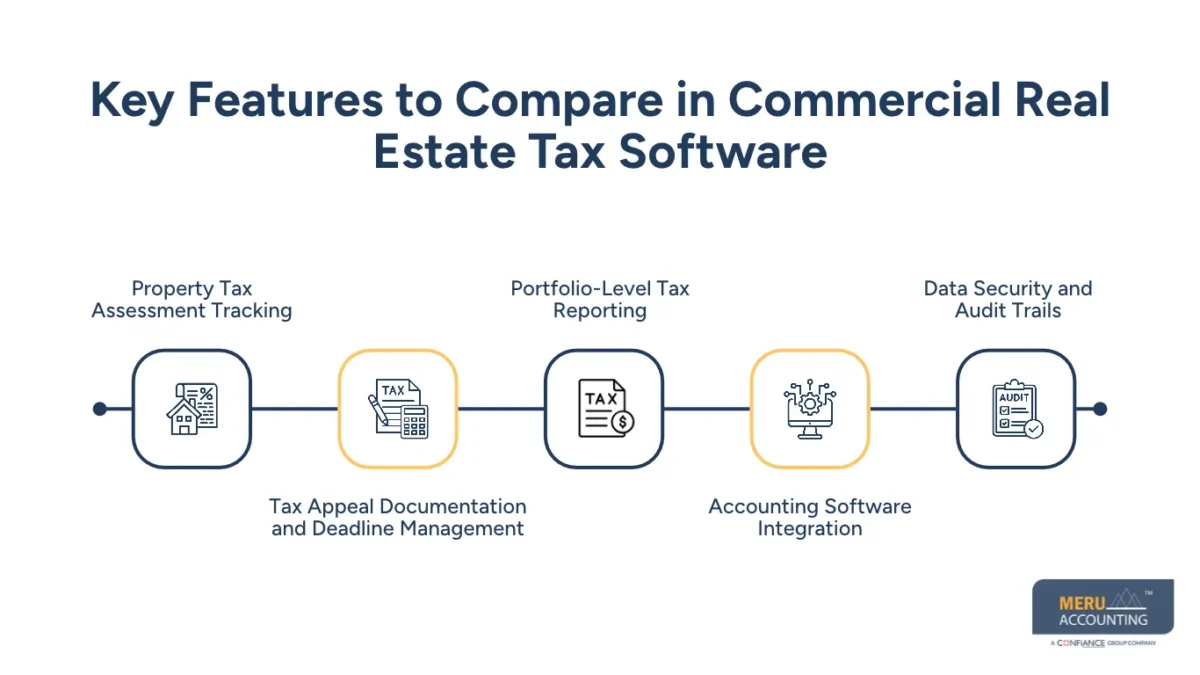
Property Tax Assessment Tracking
Look for a record for each property or parcel. It should show the assessed value, tax year, authority, tax rate where available, and prior changes. This history makes it easier to spot a sharp increase and check it against past years.
Tax Appeal Documentation and Deadline Management
Choose a tool that stores notices, evidence, filing dates, case status, and decisions. Alerts are useful, but staff should verify dates with the relevant tax authority or a qualified local adviser. A missed deadline can limit appeal options.
Portfolio-Level Tax Reporting
Reports should group tax costs by property, region, legal entity, and year. Look for budget-versus-actual views and flags for large changes. These reports can inform cash planning and help staff find bills that need review.
Accounting Software Integration
Check whether the product connects with your accounting platform or offers reliable exports. Useful fields may include property IDs, tax accruals, payment status, cost codes, and journal data. Test the flow before purchase; a summary-only link may not meet property-level reporting needs.
Data Security and Audit Trails
Review user access, encryption, backup plans, document history, and export controls. An audit trail should show who changed a record, what changed, and when. Ask how data is stored, recovered, and removed when an employee leaves.
Best Commercial Real Estate Tax Software Compared
No product suits every owner. Compare commercial real estate tax software features, setup needs, and service terms instead of relying on a vendor’s broad claims. The examples below reflect vendor-published descriptions, not an independent performance ranking.
Software Features and Core Capabilities
Avalara Property Tax publishes features for assessment and appeal tracking, document management, tax bill tracking, and portfolio reporting. It may be worth reviewing when teams want central records for property tax tasks.
CSC PTMS describes features for property and parcel records, appeal workflows, tax forecasts, accruals, and links with accounts payable and receivable systems. It may suit firms with detailed asset and tax reporting needs. Confirm current functions with each vendor before making a choice.
Pricing Models and Portfolio Scalability
When evaluating commercial real estate tax software, ask whether pricing depends on property count, users, jurisdictions, modules, or transaction volume. Include setup, data migration, training, support, and renewal fees in the estimate. A low starting price may not show the full cost.
Integration Options and Reporting Tools
Confirm whether the product offers a direct connection, an application programming interface (API), or file exports. Ask which fields move between systems and how errors appear. Test property IDs, bills, payments, and journal entries before signing a contract.
Best-Fit Software by Property Portfolio Type
- Small portfolios may manage a few properties with a controlled spreadsheet or a basic tool.
- Mid-size portfolios may need shared workflows for notices, payments, and open appeals.
- Large portfolios may need detailed reports, user controls, and links to an ERP system.
The best commercial real estate tax software is the one your team can use consistently and check with confidence. Compare each product against the same list of tasks before making a final choice.
Commercial Property Tax Appeals: Software Features That Matter
An appeal starts with a review of the assessment notice. Compare the assessed value with property facts, past assessments, and suitable market evidence where relevant. Commercial real estate tax software should keep these records linked to the right property and tax year.
Evidence Storage
Store assessment notices, property details, photos, valuation reports, and other records in one case folder. Use clear file names so reviewers can find each item quickly.
Case Status and Ownership
Give every case a named owner, status, next step, and due date. A shared view makes it easier for property managers, finance staff, and outside advisers to see what remains open.
Review of Possible Tax Savings
Record the original assessment, requested change, appeal cost, and final decision. Compare the outcome with the cost of the case, but do not assume every appeal will reduce tax.
Deadline Checks
Dates vary by location and notice type. Use software alerts as reminders, then confirm the actual deadline with the tax authority or a qualified local adviser. Commercial real estate tax software should record the verified date and the person responsible for the next step.
optional anymore
on running the business
Accounting Integration for Commercial Real Estate Tax Management
Tax records should match the accounting records. When a bill arrives, staff need to confirm the property, amount, period, payment date, and ledger account. Commercial real estate tax software can keep tax details organized, while accounting systems record the financial entries.
Tax Accruals and Budgets
Under the company’s accounting policy, finance staff may use expected tax costs to plan accruals. When the final bill arrives, compare the estimate with the amount due and record any needed adjustment.
Payment and Ledger Checks
Match bills with payment records and bank entries. Review duplicate bills, missing payments, and differences between the tax system and the general ledger.
Property-Level Cost Codes
Use consistent property IDs and cost codes across tax and accounting tools. This makes it easier to report costs by building, owner, or legal entity.
Monthly and Year-End Reports
Prepare a report showing billed tax, payments, outstanding amounts, and estimated liabilities. Review large changes before finalizing financial records or sending records to a CPA.
The IRS explains that business records should clearly show income and expenses, with supporting documents backing up accounting entries.
CPA Handoff: Preparing Accurate Tax Records
A CPA needs clear records, not just access to a dashboard. Commercial real estate tax software should make it easier to export a full record set, but staff must check that files are complete and readable.
Property and Ownership Details
Provide property addresses, parcel numbers, legal entity names, acquisition dates, and ownership changes for the period under review.
Tax Bills and Payment Proof
Include assessment notices, bills, receipts, payment confirmations, and unpaid amounts recorded in commercial real estate tax software. Mark disputed bills so the CPA can separate open cases from settled items.
Appeal History
Share appeal forms, evidence, authority decisions, and revised assessments. Include dates and past outcomes where relevant.
Reconciled Accounting Data
Provide ledger balances, tax expense, payments, accruals, and differences that still need review. Explain large changes rather than leaving the CPA to guess.
Secure File Transfer
Use an approved file-sharing method with access controls to transfer records from commercial real estate tax software securely. Agree on file names, formats, and delivery dates, and retain a copy of the final handoff.
A complete handoff gives the CPA a clear record of what was billed, paid, disputed, and recorded. Tax Outsourcing for Commercial Real Estate can also cover agreed record preparation tasks before the CPA begins the review.
When to Consider Tax Outsourcing for Commercial Real Estate
Tax Outsourcing for Commercial Real Estate may suit owners who manage several properties, work across many tax areas, or lack staff for routine records and deadlines. It may also fit a large acquisition, year-end close, or period with many open appeals.
Growing Property Portfolios
As a portfolio grows, staff may face more bills, records, and local deadlines that commercial real estate tax software can track. Tax Outsourcing for Commercial Real Estate can assign routine tracking and document tasks to a specialist team under agreed procedures.
Limited In-House Capacity
A small finance team may struggle to review notices while managing payments, reports, and monthly close tasks. Tax Outsourcing for Commercial Real Estate can cover defined tasks while managers retain oversight.
Complex Records and Open Appeals
Outside staff may organize source files, track case status, and prepare evidence packs for review. Tax Outsourcing for Commercial Real Estate can cover record preparation, but the owner should confirm who checks local rules and who may file an appeal.
Clear Scope and Accountability
Before choosing Tax Outsourcing for Commercial Real Estate, set the scope, response times, access rights, review steps, and reports in writing. Confirm who checks local rules and who approves payments or appeal submissions.
Outsourcing does not remove every legal duty or guarantee lower tax bills. Owners remain responsible for reviewing the work and meeting applicable requirements. Tax Outsourcing for Commercial Real Estate should have clear service limits, review steps, and named owners for each task.
Measuring Software Performance and Tax Management Efficiency
Measure commercial real estate tax software performance with clear figures rather than relying on claims about time saved or tax reduced. Review the same measures each month or quarter to see whether the process meets your needs.
Time Spent on Tax Tasks
Track hours spent entering bills, checking records, preparing appeals, and building reports. Compare the figures before and after setup to see where staff time has changed.
Error and Rework Rates
Review commercial real estate tax software for duplicate entries, missing documents, wrong property codes, and changes made after review. A lower error rate may show that staff follows a more consistent process.
Appeal Outcomes
Record appeals filed, cases closed, final value changes, and fees paid. Compare similar properties where possible, while noting that each case has its own facts and rules.
Deadline Compliance
Measure the share of bills, payments, and appeals handled by their due dates. Review each missed date to find whether the cause was a weak process, missing data, or unclear ownership.
Total Cost of Ownership
Include software fees, staff time, training, data migration, and outside service costs. Compare these costs with measured gains in time, record quality, and tax review. When you assess commercial real estate tax software, include the cost of keeping data current and training new staff.
Meru Accounting’s Services for Commercial Real Estate Tax Management
Meru Accounting provides accounting and bookkeeping services for real estate firms that need clear financial records and regular reports. Our team records transactions, reconciles accounts, reviews balances, and prepares reports based on client records and agreed service terms.
Property Bookkeeping and Reconciliation
Our team records property income and expenses and reconciles bank and ledger balances. Clear records give owners a better view of property costs and open items.
Tax Expense Records
We organize accounting records for property tax expenses, payments, and related entries based on the documents provided. These records can be used during internal reviews and CPA handoffs.
Accounts Payable and Payment Records
Our accounts payable services cover invoice entry, bill review, payment tracking, and account reconciliation. The client retains payment approval and release under the agreed workflow.
Financial Reporting
We prepare reports showing income, expenses, account balances, and other agreed measures from commercial real estate tax software and accounting records. These reports give property managers and finance teams a clear view of recorded figures.
Coordination With Your Tax Team
Our team can prepare accounting records and share agreed reports with the client’s CPA or tax adviser. Tax filings, appeal decisions, and legal advice remain subject to the agreed scope and required qualifications.
Tax software and accounting services have different roles. Commercial real estate tax software tracks tax data and case activity, while accounting services keep financial records ready for review. Tax Outsourcing for Commercial Real Estate may fit firms that need routine bookkeeping and record preparation under a defined service plan.
Our Expert Perspective
The best system is not always the one with the most features. It is the one that keeps property records accurate, assigns clear ownership, and gives the CPA the right documents at the right time.
Before buying, test the tool with one property, one tax bill, and one sample appeal file. Check whether data reaches the accounting system in the right format and whether staff can find source records without extra work. A small test can reveal gaps before you move the full portfolio.
Key Takeaways
- Choose commercial real estate tax software based on portfolio size, appeal needs, and accounting setup.
- Check tax notices, appeal dates, case records, and reporting tools before you buy.
- Test accounting links with sample data to find errors before full use.
- Keep tax bills, payment proof, appeal records, and ledger data ready for the CPA.
- Consider Tax Outsourcing for Commercial Real Estate when staff capacity or record volume becomes difficult to manage.
- Measure results through task time, error rates, deadline compliance, appeal outcomes, and total cost.
- Ask a qualified tax adviser to confirm local rules, appeal dates, and tax decisions.
FAQs
The best option depends on appeal tracking, document storage, deadline alerts, reporting needs, and portfolio size. Compare vendor features before choosing a tool.
It can store assessment notices, track appeal deadlines, organize evidence, and record case status. Staff must still verify local filing rules and review each case.
Compare products such as Avalara Property Tax and CSC PTMS for their published integration features. Confirm compatibility with your accounting platform, required data fields, and reporting needs before purchase.
Prepare property details, tax bills, assessment notices, payment records, appeal documents, ledger entries, and reconciliations. The CPA may request more records based on the tax work involved.
Property owners may consider Tax Outsourcing for Commercial Real Estate when they manage many properties, face multiple tax deadlines, or lack staff for tax records and routine accounting tasks.
optional anymore
on running the business