A project may look profitable on paper until a missing supplier bill or an incorrect labor cost changes the numbers. Such errors can occur when contractors move financial records from an old system to a new one. Construction cost accounting software can track project spending, invoices, payroll, and budgets, but its reports are only as reliable as the data entered into it.
The real task is not simply moving files. It is making sure every cost, payment, and project record reaches the right place. With careful checks, construction firms can reduce migration errors, protect financial records, and use software for construction cost management with greater confidence.
What You Will Learn From This Blog
- Why accurate data matters when moving to a new accounting system.
- Which migration errors can affect project costs and financial reports.
- How to prepare, test, and check records before launch.
- How to verify balances after moving to construction cost accounting software.
- Which practices make software for construction cost management easier to use.
Why Accurate Data Migration Matters in Construction Accounting
Imagine a contractor reviewing a project report that shows a profit, only to find that two supplier bills never reached the new system. Such gaps can affect bids, budgets, and payment plans. Accurate data gives construction cost accounting software and software for construction cost management a sound base for reporting.
Reliable Project Cost Reports
Every labor hour, material purchase, and subcontractor charge affects the cost of a job. Correct records let managers see where money goes and compare actual spending with the project budget.
Correct Opening Balances
The new system must start with figures that match the approved closing records. Wrong opening balances can make later reports unreliable, even when new transactions are entered correctly.
Clear Cash Flow Records
A missed invoice or wrong payment date can change the view of available cash. Correct records show which bills are due and which client payments remain outstanding.
Better Budget Control
When costs are assigned to the right jobs, managers can spot overspending sooner. They can review material use, labor hours, or subcontractor charges before a small gap grows.
Sound Financial Decisions
Owners use cost reports to set bids, plan payments, and review project results. Reliable construction cost accounting software records give them better facts for these choices.
optional anymore
on running the business
Common Data Migration Errors in Construction Accounting Systems
Many migration problems begin with small gaps that go unnoticed during setup. A missing invoice or a wrong project code can affect several reports, so teams should know what to check before launch.
Incomplete Transfer of Financial and Project Data
Some invoices, change orders, or payment records may not transfer when implementing new construction cost accounting software. Compare record counts and totals to find missing items before staff begin daily work.
Incorrect Job Costing and Cost Code Mapping
A material charge assigned to the wrong job can make one project look too costly, and another look more profitable. Check that each old cost code matches the correct new field.
Missing Vendor, Customer, and Subcontractor Records
Missing tax details, contact data, or payment terms can delay payments and collections. Duplicate records can also cause staff to enter the same bill twice.
Errors in Payroll, Accounts Payable, and Accounts Receivable Data
Wrong wage details or unpaid invoice balances can affect cash flow and payroll checks. Confirm payment status, employee details, and outstanding amounts before approving the transfer to construction cost accounting software.
Inaccurate Work-in-Progress (WIP) and Retainage Balances
WIP reports show costs and revenue linked to unfinished work under the firm’s accounting method. Incorrect project values or retainage figures can give managers a false view of job performance.
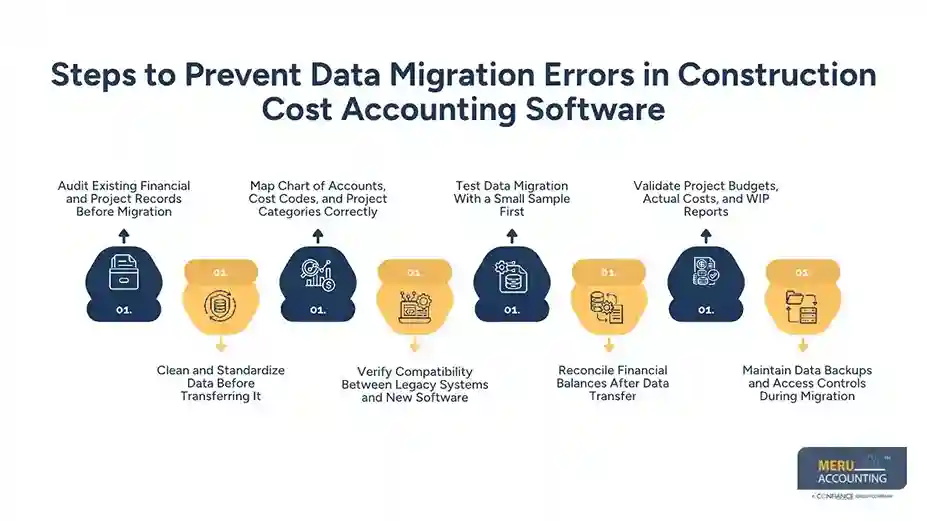
Steps to Prevent Data Migration Errors in Construction Cost Accounting Software
A successful transfer starts well before the launch date. The team must know which records to move, how to match them, and who will confirm the results in construction cost accounting software.
Audit Existing Financial and Project Records Before Migration
Review ledger accounts, job cost reports, payroll data, supplier bills, and client invoices. List missing records and open differences, then confirm which data the new system needs.
Clean and Standardize Data Before Transferring It
Remove duplicate entries, correct spelling errors, and use consistent date formats and project IDs. Clean records make matching easier and reduce the chance of carrying old mistakes into construction cost accounting software.
Map Chart of Accounts, Cost Codes, and Project Categories Correctly
Create a mapping sheet that links every old account and cost code to its new field. A material charge must stay linked to the right project and cost type in the new software for construction cost management.
Verify Compatibility Between Legacy Systems and New Software
Check whether the old platform can export data in a format the new system accepts. Review date formats, field limits, tax fields, and links between projects and transactions.
Test Data Migration With a Small Sample First
Move a sample of active jobs, vendor records, and unpaid invoices into a test setup. Compare the results with source records, correct any gaps, and repeat the test before moving everything into construction cost accounting software.
Reconcile Financial Balances After Data Transfer
Compare opening balances with the final approved ledger from the old system. Check bank accounts, accounts payable, accounts receivable, and general ledger totals, then resolve each difference.
Validate Project Budgets, Actual Costs, and WIP Reports
Choose active projects and compare budgets, actual costs, billed revenue, and retainage with source reports. Confirm that project budgets, actual costs, and WIP figures match in the software for construction cost management before approving the migration.
Maintain Data Backups and Access Controls During Migration
Keep a secure copy of source data and limit access to approved staff. Set clear rules for editing and approval, and check that the backup can be restored if the transfer fails.
Best Practices for Implementing Software for Construction Cost Management
Technology alone cannot make a migration successful. Staff need a clear plan, defined roles, and time to learn the new process. These practices make software for construction cost management easier to adopt across projects.
Create a Structured Data Migration Plan
List the records to move into construction cost accounting software, test steps, deadlines, and approval rules. Assign each task to a named person so the team can track progress and address issues before launch.
Assign Clear Responsibilities to Accounting and Project Teams
Accountants should check balances, while project staff should review job codes and budgets. Name one person to approve the final results and track unresolved issues.
Train Employees on New Data Entry and Reporting Processes
Show staff how to enter costs, assign codes, post bills, and run reports. Use examples from daily work so employees can follow the same process across projects.
Schedule Migration During a Low-Activity Period
Choose a period with fewer invoices, payroll changes, and project updates. Set a cut-off date and tell users when the new system becomes the main source of records.
How to Verify Data Accuracy After Implementation
A completed transfer does not prove that every record is correct. A final review should compare source data with the new records and confirm that construction cost accounting software is ready for daily use.
Compare Opening Balances With Previous Accounting Records
Match each opening balance in the software for construction cost management with the final approved ledger. Check debit and credit totals, and confirm that any adjustments have clear notes and approval.
Review Job Cost Reports and Project-Level Transactions
When validating data in the construction cost accounting software, select active and completed jobs, then trace sample costs to invoices, labor entries, and purchase orders. Confirm that each transaction appears under the correct project and cost code.
Check Supplier Balances, Payroll Records, and Outstanding Invoices
Compare supplier statements, payroll totals, and open client invoices with the new records. Check dates, employee details, invoice status, and outstanding amounts.
Resolve Migration Discrepancies Before Going Live
Record each mismatch, find its cause, and assign someone to fix it. Keep evidence of corrections and obtain approval before closing each issue.
Common Data Migration Mistakes to Avoid
Rushing the final steps can undo weeks of preparation. Avoid these common mistakes when moving to construction cost accounting software.
Moving All Records Without Checking Their Quality
Old systems may contain duplicate entries, inactive vendors, and incomplete project details. Review source data first so old errors do not enter the new system.
Ignoring Historical Data Requirements
Moving only current balances may leave teams without details needed to review past costs. Decide how much history to move into the new construction cost accounting software and how older records will be retained.
Skipping User Acceptance Testing
A transfer may look correct in a summary report but fail during daily tasks. Ask accountants and project staff to test common actions before approving the setup.
Failing to Track Changes During Migration
Staff may change records while the transfer is in progress. Set a cut-off time and move valid late entries through a controlled process.
Going Live Before Reconciliation Is Complete
Starting work before key balances are checked can carry errors into new invoices and reports. Delay the launch if major differences remain unresolved.
Benefits of Accurate Data Migration for Construction Cost Control
Correct records do more than keep accounts in order. They give project teams a clearer view of spending and let construction cost accounting software produce reports that reflect actual business activity.
Clearer Project Cost Tracking
Correct job codes show where money goes on each project. Managers can compare actual spending with budgets and investigate unexpected costs early.
Better Cash Flow Planning
Correct invoice and payment records in the software for construction cost management show what the firm owes and what clients still need to pay. This gives owners a clearer view of near-term cash needs.
More Reliable Financial Reports
Balanced ledgers and complete project data allow construction cost accounting software to generate reports that match source records, giving accountants more time to review results.
Fewer Errors in Daily Work
Clean vendor records, correct cost codes, and tested workflows reduce duplicate entries and wrong postings. Software for construction cost management can keep daily processes consistent across projects.
Stronger Control Over Project Budgets
Accurate reports show where labor, materials, and subcontractor charges differ from plan. Project leaders can review the cause and act before costs exceed the approved budget.
Why Choose Meru Accounting for Construction Accounting Services?
Accurate Financial Record Management
We provide bookkeeping services to record project expenses, supplier bills, payments, and income. Our organized records give construction firms a clear base for financial reviews and cost tracking.
Accounts Payable and Receivable Management
Our accounts payable and receivable services maintain supplier balances, unpaid client invoices, and payment records. We keep financial records organized so firms can review outstanding amounts and payment dates.
Payroll and General Ledger Reconciliation
We provide payroll and general ledger reconciliation services to maintain employee payment records and check account balances. Our regular reviews identify differences that need attention.
Financial Reporting for Better Cost Control
Our financial reporting services give business owners a clearer view of income, expenses, and financial results. Construction firms can use these reports alongside construction cost accounting software to review project spending and plan budgets.
Our Expert Perspective
A useful migration check is to pick one active project and trace a cost from its source invoice to the final report. Then compare its budget, actual costs, and open bills with the old system. This simple test can reveal mapping gaps that a total balance check may miss. Construction cost accounting software should not be approved for live work until the team can explain key differences and trace figures back to source records.
Key Takeaways
- Review financial and project records before migrating them to the new construction cost accounting software.
- Remove duplicate entries and standardize account names, dates, and cost codes.
- Test a small sample before transferring all records.
- Match opening balances, vendor accounts, payroll data, and WIP reports with approved records.
- Set clear roles, train staff, and keep secure backups during migration.
- Resolve major differences before relying on the new construction cost accounting software for live project accounting.
FAQs
Review old records, remove duplicates, map cost codes, and test sample data before transferring all records. Reconcile financial balances and resolve errors before using the new system for live work.
Migrate the chart of accounts, project budgets, job costs, vendor records, payroll data, unpaid invoices, and WIP balances. The data set should match the firm’s reporting needs and record retention rules.
Compare opening balances, supplier accounts, payroll records, and project cost reports with approved source records. Trace sample transactions to invoices and other documents, then fix any differences before launch.
Cost code mapping assigns labor, material, equipment, and subcontractor costs to the correct project and cost category. Incorrect mapping can distort job cost reports, hide budget gaps, and affect project decisions.
Choose a period with fewer invoices, payroll changes, and project updates to reduce disruption during migration. Set a cut-off date, back up the data, test the transfer, and verify key balances before going live.
optional anymore
on running the business