Choosing the right accounting software for IT firms is not a small task. IT teams often manage project billing, time tracking, and client reporting at the same time. Because of this, how accounting software options are compared and evaluated can directly impact billing accuracy, cash flow, and reporting quality.
For firms offering IT accounting services, software choice becomes even more important since projects are often complex and multi-layered.
In this blog, we break down how different tools perform for IT-focused finance work, and you will also learn how finance teams can improve billing accuracy and reporting by using the right system.
What You Will Learn From This Blog
- Why IT firms need specialized tools for billing and reporting
- Key features to look for in financial systems
- How comparing accounting software helps in selecting the right tool
- Differences between cloud-based and on-premise systems
- Best tools used by IT finance teams
- Cost breakdown of popular accounting systems
- How billing errors can be reduced in project-based work
- How Meru Accounting supports IT finance operations
Why IT Accounting Services Need Specialized Accounting Software
Project-Based Billing Structure
IT firms often work on hourly, milestone, or fixed-cost projects. Standard tools fail to track this mix properly. This is why IT accounting services need systems that link time logs with billing cycles.
Multi-Client Handling
IT teams often manage multiple clients simultaneously, with each client having different billing requirements. When accounting software solutions are compared, systems with strong client-tracking capabilities tend to perform better.
Complex Cost Tracking
Costs include developers, tools, cloud usage, and support staff. Without a clear system in place, spending gaps can occur. Accurate cost tracking is essential for financial control.
Time Tracking Integration
Time sheets must connect directly to invoices. Manual work creates errors. This is a key reason why accounting software comparison analysis is important for IT firms.
Reporting Accuracy Needs
Clients expect clear updates on project progress and cost usage. Reliable reporting tools help finance teams build trust by showing transparent and accurate project details.
Compliance and Audit Readiness
IT firms working globally must follow tax and audit rules. Good systems help maintain clean records when accounting software solutions are evaluated.
Key Features To Look For In Accounting Software For IT Firms
Project Billing Automation
Automated billing helps reduce mistakes and makes invoice generation faster. It ensures project charges are recorded correctly without extra manual effort. This is especially useful for IT firms managing multiple client projects.
Time Tracking Tools
Built-in tracking systems record work hours in real time. This helps ensure every task is billed fairly and accurately. It also improves visibility into how time is spent across projects.
Multi-Currency Support
IT companies often work with international clients. Currency conversion and global payment handling help maintain accurate financial records across regions. This supports smoother global operations.
Real-Time Reporting
Live dashboards provide instant updates on project performance and expenses. Finance teams can quickly identify issues and take corrective action when needed. It also helps in better decision-making.
Integration With Other Tools
Good systems connect easily with CRM, payroll, and project management tools. This reduces duplicate data entry and improves workflow efficiency across departments.
Data Security Features
Strong security controls protect sensitive financial and client data. Backup systems and restricted access ensure information stays safe and reliable.
Top Factors To Consider When Comparing Accounting Software
Ease Of Use
Simple dashboards make it easier for teams to learn and use the system quickly. A clean layout also reduces training time and helps teams work with fewer errors.
Scalability
As IT firms expand, their systems must handle more projects, users, and data. A scalable solution supports smooth growth without slowing down daily operations.
Customization Options
Every IT firm has its own working style and billing methods. Flexible settings help adjust the system to match different project needs and internal processes.
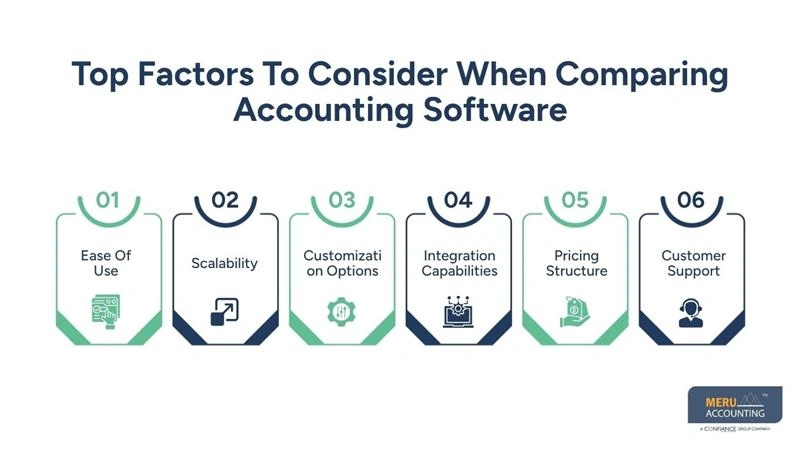
Integration Capabilities
The software must connect with tools like Jira, Trello, and Slack. This supports the workflow of IT accounting services.
Pricing Structure
Clear pricing helps firms understand total costs, including subscriptions and extra features. This allows better financial planning and avoids unexpected expenses.
Customer Support
Quick and reliable support reduces delays when issues arise. Strong assistance ensures teams can continue working without long interruptions.
Comparing Accounting Software: Cloud-Based vs On-Premise Solutions
Factor | Cloud-Based Solutions | On-Premise Solutions |
Accessibility And Remote Work | Cloud systems allow access from anywhere, making it easier for remote teams to work on financial data in real time. | Access is usually limited to office systems unless additional remote setup is arranged. |
Setup And Maintenance | Minimal setup is required, and updates are handled automatically by the provider. This reduces internal workload. | Requires full internal setup, regular updates, and dedicated IT maintenance. |
Cost Differences | Operates on a subscription model with monthly or annual fees, making costs predictable. | Involves higher upfront investment in infrastructure and software licenses. |
Data Control | Data is stored on external servers managed by the provider with strong security protocols. | Full control of data remains within the organization’s own servers. |
Update Frequency | Updates are rolled out automatically, ensuring access to the latest features and fixes. | Updates must be manually installed, which can delay access to new features. |
Scalability Speed | Easily scales as the business grows by adding users or storage quickly. | Scaling requires additional hardware and system upgrades, which take more time. |
Best Accounting Software Options For IT Accounting Services Teams
QuickBooks Online
Simple interface and strong billing features. Works well for small teams. It also supports basic reporting and expense tracking for daily finance work.
Xero
Good for automation and bank syncing. Often included in software reviews for firms. It helps reduce manual entry and improve financial accuracy.
Zoho Books
Affordable and flexible with strong reporting tools. It also offers easy integration with other Zoho applications for smoother workflows.
NetSuite
Suitable for large firms with complex billing needs. It is frequently used in comparison studies. It supports advanced financial management across multiple projects and entities.
FreshBooks
Strong time tracking and invoicing features for small projects. It is especially useful for freelancers and small teams handling hourly billing.
Sage Intacct
Advanced reporting system is used in growing companies. It provides deep financial insights that support better decision-making at scale.
Cost Comparison Of Popular Accounting Software Solutions
Subscription-Based Pricing
Most tools charge monthly fees, varying widely by features and plans. Pricing usually depends on storage, users, and reporting capabilities offered.
User-Based Pricing
Some tools charge per user, affecting scalability for growing teams. Costs increase as more employees require system access and permissions.
Add-On Costs
Extra features like payroll or reporting often require additional payments. These add-ons can significantly increase total software ownership costs.
Setup Fees
On-premise tools require a higher upfront setup investment before usage begins. Installation and configuration may also require technical support or consultants.
Long-Term Value
Cheaper tools may lack advanced features needed for business growth. Higher-value systems often provide better efficiency and reporting accuracy overall.
ROI Consideration
Better tools reduce errors, save time, and improve financial returns. Strong ROI depends on automation, accuracy, and reduced manual work.
How Accounting Software Improves Project Billing Accuracy
Accurate Time Tracking
Every billable hour is recorded accurately for each project task. This helps IT accounting services avoid revenue loss across projects.
Reduced Manual Errors
Automation helps reduce human errors in billing and financial data entry. When accounting software solutions are compared, systems with advanced automation features are found to significantly reduce error rates.
Faster Invoice Creation
Invoices are generated quickly after project updates and approvals are complete. This helps improve cash flow and reduce client payment delays.
Clear Cost Allocation
Costs are assigned correctly to each project for accurate reporting. It also helps IT accounting solutions understand project profitability better.
Real-Time Updates
Project changes reflect instantly in billing records and financial reports. This keeps accounting data aligned with ongoing project activities.
Better Client Transparency
Clients receive clear breakdowns of costs and project billing details. This improves trust in IT accounting solutions and long-term relationships.
Why Choose Meru Accounting?
Meru Accounting provides specialized support for IT firms that face challenges in billing, reporting, and financial control systems. Many companies struggle to choose the right tools after comparing different software options, and we help them make decisions based on real business needs and practical use cases. Our team works closely with global IT finance teams to improve reporting accuracy, reduce billing delays, and build clear financial workflows that support daily operations.
We also support system migration, data cleanup, and project-based reporting setup to ensure smooth financial transitions. With strong experience in IT finance operations, Meru Accounting helps businesses turn software selection decisions into practical improvements that enhance accuracy, efficiency, and overall financial control.
Key Takeaways
- IT firms need tools designed for project billing and reporting
- Accounting software comparison helps identify the right system for each business
- Time tracking and automation are key features for success
- Cloud systems are more flexible for most IT teams
- Cost planning must include hidden charges and add-ons
- Strong systems reduce billing errors and improve cash flow
- Meru Accounting supports IT firms in choosing and managing finance tools
FAQs
It depends on size and needs. Tools like QuickBooks, Xero, and Zoho Books are common choices for IT accounting services teams.
Project billing ensures every hour and task is charged correctly. This helps IT accounting solutions maintain accurate revenue records.
For most IT firms, cloud systems are better due to remote access and lower setup costs.
It automates time tracking and invoice creation, reducing manual mistakes in IT accounting services.
Yes, many tools offer flexible pricing and features that suit small IT accounting solutions teams.