Buying another rental property is exciting, but choosing how to manage its books is rarely part of the plan. Before long, rent payments, repair bills, property taxes, insurance, and loan costs start piling up. Without the right accounting software for landlords, it can be hard to tell how much each property earns after expenses or where your rental income goes each month.
The good news is that you don’t need a complex system to keep your finances in order. You need software that fits the size of your portfolio, tracks each property’s finances, and gives you reports you can actually use. Let’s look at what to consider before choosing one.
What You Will Learn From This Blog
- What landlord accounting software does and how it works.
- Which key features matter when you manage more than one rental property.
- How to compare tools based on cost, reports, ease of use, and data safety.
- How to pick software based on the size of your rental portfolio.
- How to set up your books and track each property with care.
- When outsourced landlord accounting services can help with daily books and reports.
What Is Accounting Software for Landlords?
Accounting software for landlords is a tool that helps rental property owners track money earned and spent on their properties. It brings key records into one system, so you can see rent, costs, bills, and cash flow without sorting through many files or sheets.
Unlike basic accounting tools, landlord-focused software may offer features such as rent tracking, tenant records, property-level reports, and links to rent payment tools. Some tools also let you track repair costs, loan payments, and security deposits.
For example, if you own five rental homes, you may get rent from five tenants on set dates. You may also pay for repairs, insurance, taxes, and other costs for each home. A good system helps you record each entry under the right property. This makes it easier to see which homes earn a profit and which ones have high costs.
Landlords can also use general accounting tools if they let users track income and costs by property. The key is to check if the tool can handle your needs without too much manual work.
optional anymore
on running the business
Essential Features to Look for in Accounting Software for Landlords
Not all tools offer the same level of support. Before you choose one, check the features that can help you keep clean books and make sound choices.
1. Rental Income and Payment Tracking
Your software should let you track rent due, rent paid, late fees, and unpaid balances. This helps you spot missed or late payments before they affect your cash flow.
Look for tools that let you set rent due dates and link each payment to the right tenant and property. Some tools also send rent notices or let tenants pay online.
2. Property-Wise Income and Expense Tracking
This is one of the most useful features for landlords with more than one rental unit. You should be able to view income and costs for each property on its own.
For example, if one home needs roof work while another has no major repair costs, your reports should show that gap. This helps you judge the true return from each property.
3. Expense and Repair Cost Tracking
Rental property costs can include repairs, upkeep, insurance, taxes, utilities, and fees paid to vendors. Your software should let you sort these costs into clear groups.
It should also let you add bills, receipts, and notes to each entry. This gives you a clear record if you need to check a cost or share it with your tax preparer.
4. Security Deposit Records
Security deposits need care. You should not treat them as rental income just because you have the funds. In many cases, they are a liability until they are paid back or used in line with the lease and state law.
Choose a tool that lets you track each deposit by tenant and property. This can help you keep deposit records clear and avoid mixing them with rent income.
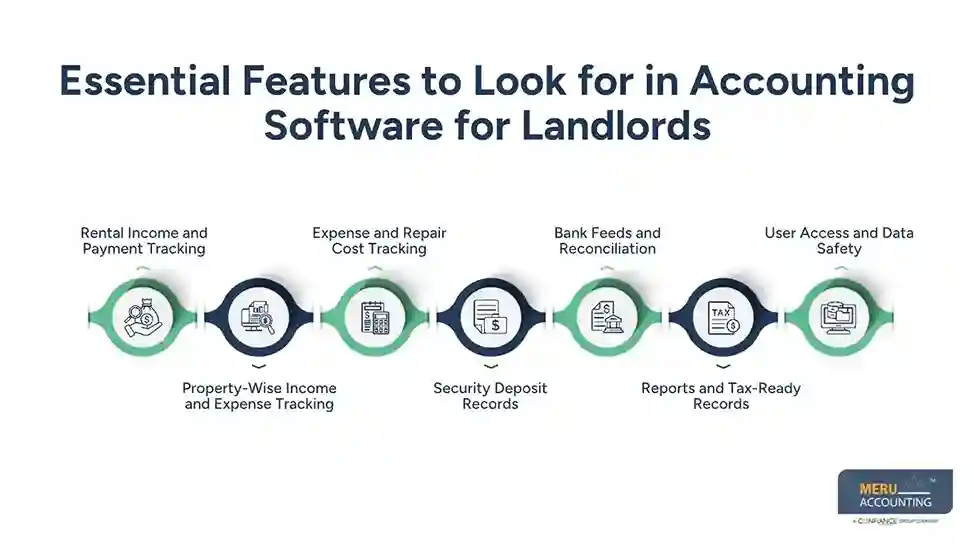
5. Bank Feeds and Reconciliation
Bank feeds can bring in new entries from linked bank accounts. This cuts down on manual data entry and helps you keep your books up to date.
But an imported bank entry does not mean your books are right. You still need to match each entry to the right rent payment, bill, or transfer. Look for tools that make bank reconciliation clear and easy.
6. Reports and Tax-Ready Records
Your software should offer reports such as profit and loss, cash flow, balance sheet, and income by property. These reports help you see how your rental business is doing.
Tax-ready records are also useful. You may need to track repairs, loan interest, property tax, insurance, and other costs. The right tool can keep these records in order for your tax preparer. Tax rules can vary by property type and use, so software reports should not take the place of tax advice.
7. User Access and Data Safety
If a bookkeeper, property manager, or tax pro needs access, you should be able to set clear user roles. Each person should only see or change the data they need.
Check for secure login, data backup, access logs, and clear ways to remove users who no longer work with you. These steps help protect tenant and business records.
How to Compare Accounting Software for Multiple Rental Properties
Once you know which features matter, compare your options in a clear way. Do not pick a tool just because it has the most features. The best choice is the one that fits your work and is easy to use each month.
Ease of Use and Setup
A tool with many features may still be a poor fit if it takes too long to learn. Check how easy it is to add a property, enter rent, sort costs, and view reports.
Try a demo or test account if one is offered. Use a sample month of rent and bills to see how the tool works in real life.
Software Links and Bank Support
Check if the tool works with your bank and the apps you use for rent, bills, and property work. Good links can cut down on data entry and help keep records in sync.
Ask how often bank feeds update and what happens if a link stops working. Also check if you can export data in common file types if you move to a new tool.
Report Quality
A good report should show more than the total income from all your homes. It should let you view each property on its own and compare results across your full portfolio.
Check if you can set date ranges, view unpaid rent, and track costs by type. Clear reports help you spot trends and plan for future repairs.
Price and Extra Fees
Compare the monthly or yearly fee with the features you will use. Some tools charge by the number of units, while others have set plans.
Check for extra costs tied to bank links, online payments, more users, data storage, or report tools. A low base fee may not be the lowest cost once you add what you need.
Data Safety and Support
Your books hold bank data, tenant details, and records of rent and bills. Check the tool’s data safety rules, backup plan, and support options.
Find out if help is offered by phone, email, or live chat. Good support can save time when a bank link fails, or a report does not look right.
How to Choose Accounting Software Based on Your Rental Portfolio Size
The right tool depends on how many units you own, how many entries you record, and how much help you need.
For 2–5 Rental Properties
If you own a few homes, you may not need a high-cost tool with many advanced features. A simple system that tracks rent, costs, deposits, and bank entries may be enough.
Focus on ease of use, clear reports, and a fair price. Make sure you can still view income and costs for each home on its own.
For 6–20 Rental Properties
As your portfolio grows, manual work can take up more time. You may have more tenants, bills, repairs, and bank entries to track.
Look for tools with bank feeds, repeat entries, rent tracking, and property-level reports. User access can also help if you work with a bookkeeper or property manager.
For Large Rental Portfolios
Landlords with many units may need more advanced tools. These can include bulk data entry, custom reports, links to property systems, and role-based access.
At this size, also think about who will manage the books. Software can speed up the work, but it still needs the right setup, review, and upkeep.
How to Set Up Accounting Software for Multiple Rental Properties
Once you have picked your tool, set it up with care. A good setup makes each month easier and helps you avoid errors.
- Add each rental property: Set up a separate record for every home or unit. Add the address, unit number, and key details.
- Set up income and cost groups: Create clear groups for rent, late fees, repairs, insurance, taxes, utilities, and other costs. Use the same groups across all properties where they fit.
- Add tenant and lease details: Record tenant names, rent due dates, lease terms, and deposit amounts. Limit access to private tenant data.
- Link bank accounts: Connect the right bank accounts and check that each feed imports entries as expected. Keep personal and rental funds apart where possible.
- Set up bank reconciliation: Match bank entries to the right rent payments, bills, and transfers. Do not mark an entry as cleared just because it appears in the feed.
- Add bills and receipts: Save proof of repair work, vendor payments, and other costs. Link each record to the right property and cost group.
- Review reports each month: Check rent due, rent paid, unpaid balances, costs, and cash flow. Fix any wrong or missing entries before you close the month.
How Meru Accounting's Outsourced Landlord Accounting Services Can Help
A good accounting system should tell you more than how much rent you collected. It should show the income, operating costs, outstanding bills, and financial performance of each property. Getting that level of detail takes consistent bookkeeping, accurate expense coding, and regular account reviews. That’s where Meru Accounting can help.
Our outsourced landlord accounting services cover the day-to-day accounting work needed to keep rental property records accurate and up to date.
Our services include:
- Rental Income Tracking: Record rent payments, late fees, outstanding balances, and other rental income by property.
- Property-Wise Bookkeeping: Maintain separate income and expense records for each rental unit or property.
- Expense and Vendor Bill Management: Record repair costs, maintenance bills, insurance, utilities, property taxes, and vendor payments under the right accounts.
- Bank and Credit Card Reconciliation: Match transactions with your books and identify missing entries, duplicate charges, and unmatched payments.
- Accounts Payable and Receivable: Track bills due to vendors and rent balances due from tenants.
- Catch-Up and Cleanup Bookkeeping: Organize past transactions, correct account errors, and bring overdue rental books up to date.
- Monthly Financial Reporting: Prepare property-level income statements and other reports to help you review rental income, expenses, and cash flow.
We also work with your existing accounting software. Our team can help set up property tracking, maintain consistent expense categories, review bank feeds, and keep monthly records in order. This means you don’t have to switch tools or manage every accounting task yourself.
With Meru Accounting handling the books, you can spend less time sorting transactions and more time reviewing property performance, planning repairs, and making decisions about your rental portfolio.
Our Expert Insight
One mistake landlords make when choosing accounting software is planning only for the properties they own today. A system that works well for three rental units may become hard to manage when you add more properties, bring in a business partner, or hire a property manager. Changing software later can also mean moving years of financial data, account balances, and transaction records.
We recommend looking beyond the current monthly cost and checking how well a platform can handle portfolio growth. Pay attention to user access, data export options, custom reports, and the ability to track different property owners or entities. These details may not seem important at first, but they can make a real difference as your rental business changes. The best accounting software for landlords should support not just your current portfolio, but the way you plan to run it in the years ahead
Key Takeaways
- Choose accounting software for landlords based on your unit count, work volume, and report needs.
- Look for rent tracking, property-wise reports, cost groups, deposit records, and bank feeds.
- Check price, bank links, data safety, and ease of use before you buy.
- Keep each property’s income and costs clear and easy to review.
- Review bank entries and reports each month to catch errors early.
- Consider outsourced landlord accounting services when your books need more time, care, or expert review.
FAQs
The best option depends on your portfolio and budget. Look for rent tracking, property-level reports, expense management, and bank feeds.
Yes. QuickBooks can track rental income, expenses, bills, and reports. You can use classes or locations to organize records by property.
Prices vary by provider and plan. Some charge a flat monthly fee, while others charge based on the number of properties, users, or features.
Yes. Separate records help you track each property’s income, expenses, and profit. You can use property tracking features or separate accounts, depending on your setup.
onsider outsourcing when you have too many transactions to manage, fall behind on your books, or need accurate monthly reports across multiple properties.
optional anymore
on running the business