A store shows $50,000 in sales. The bank shows only $43,800. The owner checks the numbers again, but nothing seems to match. Where did the missing $6,200 go? In ecommerce, this gap may come from marketplace fees, refunds, chargebacks, tax, payment holds, or timing differences. Ecommerce accounting software can bring these figures together, but only when sales, fees, stock, and payouts are recorded in the right way.
A small error can also spread across many orders. One wrong fee setting or duplicate import may affect hundreds of transactions before anyone notices.
This blog breaks down the errors that often create these gaps and shows how to find the source before changing the numbers.
What You Will Learn From This Blog
- Why sales figures and bank deposits can be different.
- Which ecommerce accounting errors can affect profit and cash records.
- How ecommerce accounting software can trace sales, fees, refunds, and payouts.
- How accounting software for online sellers handles data from different sales channels.
- How to reconcile marketplace and payment data with bank records.
- Which checks can reduce repeated accounting errors in 2026.
What Is Ecommerce Accounting Software
Think of an online order as more than one transaction. A customer pays $100, the platform takes $5, tax may account for $8, and the seller may receive $87. If only $87 enters the accounting file, part of the financial story is missing. Ecommerce accounting software brings these pieces into the accounting process so the seller can see what happened before the cash reached the bank.
Sales Data in One Place
Orders can come from a website, marketplace, or more than one sales channel. The system can bring this data into the accounting file so sales are not tracked through scattered reports.
Fees as Separate Costs
The amount received from a marketplace is often not the amount the customer paid. Platform fees, payment fees, and other charges should be shown separately so the cost of selling is clear.
Stock and Cost Data
Selling an item changes more than revenue. It also changes stock and the cost tied to that sale. If stock data is wrong, gross profit can look wrong even when sales are recorded correctly.
Refund and Return Records
A returned order can affect sales, cash, and stock at the same time. The accounting entry needs to show what was refunded and what happened to the returned item.
Reports for Review
Sales reports can show where money came from, while fee and payout reports show where part of that money went. Ecommerce accounting software brings these figures into reports that can be checked during month-end work.
Common Accounting Errors In Ecommerce Businesses
Incorrect Sales and Revenue Recording
One common mistake is treating the amount deposited into the bank as total sales. A customer may pay $200, while the seller receives $185 after platform charges.
This makes revenue look lower than the actual sale and can also hide the $15 selling cost. Over time, this can distort both revenue and profit reports.
Missing Marketplace Fees and Transaction Charges
Marketplace fees can disappear from view when the platform sends only a net payout. If the seller posts that payout as revenue, the accounting file may never show the full cost of selling.
Ecommerce accounting software can record marketplace fees separately, making it easier to compare the actual cost of each sales channel.
Inventory Quantity and Valuation Errors
Imagine the system says 40 units are in stock, but only 34 are on the shelf. The six-unit gap could come from a missed sale, return, damaged item, or wrong stock entry.
Wrong unit costs can create another problem. Even when the quantity is right, an incorrect cost can make gross profit look higher or lower than it should.
Incorrect Refunds, Returns, and Chargebacks
A refund changes the result of the original order. A chargeback can also remove money after the sale was recorded and may include an extra fee.
If these events are posted as unrelated entries, the seller may struggle to link the cash change to the original order. Returned goods can also leave stock records out of balance.
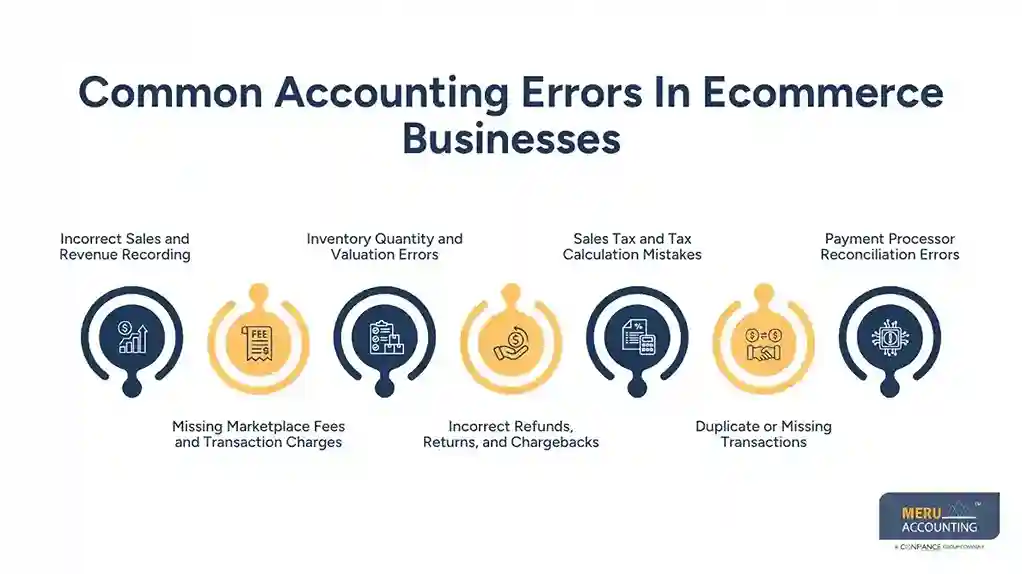
Sales Tax and Tax Calculation Mistakes
Tax errors can begin with a simple setup issue. A wrong rate, product rule, or customer location can affect many orders before the issue is found.
The risk is higher when a seller has several sales channels or sells across different tax jurisdictions. Tax settings should be reviewed against the seller’s actual filing duties.
Duplicate or Missing Transactions
An integration may send the same transaction twice, while another order may fail to import. Both errors can stay hidden if the seller looks only at the final bank balance.
Ecommerce accounting software can help identify duplicate or missing transactions before they distort sales and financial reports.
Payment Processor Reconciliation Errors
A payment report may contain sales, fees, refunds, chargebacks, reserves, and the final payout. The bank sees only the amount that reaches the account.
When only the bank amount is recorded, the seller loses the detail needed to explain the difference. This can make month-end reconciliation slow and unclear.
optional anymore
on running the business
How Ecommerce Accounting Software Helps Fix Common Errors
Finds Gaps Between Sales and Cash
A sales report may say $12,000 while the bank shows $10,900. Ecommerce accounting software can bring sales, fees, refunds, and payouts into the same review so the difference can be traced.
Keeps Fees Out of Sales
Fees should not silently reduce the sales figure. Recording them separately shows the actual revenue and the cost paid to the marketplace or payment provider.
Checks Inventory Quantity and Value
Ecommerce accounting software can compare stock movements with sales and purchase data. This can make quantity gaps and wrong item costs easier to spot before they affect profit reports.
Tracks Refunds and Chargebacks
Refunds need to stay linked to the order that created them. The system can also show chargebacks and related fees so changes in revenue and cash are easier to trace.
Review Sales Tax Data
Tax reports can show the tax collected across sales. Ecommerce accounting software can organize this data by channel or period, making it easier to review figures before a tax filing.
Finds Duplicate Or Missing Transactions
Order numbers, dates, and amounts can be compared to spot repeated or missing entries. This check can prevent one transaction from being counted twice or left out.
Reconciles Payment Processor Payouts
Payment reports may include sales, fees, refunds, and other adjustments before the final payout. Ecommerce accounting software can bring these figures together so the payout can be matched with the bank deposit.
How Accounting Software For Online Sellers Handles Sales, Fees, And Payouts
Gross Sales Come First
Accounting software for online sellers should show the amount generated by orders before platform deductions. This gives the seller a starting point for checking the full transaction.
Fees are Posted as Costs
If a marketplace charges $700 during a month, ecommerce accounting software should record that amount separately from the payout. It should appear as a cost so the seller can see what was paid to the platform.
Payouts Show the Cash Side
The payout is what the seller actually receives. It may be lower than sales because fees, refunds, or other deductions were taken out first.
Multiple Channels Need Clear Labels
A seller may use several marketplaces at once. Accounting software for online sellers can keep the data separated so one channel’s fees or refunds do not get mixed with another channel.
Reports Need Source Checks
A report can look correct while the source data is wrong. When a number seems unusual, compare it with the marketplace or payment report before making a manual adjustment.
How To Reconcile Ecommerce Transactions With Bank and Payment Accounts
Start With the Payout Report
Take the payout report for the period being checked. Note the gross sales, refunds, fees, chargebacks, and final amount paid.
Match the Accounting Entry
Compare each part of the payout with the accounting record. Ecommerce accounting software should show enough detail to explain how the final payout was reached.
Match the Bank Deposit
The final payout should agree with the bank deposit, allowing for timing. A payout sent on one date may appear in the bank a day or two later.
Check Old Unmatched Items
An old unmatched transaction is worth a closer look. It may be a duplicate, a missing import, a wrong date, or a manual entry that was never cleared.
Keep a Clear Audit Trail
Keep sales reports, payout reports, invoices, and other source records that explain the accounting entries. Good records make later reviews much easier and provide support for reported income and expenses.
Best Practices For Using Ecommerce Accounting Software in 2026
Set up Each Sales Channel
Give each marketplace or store a clear place in the accounting setup. This makes it easier to compare sales, fees, refunds, and payouts by channel.
Review Sales Every Month
Do not wait until tax time to find a missing payout or duplicate sale. Use ecommerce accounting software for a monthly check of sales, fees, refunds, and cash.
Count Stock on a Set Plan
A seller with 50 products may need a different stock review plan from a seller with 5,000 SKUs. High-value and fast-selling items may need more frequent counts.
Check Tax Data Often
Tax settings can affect a large number of orders at once. Review tax reports during the year and check that the setup still fits the seller’s current filing duties.
Match Form 1099-K data
For U.S. sellers, Form 1099-K reports gross payment amounts. The IRS notes that the form does not reduce those amounts for fees, refunds, shipping, or discounts, so sellers should compare it with their own records.
Why Choose Meru Accounting for Ecommerce Accounting?
Reviews Sales Across Channels
Meru Accounting provides ecommerce accounting services for businesses selling through websites and online marketplaces. Our team reviews sales data across channels to keep revenue, fees, refunds, and payouts properly recorded.
Reconciles Fees and Payouts
A marketplace payout may not match the sales total because of fees, refunds, and other deductions. Meru Accounting reviews these differences and matches the payout data with the related accounting entries.
Checks Inventory Records
Inventory errors can affect both stock values and profit reports. At Meru Accounting, we review purchase, sales, return, and adjustment data to find gaps between physical stock and accounting records.
Reviews Payment Accounts
Payment processors can create many entries before cash reaches the bank. We use ecommerce accounting software to compare processor reports with bank deposits and identify missing, duplicate, or unmatched transactions.
Uses Common Accounting Platforms
Meru Accounting provides services using platforms such as QuickBooks, Xero, Zoho Books, NetSuite, and Odoo. The accounting setup can be aligned with the seller’s sales channels and reporting needs.
Our Expert Perspective
When an ecommerce number looks wrong, start with the source rather than changing the final balance. Check the order, marketplace report, payment report, or bank entry to find where the gap began. If the same mismatch appears each month, review the accounting setup or integration, as a repeated error may point to a process issue rather than one bad entry.
Also look beyond the bank deposit, as the amount received may not show the full sale. Ecommerce accounting software should let you trace deposits to sales, fees, refunds, and other adjustments. Keep each major figure linked to its source, and use accounting software for online sellers to make sales, payouts, fees, and adjustments easy to review and trace.
Key Takeaways
- Ecommerce accounting software can bring sales, fees, refunds, stock, tax, and payouts into one accounting process.
- A bank deposit is not always the same as gross ecommerce sales.
- Marketplace fees should be recorded separately from sales.
- Refunds and chargebacks should be matched with the related order.
- Stock counts should be checked against system quantities and costs.
- Payment processor reports should be matched with bank deposits.
- Accounting software for online sellers should make each transaction easy to trace back to its source.
- Regular checks can find errors before they affect month-end or tax work.
FAQs
Common errors include incorrect sales recording, missing marketplace fees, inventory mistakes, duplicate transactions, refund errors, and payment reconciliation issues.
Ecommerce accounting software can organize sales, fees, refunds, inventory, and payouts so errors are easier to find and correct.
Compare gross sales, fees, refunds, and payment payouts with the related bank deposits for the same period.
The right accounting software for online sellers should track sales, fees, refunds, inventory, taxes, payments, and bank transactions in one system.
Ecommerce sales may differ from payouts because payment processors can deduct fees, refunds, chargebacks, reserves, or other charges before sending funds.
optional anymore
on running the business