
Running a business often brings a variety of bills, forms, and numbers to track. Among these, GST and HST can feel challenging. Over time, the CRA has moved many filings online, and for some businesses, Mandatory Electronic Filing may no longer be optional. It would become the only way you have to submit returns, rather than a choice.
Small-business owners might not fully understand what this means. How it works, who it affects, and what might happen if it is ignored may seem unclear. This blog walks through the rules, who it can affect, why it might matter, and how businesses can adjust without stress.
What is Mandatory Electronic Filing?
Mandatory Electronic Filing means some businesses must file GST/HST returns online. Paper forms may no longer be enough in certain cases. Instead, submissions often go through CRA’s web portal or certified software.
This is not just a suggestion. CRA may see it as a way to modernize filings, reduce errors, and speed up processing. Businesses that meet certain thresholds may have to use online systems every time they file. Filing by paper, even occasionally, could be disallowed for these businesses.
Who Might Need to File Electronically?
Not all businesses are forced to go online. CRA sets criteria that determine who falls under the rule. Some common factors include:
Revenue Size
Businesses with larger sales or revenue totals may cross the threshold that triggers online filing.
GST/HST Registration
Those registered for GST or HST and filing regularly—monthly, quarterly, or annually—may need to comply.
Business Type
Corporations, partnerships, and trusts could have different requirements applied by CRA.
Existing CRA Services
Companies already using CRA portals for payroll or corporate tax may also need to file GST/HST online.
Because rules can change, checking with CRA or a tax professional may help businesses avoid surprises.
Why is Mandatory Electronic Filing introduced?
Mandatory Electronic Filing is introduced to make things easier for Canadian businesses:
Faster Processing
Submitting online may reach CRA instantly. Refunds, credits, or assessments could happen sooner than expected.
Fewer Errors
Digital systems often catch missing fields or simple miscalculations. Mistakes that happen on paper forms may happen less frequently online.
Lower Costs
Printing, mailing, and manual entry may shrink. Some businesses may even save money despite software fees.
More Security
Encrypted systems may protect sensitive data better than paper stored in an office.
Easier Records
Digital storage can make past returns easy to find. Businesses may audit themselves without digging through piles of paper.
Environmental Benefit
Less paper means less waste. Filing online can align with eco-conscious practices.
When will Mandatory Electronic Filing be applicable?
CRA may roll out the mandate in stages rather than all at once.
Transition Period
Businesses may get warnings, guidelines, or windows to adjust.
Effective Date
Once active for a group, businesses meeting criteria may have to submit returns online by the cutoff date.
Ongoing Compliance
After the initial switch, online filing may be expected for every period without exception.
Staying aware of CRA announcements can help avoid last-minute surprises.
Steps to File GST/HST Electronically
Register Online
Sign up for CRA’s My Business Account or a similar portal. This gives access to tools needed for filing.
Pick a Filing Method
You can use CRA’s web forms or certified accounting software.
Gather Information
Collect sales, input tax credits, and adjustments like you would for paper forms.
Check for Errors
Systems may highlight mistakes or missing numbers. Reviewing them before submission can save headaches.
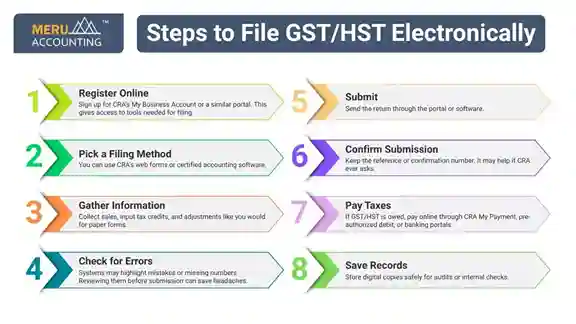
Submit
Send the return through the portal or software.
Confirm Submission
Keep the reference or confirmation number. It may help if CRA ever asks.
Pay Taxes
If GST/HST is owed, pay online through CRA My Payment, pre-authorized debit, or banking portals.
Save Records
Store digital copies safely for audits or internal checks.
Possible Challenges
While online filing brings benefits, some businesses may face obstacles:
Technical Skills
Not everyone may know how to use the software or portal.
Software Costs
Certified tools may feel expensive, especially for micro-businesses.
Internet Access
Poor connectivity can delay submissions or frustrate users.
Learning Curve
Time may be needed to understand the platform or software.
Security Concerns
Some firms worry about hacking or data loss.
System Outages
If CRA or software servers are down, timely filing may be difficult.
Best Practices for Smooth Filing
Start Early
Register and try the system well before deadlines.
Train Staff
Ensure the person handling taxes understands the tools.
Use Certified Software
Stick to CRA-approved tools to avoid errors.
Validate Before Submission
Check for mistakes using system features.
Keep Backups
Store digital copies on secure drives or cloud storage.
Follow CRA Updates
Rules may change; staying informed can prevent trouble.
Have Backup Plans
A mobile hotspot or alternate internet may help during outages.
Secure Data
Strong passwords, two-factor authentication, and encryption may reduce risk.
Automate Payments
Tools like CRA My Payment or pre-authorized debit may prevent missed deadlines.
Consequences of Not Complying
Ignoring mandatory electronic filing may bring problems:
Fines
CRA may penalize late or incorrect submissions.
Interest
Unpaid GST/HST may grow over time.
Audit Attention
Non-compliance could raise CRA scrutiny.
Business Flow Issues
Delays in processing can affect cash flow or refunds.
Reputation Impact
Partners, suppliers, or investors may view repeated non-compliance negatively.
Tools for Filing
CRA Web Portal
The direct approach: file through My Business Account.
Certified Accounting Software
QuickBooks, Sage, Xero, and similar tools allow preparation and submission.
GST/HST E-Filing Services
Specialized services may focus solely on online filings.
ERP Systems
Larger companies may use enterprise systems for tax reporting and compliance.
Choosing a tool that matches your business size and CRA requirements may save frustration.
Mandatory electronic filing is no longer optional for some businesses. It can be faster, more accurate, and less stressful than paper submissions.
For small businesses, learning to file online may feel challenging, but you can easily outsource it to professionals. At Meru Accounting, we manage GST/HST filing for many Canadian businesses. Contact us now and leave the entire tax filing on us. This will help you save time, cut costs, and improve record keeping while keeping your business compliant.
FAQs
- What does Mandatory Electronic Filing mean?
It means businesses may have to submit GST/HST online instead of on paper. - Who needs to file this way?
Businesses with certain revenue or registration rules may be included. - Why does CRA require online filing?
It can make processing faster, reduce errors, and secure data. - When should I switch to electronic filing?
After CRA sets the mandatory date or phase-in period. - Can paper forms still be used?
For businesses mandated, paper filing may no longer be allowed. - What software works for filing?
CRA web portal or certified tools like QuickBooks, Sage, or Xero. - Does software cost money?
Yes, though many find it worth the time saved and accuracy gained. - How do I pay online?
Through CRA My Payment, pre-authorized debit, or online banking. - Can I fix mistakes after submission?
Adjustments can often be submitted through the same system. - Is my information safe online?
Certified platforms may use encryption and secure logins. - Will I get confirmation after filing?
Yes, a reference number is typically provided. - Do I need an accountant?
Not always, though help may make complex returns easier. - What happens if I ignore the rules?
Fines, interest, and audits may occur. - Can small businesses handle it?
Yes, training and the right tools may make it manageable. - How long should records be kept?
Several years, as CRA may review past filings. - Is internet downtime a problem?
It can be, so backup plans may help. - Does e-filing help during audits?
Digital records can make audits faster and clearer. - Will online filing save money?
Often yes, by cutting printing, postage, and manual work. - Are there guides for e-filing?
Yes, CRA tutorials and software instructions may help. - Can rules change?
CRA may update policies, so staying alert is important.