A construction project can look profitable on paper while quietly losing money. Material costs rise, labour hours exceed estimates, a client delays payment, and an invoice remains unapproved. When these details sit in separate spreadsheets and systems, you may not see the full impact until the project is nearly complete. NetSuite construction management brings project and financial data into a connected ERP environment. It gives construction businesses a structured way to track costs, manage transactions, review budgets, and prepare financial reports.
However, the results depend on how the system is implemented and how its accounting settings match actual business operations. This blog explains the role of NetSuite construction management, the ERP implementation process, and the accounting setup decisions that construction companies should review before using the system.
What You Will Learn From This Blog
- How NetSuite construction management works in construction accounting.
- Why construction companies need project-based financial controls.
- Steps involved in NetSuite ERP implementation.
- How to configure job costs, billing, and accounting records.
- Common implementation challenges and ways to avoid them.
- How financial reports can improve project-level reviews.
What is NetSuite Construction Management?
NetSuite construction management refers to using NetSuite ERP and its configured modules, workflows, and integrations to manage construction-related financial and operational records. The exact functions available depend on the selected modules and system configuration.
Instead of reviewing every project through separate files, your finance team can use NetSuite construction solutions to manage connected records for jobs, vendors, customers, expenses, and financial activity.
Project Cost Tracking
A construction budget includes several cost types, such as labour, materials, equipment, subcontractors, and site expenses. NetSuite construction management can organise these costs against project records and configured cost categories.
For example, if a project has a material budget of ₹12 lakh but actual purchases reach ₹14 lakh, the finance team can review the difference and investigate the reason. Regular cost entry and review are essential for reliable results.
Project-Based Accounting
General ledger records show the company’s overall financial position, but project-based accounting adds another level of detail. You can review income and expenses by job, phase, department, or cost code where the system is configured to capture those details.
This structure gives managers a clearer view of individual project performance rather than relying only on company-wide totals.
Vendor and Client Transactions
Construction companies deal with suppliers, subcontractors, clients, and other service providers. NetSuite construction solutions can bring relevant payable and receivable records into the wider accounting process.
Your team can review supplier bills, customer invoices, payments, outstanding balances, and transaction histories. Approval rules and integration settings should be checked before relying on automated transaction flows.
Financial Data in One System
When project and accounting records are connected, finance teams spend less time comparing separate reports. NetSuite construction management can provide a shared view of financial activity, subject to correct data entry and system configuration.
optional anymore
on running the business
Why Construction Companies Need NetSuite Construction Management
Construction work involves changing costs, contract terms, payment schedules, and project deadlines. A system designed around general business transactions may not provide enough detail unless it is configured for construction accounting.
Control Project Cost Overruns
A small cost difference across several job categories can affect the final project margin. NetSuite construction management allows teams to compare recorded costs with approved budgets when suitable tracking fields and reports are in place.
If equipment hire exceeds the estimate, managers can review the expense before it becomes part of a larger budget problem.
Manage Progress Billing
Construction invoices often depend on completed work, agreed milestones, or contract terms. Progress billing records the amount billed against the work performed.
NetSuite construction solutions can be configured to record billing details and outstanding customer balances. Retainage, milestone billing, and other contract-specific terms must be set up correctly.
Improve Cost Allocation
A single expense may relate to a specific job, phase, or department. If the cost is posted to the wrong category, project reports can show misleading results.
Use consistent job codes and allocation rules so labour, material, equipment, and subcontractor costs reach the right project records.
Plan Cash Requirements
A project may have strong expected revenue but still face a cash shortage when supplier payments fall due before customer receipts arrive.
NetSuite construction management can bring receivables, payables, and recorded project costs into financial reviews. Forecast accuracy still depends on updated payment dates, expected receipts, and reliable project information.
NetSuite ERP Implementation for Construction Companies
ERP implementation is not just a software installation. It requires a review of business processes, financial records, user roles, and reporting needs.
Assessing Business Requirements and ERP Readiness
Start by reviewing how your company handles job costing, purchasing, billing, payroll data, and financial reporting. Identify where teams use spreadsheets or enter the same information more than once.
This assessment defines how NetSuite construction solutions should manage business processes and connect with existing systems.
Planning the NetSuite Implementation Process
Set clear goals, project timelines, responsibilities, and approval stages. Decide which departments will use the system and what information each team needs.
A phased rollout may suit companies that want to test core accounting processes before moving every department onto the platform.
Configuring Construction Workflows and Accounting Modules
Configure the required accounting records, project fields, approval paths, and transaction workflows. NetSuite construction management should reflect the company’s actual contract and cost structures.
Avoid adding fields or workflows without a clear business purpose. Too many unnecessary steps can make routine work harder.
Integrating NetSuite With Existing Construction Systems
Construction companies may already use tools for project scheduling, payroll, procurement, or field operations. Review which systems need to exchange data with NetSuite.
Before integration, define the information being shared, the frequency of updates, and how failed transfers will be handled.
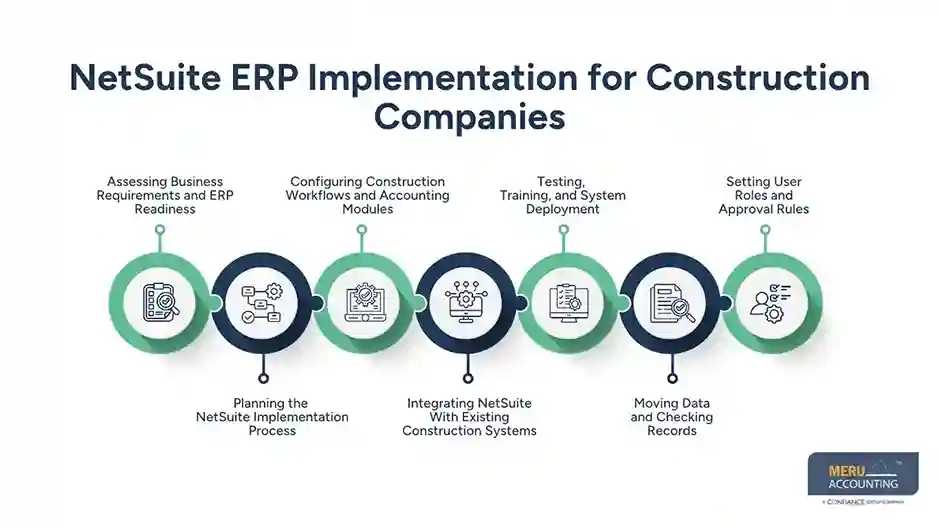
Testing, Training, and System Deployment
Test common transactions before launch. These may include supplier bills, customer invoices, project expenses, journal entries, and financial reports.
Train users according to their roles. A site manager needs different system knowledge from an accounts payable executive or financial controller.
Moving Data and Checking Records
Review customer, vendor, account, project, and opening balance records before migration. Remove duplicates and correct incomplete entries.
After data transfer, compare trial balances and selected account records with the old system. NetSuite construction management reports are only as reliable as the information entered into them.
Setting User Roles and Approval Rules
Assign access according to job responsibilities. For example, a project manager may need to review job costs, while only authorised finance staff can approve certain payments or post selected entries.
Clear approval limits reduce unauthorised changes and make transaction reviews easier.
NetSuite Construction Accounting Setup: A Step-by-Step Guide
Accounting setup determines how transactions appear in financial records. A suitable structure makes project reporting easier to review and reduces the risk of inconsistent postings.
Setting Up the Chart of Accounts
Create accounts for assets, liabilities, income, expenses, and equity. Construction businesses may also need suitable accounts for work in progress, retainage, subcontractor expenses, and project-related costs.
The chart should provide enough detail for financial reporting without creating an unnecessarily long account list.
Configuring Job Cost Codes and Cost Categories
Set up cost codes for major project expenses, such as labour, materials, equipment, permits, and subcontractor work. Apply the same naming and coding rules across projects where practical.
NetSuite construction management becomes more useful when teams record costs under consistent categories.
Establishing Project-Based Accounting Structures
Define how projects, phases, departments, and cost centres will be recorded. For example, a building project may have separate records for site preparation, structural work, electrical work, and finishing.
NetSuite construction solutions allow finance teams to review project spending at the level required by management.
Setting Up Billing Methods and Revenue Recognition
Configure NetSuite construction management billing based on the company’s contracts, such as fixed-price milestones, time-based charges, or progress claims. Review retainage terms and invoice approval steps as part of the setup.
Revenue recognition must follow applicable accounting standards and contract terms. System settings should reflect the approved accounting policy rather than replace professional judgement.
Configuring Financial Reports and Accounting Controls
Set up reports for the general ledger, accounts payable, accounts receivable, project costs, and budget comparisons. Add controls for journal approvals, vendor changes, and payment authorisation.
Test reports in NetSuite construction solutions with sample transactions before using them for regular financial reviews.
Common NetSuite Implementation Challenges in Construction
Construction companies may face several issues during implementation:
- Poor project data: Missing job codes and duplicate records can affect cost reports.
- Unclear accounting structure: A chart of accounts that lacks project-level detail can limit financial analysis.
- Incorrect migration: Unchecked opening balances and unpaid invoices can create differences after launch.
- Weak user adoption: Teams may continue using old spreadsheets if training is limited.
- Integration gaps: Data may not transfer correctly between NetSuite and existing systems.
- Unclear responsibilities: Without defined approval roles, transactions can remain pending or receive incorrect authorisation.
Address these issues during NetSuite construction management planning and testing rather than waiting until the system goes live.
Best Practices for Successful NetSuite Construction Management
A successful setup needs regular attention after implementation. These practices can keep records consistent and make NetSuite construction management more useful over time.
Keep Project Data Consistent
Use standard project names, cost codes, and expense categories. Set rules within NetSuite construction solutions for creating new records so different teams don’t classify similar costs in different ways.
Involve Site and Finance Teams
Site teams know what work has been completed and what materials have been used. Finance teams understand how those details affect accounting records. Include both groups when designing workflows.
Set Clear Approval Limits
Define who can raise purchase requests, approve bills, authorise payments, and review project expenses. Keep approval limits in line with company policy.
Review Reports on a Set Cycle
Compare project costs with budgets every month or at another suitable reporting interval. Review unusual changes before closing the period.
Keep Training Up to Date
Train new users and provide updates when workflows change. Short sessions based on real transactions can be more useful than broad software demonstrations.
Plan for Ongoing System Review
Review access rights, integrations, reports, and accounting settings as the business changes. NetSuite construction solutions should be checked periodically to ensure they still match the company’s operating needs.
How NetSuite Construction Management Improves Financial Reporting
Financial reports are useful when they answer specific questions about project costs, margins, cash, and outstanding balances.
Project Profitability Analysis
Compare project revenue with the costs recorded against each job. Review labour, materials, equipment, subcontractor expenses, and other direct costs to understand where margins are changing.
Work-in-Progress (WIP) Reporting
WIP reporting tracks the financial position of work that is underway. Construction companies should review costs incurred, amounts billed, contract progress, and relevant adjustments.
The method used for WIP reporting must match the company’s accounting policy and contract requirements.
Budget-to-Actual Cost Comparisons
Compare approved budgets with recorded costs for each project or cost category. A large difference in material spending, for example, may point to price changes, waste, or an incorrect estimate.
Construction Cash Flow and Financial Forecasting
Review expected customer receipts, supplier payments, payroll obligations, and upcoming project expenses. NetSuite construction management can provide financial data for these reviews when records are current, and forecast assumptions are clearly defined.
Meru Accounting's Construction Accounting and Bookkeeping Services
A construction ERP system needs accurate accounting records. Meru Accounting provides accounting and bookkeeping services that cover routine financial processes and project-related reviews. These services can complement a company’s NetSuite construction management environment.
Construction Accounting Setup
We review account structures and transaction categories to maintain organised financial records. The final setup should reflect the company’s reporting needs and approved accounting policies.
Job Cost Review
We review project expenses and cost classifications to identify missing entries, unusual amounts, and costs posted to incorrect categories.
Accounts Payable and Receivable
Our services include recording supplier bills, tracking customer invoices, reviewing outstanding balances, and matching payments with the relevant accounts.
Financial Reporting
We prepare financial reports that show income, expenses, balances, and other relevant accounting details. Project-level reports depend on the availability and quality of the underlying records.
Bookkeeping and Reconciliation
We record financial transactions, reconcile bank accounts, and review differences between bank activity and accounting records. Regular reconciliation keeps account balances ready for review.
Our Expert Perspective
NetSuite construction solutions work best when the accounting structure reflects how projects are priced, managed, billed, and reviewed. Software alone cannot correct unclear cost codes or incomplete records. Construction companies should first define their accounting rules, then configure the system around those requirements.
Key Takeaways
- NetSuite construction management connects project and financial records within a configured ERP environment.
- Accurate job codes and cost categories are essential for useful project reports.
- ERP implementation should include process reviews, data checks, testing, and user training.
- Billing and revenue recognition settings must follow contract terms and applicable accounting standards.
- Regular cost, WIP, and cash flow reviews keep project finances visible.
- Ongoing bookkeeping and reconciliation maintain the quality of financial records.
FAQs
NetSuite construction management connects project costs, billing, vendor transactions, and financial records for clearer project-level accounting.
Construction companies should configure job costing, project tracking, progress billing, cost codes, approval workflows, and financial reports.
Set up project records, cost codes, and expense categories to track labour, materials, equipment, and subcontractor costs.
Yes, suitable NetSuite configurations can organise project cost and billing data for WIP reporting based on the company’s accounting policy.
Construction companies should assess their accounting processes, project data, system integrations, reporting needs, user roles, and training requirements before implementation.
optional anymore
on running the business