
Accounting software for real estate agents can make it easier to track sales income, business costs, bank activity, and tax records. Real estate agents may earn most of their income from a few large deals, while expenses can occur every week. Advertising, signs, fuel, client meals, dues, fees, and software bills can add up quickly.
The right accounting software for real estate agents gives you a clear view of where your money comes from and where it goes. It can also make month-end bookkeeping easier and give your tax professional organized records to review.
Several tools stand out in 2026, but no single tool fits every agent. QuickBooks Online, Xero, FreshBooks, Wave, and Zoho Books each have a place based on your needs, budget, and work style.
What You Will Learn From This Blog
- How to choose the right accounting software for your real estate business.
- The key accounting features that matter most for real estate agents.
- A comparison of five popular accounting software options in 2026.
- When QuickBooks may be suitable for realtors and how it compares with other accounting software for real estate agents.
- The main costs of accounting software and bookkeeping services.
- Common accounting mistakes that real estate agents should avoid.
- When hiring a professional bookkeeper may be a practical choice.
Introduction to Accounting Software for Real Estate Agents
Real estate work has a cash flow pattern that can be difficult to manage. You may spend money for weeks before a deal closes. Then, one closing can bring a large commission payment at once.
That is why accounting software for real estate agents needs to do more than list sales and expenses. It should give you a clear way to sort income, track costs, review bank activity, and generate financial reports.
For example, an agent may close two homes in one month while spending money on photos, advertising, signs, travel, dues, and client events. Each cost needs a clear record. QuickBooks for realtors can be set up to track these types of income and expenses in one place.
Key Features to Look for in Accounting Software for Real Estate Agents
The best accounting software for real estate agents should fit your day-to-day work. A long list of features doesn’t help if the system is difficult to use or doesn’t match your sales process.
Commission Tracking
Commission income is the main source of revenue for many agents. Your software should let you record income clearly and match it with your bank activity.
Expense Management
Advertising, signs, dues, travel, phone bills, software, office costs, and client expenses can all affect your profit. QuickBooks for realtors and other tools can organize these costs into consistent categories.
Income Tracking
A clear income record can show when money was received and what type of income it represents. Separate income categories can also make your financial reports easier to review.
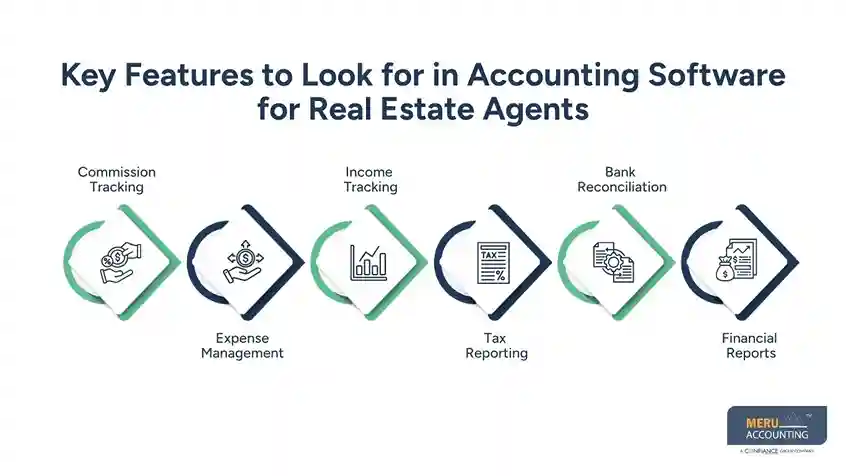
Tax Reporting
With accounting software for real estate agents, tax reports can be easier to prepare and share with your tax professional. Software doesn’t decide whether a cost is tax-deductible, so tax rules should be checked with a qualified tax professional.
Bank Reconciliation
Bank feeds bring transaction data into your books, but imported data can still contain errors. Reconcile your bank and credit card accounts each month to find missing or duplicate transactions and items that need review.
Financial Reports
Profit and loss reports can show how much you earned and spent during a specific period. Balance sheets and cash flow reports can provide more detail as your business grows.
optional anymore
on running the business
Best Accounting Software for Real Estate Agents
The best accounting software for real estate agents depends on how you work. A solo agent with a few deals may not need the same setup as a larger team.
QuickBooks Online
QuickBooks Online is a broad accounting tool with bank feeds, expense tracking, reports, invoices, and other core accounting features. It can suit agents who want room to grow and work with an accountant.
QuickBooks for realtors can be a useful choice when you want more control over income and expense categories. The setup should be planned carefully so your reports reflect your real estate work.
Xero
Xero is an online accounting tool with bank feeds, bank matching, bills, invoices, and financial reports. It can suit agents and small teams that want a cloud-based accounting system.
Xero may be worth considering when more than one person needs access to the books. Check your plan for user limits and the features you need.
FreshBooks
FreshBooks is an option among accounting software for real estate agents for users who need simple tools for billing, expenses, payments, and reports. It can suit agents who also bill clients for services or work outside standard commission income.
Its clean layout may suit users who don’t want a complex setup. Agents with more advanced accounting needs may want to compare it with broader accounting tools.
Wave
Wave can be useful for a small agent who wants basic accounting and invoicing at a low cost. It can provide a simple starting point when the number of monthly transactions is low.
As your business grows, review whether the plan still provides the bank, reporting, user, and support features you need.
Zoho Books
Zoho Books offers tools for income, expenses, bank feeds, bills, invoices, and reports. It may suit agents who want a broad accounting system at a price that works for a small business.
Agents who already use other Zoho tools may also find it useful to keep their business records in the same system.
QuickBooks for Realtors: Is It the Right Choice?
QuickBooks for realtors can be a strong choice for agents who want a full accounting system rather than a simple expense tracker. It can handle many of the core accounting tasks agents need each month.
Good For Solo Agents
QuickBooks for realtors can give a solo agent one place to track income, costs, bank data, and reports. A simple chart of accounts can keep the setup easier to manage.
Good For Growing Teams
As a team grows, accounting software for real estate agents becomes more useful when multiple people need access to financial records and reports. QuickBooks for realtors can make sense when more people need to work with the same financial records.
Useful For Tax Records
QuickBooks for realtors can keep business records in a format that a tax professional can review. The final tax treatment of each item should still be checked based on the rules that apply to you.
Good For Custom Categories
Real estate agents can use income and expense categories that fit their own work. Avoid creating too many categories, since an overly complex chart of accounts can make monthly review harder.
Setup Still Matters
Even QuickBooks for realtors needs the right setup. Bank feeds, income categories, expense categories, owner payments, and other accounts should be set up before a large number of transactions are entered.
How to Choose Accounting Software Based on Your Real Estate Business
Choosing accounting software for real estate agents should start with your own work, not a brand name. Think about your sales, costs, team size, and reporting needs.
Solo Real Estate Agent
A solo agent may only need income tracking, expense records, bank feeds, and basic reports. A simple system can be enough when transaction volume is low.
High-Volume Agent
Agents with many closings may need stronger bank tools, receipt capture, rules, and reports. Faster data entry can save time during busy months.
Real Estate Team
Teams should check user access and roles when comparing accounting software for real estate agents. Each person should know who enters, checks, and approves financial data.
Agent With Side Income
Some agents also earn money from referrals, consulting, rentals, or other work. Separate income categories can make these sources easier to review.
Agent Working Across States
Agents who work in more than one state may face additional tax and filing needs. Your accounting setup should give your tax professional clear records for each type of income and expense.
Accounting Software for Real Estate Agents: Pricing and Costs
The cost of accounting software for real estate agents is only one part of your total bookkeeping budget. A low monthly plan may not remain inexpensive if you later need several add-ons or paid support.
Monthly Plan Fees
Most online accounting tools have monthly plans. Compare the full plan price and check which features are included in the plan you’ll use.
User Costs
A team may need more than one user. Check the cost of additional users before choosing a plan.
Payment Fees
If you collect payments through the platform, transaction fees may apply. Include these costs in your budget.
Add-On Tools
You may need payroll, receipt tools, mileage tracking, or other add-ons. Factor these expenses into the total cost of accounting software for real estate agents before comparing plans.
Bookkeeping Costs
Software doesn’t replace the need for review. If you hire a bookkeeper, include that cost when calculating your full monthly budget.
Common Accounting Mistakes Real Estate Agents Should Avoid
Even the best accounting software for real estate agents can’t fix poor records on its own. Your bookkeeping process matters just as much as the tool.
Mixing Personal And Business Money
Try to keep business bank and credit card use separate from personal spending. Mixed records can make month-end bookkeeping and tax review much harder.
Delaying Commission Entries
Don’t wait until the end of the year to enter commission records. Regular entries give you a clearer view of your business throughout the year.
Missing Small Costs
Small costs can add up over time. Keep receipts and record expenses on a set schedule rather than waiting until tax season.
Skipping Bank Checks
A bank feed isn’t the same as a completed bank review. Reconcile your accounts each month and check transactions that don’t match.
Using Wrong Cost Groups
A cost placed in the wrong account can affect your reports. With accounting software for real estate agents, review unclear transactions and assign them to the appropriate cost group before closing the month.
Treating Every Cost As A Tax Write-Off
Not every business cost receives the same tax treatment. Ask a tax professional before claiming an item when the applicable rule isn’t clear.
How Meru Accounting Supports Real Estate Agents With Financial Management
Buying accounting software for real estate agents doesn’t mean your books will stay accurate on their own. Real estate records need regular review because commission income, broker fees, marketing costs, mileage, client expenses, and other charges can enter your accounts at different times.
At Meru Accounting, we can work with the accounting system you already use and build a bookkeeping process around your real estate business.
Review Commission Records
Commission payments should match your bank records and income entries. Our team can review these records and flag differences before they affect your financial reports.
Sort Real Estate Expenses
Real estate agents can have many types of business costs. We can classify advertising, software, office costs, professional fees, travel, and other expenses into clear account groups.
Reconcile Bank Accounts
Bank reconciliation checks whether your books match your actual bank activity. Regular checks can find missing entries, duplicate transactions, and items that need review.
Keep Reports Current
Many accounting software for real estate agents tools can help keep monthly profit and loss reports updated with recent income and expenses. We can keep these reports current so you aren’t relying on old numbers when reviewing business performance.
Prepare Books For Tax Review
Tax filing starts with proper records. Our bookkeeping work can keep income, expenses, bank data, and supporting records organized for your tax professional.
Work With Your Existing Software
You don’t always need to move to a new platform. Meru Accounting can work with systems such as QuickBooks Online, Xero, and other accounting tools that fit your business.
Our Expert Perspective
When choosing accounting software for real estate agents, don’t judge the tool only by its features, price, or brand. The setup should match how you receive commissions, whether payments come from brokers, referrals, or other sources, and how you track costs such as lead ads, marketing, travel, and office expenses.
Keep the chart of accounts simple, review bank feeds for errors or duplicate entries, and check income and expenses by month or quarter rather than relying only on your bank balance.
As your sales volume grows or you add team members and new income sources, your system should be able to handle the change without adding unnecessary work. For agents considering QuickBooks for realtors, the main question is whether its setup, account structure, bank process, and reports fit the way your real estate business actually operates.
Key Takeaways
- Choose accounting software based on your real estate business needs and daily work.
- Record every commission with clear and accurate income details.
- Keep personal and business transactions separate to maintain clean records.
- Review your bank and credit card transactions every month.
- Keep receipts, invoices, statements, and other key financial records organized.
- Check plan limits, user access, and extra costs before buying software.
- Don’t assume every business expense qualifies as a tax deduction.
- Consider bookkeeping support when financial recordkeeping takes too much time away from your real estate work.
FAQs
QuickBooks Online, Xero, FreshBooks, Wave, and Zoho Books are popular options for real estate agents, with the best choice based on business size and accounting needs.
Yes, QuickBooks Online is a strong option for real estate agents who need to track commissions, expenses, bank transactions, and financial reports.
Real estate agents can track commission income by recording each payment under clear income categories and matching the entries with bank records.
QuickBooks Online, Xero, and FreshBooks can suit self-employed realtors who need to manage business income, expenses, tax records, and cash flow.
Yes, accounting software can give real estate agents a clear record of commissions, business costs, bank activity, and financial results throughout the year.
optional anymore
on running the business



