Small businesses often face many challenges in managing their finances. In 2025, more businesses are turning to cloud accounting to save time, reduce errors, and handle taxes easily. This article explains why small businesses should invest in cloud accounting software and how it can help them grow.
What is Cloud Accounting Software?
Cloud accounting software is an online tool to manage business finances. It stores financial data on the internet, not on your computer. You can access it anytime, anywhere, using any device. It helps track income, expenses, invoices, and payments in real-time. Many cloud accounting tools also help with cloud accounting for tax filing.
How Cloud Accounting Software Reduces Tax Season Stress
Tax time is often a tough season for many. But with cloud accounting software, the task can feel less hard. Cloud accounting for tax filing gives you tools that cut down errors and make the job more clear. These tools help with speed, store your data safe, and keep all your records in one place. You can log in from any device and send reports with ease. In short, cloud accounting lets you stay on track and stress less.
Here are some key perks of using cloud accounting during tax time:
Easy Access Anytime, Anywhere
Cloud accounting stores your financial data online. This means you can check your records on any device, whether you’re at home or at work. Having instant access makes tax filing quicker and less stressful.
Always Up to Date
Cloud accounting software updates your data in real time. This means your numbers are current all year long. When tax time comes, you won’t have to worry about missing or outdated information.
Saves Time by Automating Tasks
Many tasks like entering data, matching bank transactions, and tracking expenses are done automatically with cloud accounting. This cuts down on the time spent on boring, repeat work and lowers the chance of errors.
Works Well With Tax Software
Cloud accounting software often links directly with tax filing programs. This lets you send your financial details straight to your tax forms without typing them again. It helps make filing faster and simpler.
Keeps Your Data Safe
Security is very important for tax data. Cloud accounting uses strong protections like encryption and two-step login to keep your information safe from hackers and loss.
Grows With Your Business
Whether your business is small or big, cloud accounting can adjust to fit your needs. It can handle more data and more complex tasks as your company grows or changes during the year.
Cost-Effective
Cloud accounting usually works on a subscription plan, which can save money compared to buying expensive software. Plus, it cuts down on paper and file storage costs.
Clear Record Keeping
Cloud accounting keeps a full history of your transactions and changes. This audit trail is very helpful if you are ever checked by tax authorities. It shows you are organized and following the rules.
By using cloud accounting software, you can reduce the stress of tax season. It helps keep your finances in order and makes filing taxes easier and faster. If you want to make tax time less of a headache, cloud accounting for tax filing is a smart choice.
Why Small Businesses Need the Best Cloud Accounting Software in 2025
1. Simplifies Financial Management
- Cloud accounting software makes it easy to record and track money.
- You can see your business finances clearly without complicated reports.
- Automatic updates reduce manual work and errors.
- It offers a simple dashboard to view profits and losses.
- Helps small business owners focus more on growth rather than paperwork.
2. Boosts Efficiency and Saves Time
- No need to enter data twice — bank transactions can sync automatically.
- Cloud accounting software speeds up invoicing and payment tracking.
- Reduces time spent on manual bookkeeping.
- Business owners and accountants can work together online in real-time.
- Saves time in finding documents or records as everything is stored in one place.
3. Makes Tax Season Easier
- Cloud accounting for tax filing means your data is always updated.
- Many software options calculate taxes automatically.
- You get reminders for tax deadlines, so no last-minute rush.
- Tax reports can be generated quickly and shared with accountants.
- Helps avoid costly tax errors and penalties.
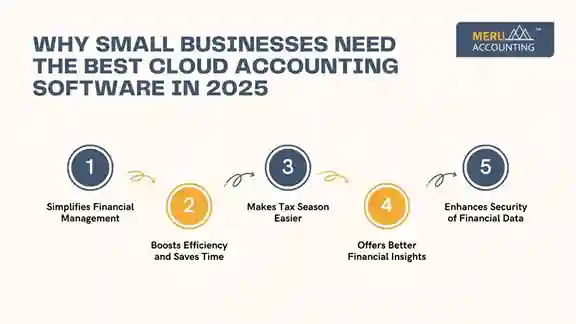
4. Offers Better Financial Insights
- You get real-time data and reports on your business health.
- Cloud accounting software provides insights to help you plan better.
- Helps track cash flow, profits, and expenses easily.
- Identifies trends that can improve decision-making.
- Gives alerts when bills are due or payments are late.
5. Enhances Security of Financial Data
- Cloud accounting software uses strong encryption to protect data.
- Your financial records are backed up automatically.
- Prevents loss of data due to computer crashes or theft.
- Access is controlled through passwords and user permissions.
- Data is safer than storing files on a local computer.
Key Features to Look for in the Best Cloud Accounting Software
1. User-Friendly Interface
- Easy to use, even without accounting experience.
- Simple navigation helps small business owners save time.
- Clear layout with easy-to-understand reports.
2. Integration with Other Tools
- Connects with your bank, payment apps, and payroll systems.
- Allows automatic data import from multiple sources.
- Saves time and reduces errors.
3. Mobile Access
- Ability to use the software on smartphones or tablets.
- Manage your business finances on the go.
- Keep an eye on your cash flow anytime, anywhere.
4. Tax Filing Support
- Supports tax calculations for your country or region.
- Generates tax reports and files returns easily.
- Helps keep you compliant with tax laws.
5. Affordable Pricing
- Offers plans suitable for small business budgets.
- No hidden costs; pay for only what you use.
- Many offer free trials to test before buying.
Top Benefits of Cloud Accounting for Small Businesses in 2025
Benefit | Description |
Access Anytime, Anywhere | Manage finances from any device with internet access. |
Automatic Updates | Software updates itself without user effort. |
Collaboration | Share data easily with accountants or team members. |
Real-Time Financial Data | View live business performance for better decisions. |
Cost-Effective | No need for expensive IT or software installations. |
Secure Data Storage | Your data is encrypted and backed up in the cloud. |
Easy Tax Filing | Built-in tools for tax calculation and filing. |
Why Cloud Accounting is the Future for Small Businesses
- Traditional bookkeeping is time-consuming and prone to mistakes.
- Cloud accounting software offers speed, accuracy, and simplicity.
- It allows small business owners to focus on growth and customers.
- The software is continuously updated with the latest tax laws.
- Cloud-based systems are scalable to fit growing business needs.
- More businesses trust cloud accounting to keep finances organized and safe.
Comparison of Top Cloud Accounting Software in 2025
Choosing the right cloud accounting software helps your business run smooth, more so for tax time. Top tools in cloud accounting now offer easy use, fair costs, and smart features built for tax filing.
Software Name | Key Features | Best For | Pricing (Starting) | Integration with Tax Filing | Ease of Use |
QuickBooks Online | Real-time updates, automated invoicing, bank sync | Small to medium businesses | $30/month | Excellent | User-friendly |
Xero | Multi-currency support, inventory tracking | Growing businesses | $25/month | Good | Clean, simple interface |
FreshBooks | Time tracking, expense management | Freelancers, small businesses | $20/month | Moderate | Very easy to use |
Zoho Books | Project management, client portal | Small businesses, startups | $15/month | Good | Intuitive dashboard |
Sage Business Cloud | Custom reports, scalable plans | Medium to large companies | $28/month | Strong | Moderate complexity |
How to Choose the Best Cloud Accounting Software for Your Small Business
Step 1: Identify Your Business Needs
- What features do you need? (Invoicing, payroll, tax filing, etc.)
- How many users will need access?
- Do you want mobile access?
Step 2: Check Software Reviews and Ratings
- Look for trusted reviews from other small business owners.
- Check for good customer support and training materials.
Step 3: Try Free Trials
- Most cloud accounting software offers free trials.
- Test the ease of use and features before buying.
Step 4: Compare Pricing Plans
- Choose a plan that fits your budget.
- Avoid software with hidden fees.
Step 5: Confirm Tax Filing Features
- Make sure the software supports your region’s tax rules.
- Check if it integrates with your accountant’s systems.
Top 7 Cloud Accounting Software Picks for 2025
Choosing the right cloud accounting software is key to managing finances in a smarter, more secure way. It helps reduce manual work, improves accuracy, and saves time. This is even more important during tax season. With the help of cloud accounting for tax filing, businesses can keep tax records clear, complete, and ready when needed.
The list below highlights seven top tools in 2025. These platforms are trusted for their features, ease of use, and strong user support. Whether you’re a solo freelancer or managing a growing team, these tools can help streamline your accounting tasks.
1. QuickBooks Online
A well-known name in cloud accounting, QuickBooks Online is great for small to mid-sized firms. It includes live bank feeds, automatic updates, and custom reports. Its strong link with tax software makes it ideal for tax filing. Businesses can manage invoices, track income, and stay ready for tax season, all from one place.
2. Xero
Xero is built for growth. It supports multi-currency payments, project tracking, and smart bank rules. Its simple layout makes it easy for teams to learn and use. With a wide range of add-ons, Xero suits both service-based firms and product-based companies. It’s a strong option for those looking to scale their use of cloud accounting software.
3. FreshBooks
FreshBooks is designed for self-employed pros and small service teams. It offers time tracking, recurring invoices, and client insights. The software syncs with bank accounts and helps keep your books clean. FreshBooks also supports key tools for tax prep, making it a good fit for cloud accounting for tax filing.
4. Zoho Books
Zoho Books is a cost-friendly solution with many useful features. It provides automated workflows, built-in payment gateways, and tax tools. The app fits well with other Zoho products and is easy to scale. For startups and lean teams, Zoho offers strong cloud accounting features without the high cost.
5. Sage Business Cloud Accounting
Sage is a smart choice for mid-size to large firms that need more control. It comes with audit trails, custom dashboards, and real-time reports. With strong tools for users across departments, Sage helps larger firms stay tax-ready and aligned year-round. It’s a strong player in the cloud accounting software space for complex business needs.
6. Wave Accounting
Wave stands out for being free. It includes key tools like invoicing, receipt scanning, and income tracking. Ideal for freelancers and side businesses, Wave still covers the basics needed for cloud accounting for tax filing. It’s a solid pick if you need simple tools without a big price tag.
7. Kashoo
Kashoo is built for ease. Its smart sorting feature uses machine learning to label transactions and reduce manual work. The layout is clean, and the setup is fast. It’s great for solo users who want a no-fuss way to manage books, track costs, and prep for tax season using cloud accounting.
Exploring Cloud Accounting Software Add-Ons
Along with the core tools in cloud accounting software, firms can boost control of their books by adding cloud add-ons. These tools link with your main setup to meet special needs. For instance, firms add stock tools to track goods and sales. Others add payroll apps to pay staff and manage tax tasks with ease. Web store links are also in use, as they sync sales data right to your books.
When used with cloud accounting for tax filing, these add-ons help build a strong and smooth setup. This plan saves time, cuts down on errors, and keeps all data in sync. With cloud add-ons, you can shape the system to fit your firm, no matter its size. Cloud accounting has grown into a smart way to run and grow a business.
Choosing the best cloud accounting software in 2025 is a smart move for small businesses. It helps simplify finances, boosts efficiency, and makes tax season less stressful. With easy access, real-time updates, and tax filing support, cloud accounting is a must-have tool for business success. Small business owners can save time, reduce errors, and get better insights to grow their companies. Cloud accounting for tax filing also helps firms stay on top of laws and avoid late fees. Meru Accounting offers expert help with cloud-based tools, giving small firms a smart, smooth path to handle their books and file on time.
FAQs
Q1: What is cloud accounting?
Cloud accounting is managing finances online, allowing access anytime from any device.
Q2: Is cloud accounting software safe?
Yes, it uses encryption and backups to keep data secure.
Q3: Can cloud accounting help with tax filing?
A3: Yes, many tools automatically calculate taxes and generate reports.
Q4: Do I need accounting knowledge to use cloud accounting software?
A4: No, most software is designed for beginners with simple interfaces.
Q5: Can multiple users work on cloud accounting software?
A5: Yes, it supports collaboration between business owners, accountants, and staff.
Q6: Does cloud accounting software work on mobile phones?
A6: Most software has mobile apps for managing finances on the go.
Q7: Is cloud accounting software expensive for small businesses?
A7: Many affordable options fit small business budgets, with free trials available.