Xero is a smart, cloud tool built for small and mid-size firms. It helps you track cash, send bills, and log costs in one place. You can link your bank, check your books, and run key reports fast. Xero does more than basic books. It helps you work fast, fix fewer errors, and stay in control. The benefits of Xero accounting software are clear. It makes key tasks quick, smooth, and stress-free. You also get real-time insights that guide better business choices. Its simple design makes it easy for anyone to use, even without deep accounting skills. And with secure cloud storage, your data stays safe and always within reach.
What is Xero accounting software?
Xero is an online tool that helps you manage your business money. You can track spend, send bills, and check cash flow with ease. It works on your phone or PC, from any place with web access. If you want smart and easy books, Xero is a great pick. It links with your bank to update deals in real time. You can make reports, run payroll, and file taxes with less stress. Its clean dashboard gives clear views of your business health.
Top Benefits of Xero Accounting Software:
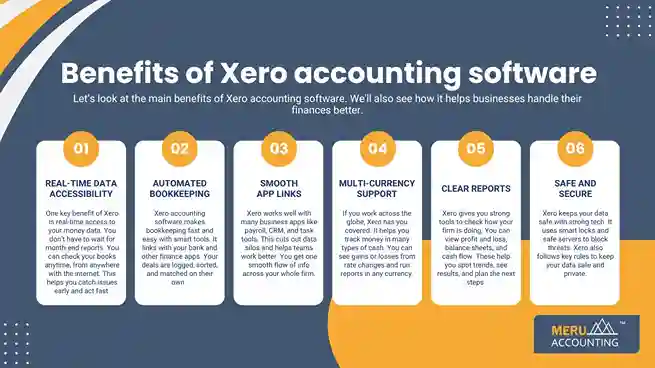
Let’s look at the main benefits of Xero accounting software. We’ll also see how it helps businesses handle their finances better.
1. Real-time Data Accessibility
One key benefit of Xero is real-time access to your money data. You don’t have to wait for month-end reports. You can check your books anytime, from anywhere with the internet. This helps you catch issues early and act fast.
2. Automated Bookkeeping
Xero accounting software makes bookkeeping fast and easy with smart tools. It links with your bank and other finance apps. Your deals are logged, sorted, and matched on their own.
3. Smooth App Links
Xero works well with many business apps like payroll, CRM, and task tools. This cuts out data silos and helps teams work better. You get one smooth flow of info across your whole firm.
4. Multi-currency Support
If you work across the globe, Xero has you covered. It helps you track money in many types of cash. You can see gains or losses from rate changes and run reports in any currency.
5. Clear Reports
Xero gives you strong tools to check how your firm is doing. You can view profit and loss, balance sheets, and cash flow. These help you spot trends, see results, and plan the next steps.
6. Safe and Secure
Xero keeps your data safe with strong tech. It uses smart locks and safe servers to block threats. Xero also follows key rules to keep your data safe and private.
Xero follows rules for data safety and privacy. This gives peace of mind to firms that deal with private money information.
Common Accounting Challenges Solved by Xero
Traditional accounting methods often slow down business growth. Manual work, delayed data, and errors cause stress and waste time. Xero offers smart solutions to fix these problems and bring speed, accuracy, and ease to your accounting.
1. Manual Data Entry Errors
Traditional accounting relies on typing numbers by hand. Xero accounting software automates data collection by connecting to your bank and scanning receipts, eliminating mistakes and saving time.
2. Slow Access to Financial Data
With old systems, you wait days or weeks for updated accounts. This slows down decisions and planning. Xero updates your financial data in real-time, so you can check your cash flow and expenses anytime, anywhere.
3. Hard-to-Track Expenses
Paper receipts and spreadsheets make expense tracking messy. Xero lets you snap receipts with your phone and matches them to bills or invoices. Your expenses stay clear and easy to review.
4. Complicated Tax Filing
Manual tax calculations can be tricky and full of errors. Xero tracks GST, VAT, or sales tax and creates accurate reports. It helps you file on time and avoid fines.
5. Poor Team Collaboration
Sending files by email or meetings slows work and causes mistakes. Xero’s cloud system lets you and your accountant see the same live data. Teams can work faster and give timely advice.
6. No Mobile Access
Old software works only on desktops. Xero works on phones and tablets. You can check reports, track payments, or send invoices on the go.
7. Late Invoice Follow-ups
Old systems can miss overdue invoices. Xero sends automatic reminders for unpaid bills. This helps keep cash flow steady and reliable.
8. Difficulty in Tracking Inventory
Manual stock tracking leads to overbuying or shortages. Xero monitors stock levels, alerts you for reorders, and keeps product data up-to-date.
Advanced Features of Xero Accounting Software That Help You Grow
The benefits of Xero go far beyond basic bookkeeping. It has smart tools that help your business grow while making your daily work more smooth and well-planned. These features save time and give you clear insights for better choices.
1. Third-Party App Support
Xero links with more than 1,000 apps, such as pay tools, CRMs, and time trackers. This lets you add tools that fit your needs and cut down on manual work. With less time on tasks, you can focus more on growth.
2. Multi-Currency Handling
If you deal with buyers or sellers abroad, Xero makes it easy. It tracks many cash types and updates rates on its own. Gains or losses show in your reports, so your records stay clear and true.
3. Custom Reports and Dashboards
Xero lets you build custom reports that match your goals. You can track sales, costs, and profits by job, team, or product. Its dashboard gives a live view of your business health at a glance.
4. Inventory Management
Xero tracks stock counts and product costs in real time. You can view what’s on hand, set re-order alerts, and track items sold or used. This helps stop stockouts or waste, which saves both time and money.
5. Recurring Billing and Auto Reminders
Set up repeat invoices or bills for regular clients or vendors. Xero also sends auto payment reminders, which cut down late pays and keep your cash flow strong—without the need for manual follow-ups.
6. Audit Trail and User Logs
Xero records all changes made to your books. Its audit trail shows who made edits and when. This boosts trust, helps prevent errors, and makes audits more smooth and stress-free.
Who Should Use Xero? Ideal Business Types and Sizes
Xero works for many kinds of businesses. But it fits best with some types and sizes. Knowing this helps you see if Xero suits your work and budget. Below, we show who gets the most from Xero.
1. Small and Medium-Sized Businesses
Xero is ideal for small to mid-sized firms that want simple, online accounting. It handles day-to-day bookkeeping, invoicing, and payroll without the need for a large finance team.
2. Startups and New Businesses
Startups benefit from Xero’s easy setup and low learning curve. It helps new companies keep track of money, manage cash flow, and grow without needing complex systems or expensive software.
3. Freelancers and Sole Traders
Freelancers and sole traders use Xero to track income and expenses. Its mobile app lets them invoice clients on the go and manage taxes without stress.
4. Growing Companies
Businesses planning growth choose Xero for its ability to handle increasing transactions and multiple users. It scales easily and connects with other apps as the business needs to expand.
5. Nonprofits and Charities
Nonprofits use Xero to keep transparent records and manage donations. The simple reports help them stay compliant with regulations and show donors how funds are used.
6. Remote and Distributed Teams
Xero works on any device with internet. You can share your data in real-time, so your team can work well even from home.
Xero helps you save time and avoid errors. It keeps your numbers clean and easy to track. The best part is Xero grows with your work.
Meru Accounting helps you use Xero accounting software the right way. From setup to support, we make sure your books stay clear and correct. Our team helps you track cash, reduce errors, and use all the key benefits of Xero. We make accounting simple, so you can focus on growing your business.
FAQ
- What is Xero accounting software?
Xero is an online tool for small and mid-size firms. It helps you manage money, send bills, track costs, and watch cash flow from anywhere. - What are the main benefits of Xero accounting software?
Xero gives real-time reports, easier tax work, mobile access, and fewer bookkeeping errors. It cuts daily tasks and shows clear data to help firms make smart choices. - Can Xero help small businesses?
Yes. It is made for small teams. It keeps things simple and removes extra steps. - Can I use Xero on my phone?
Yes. Xero works on phones and tablets. You can send bills, check cash flow, and more while on the go. - How does Xero accounting software help small firms?
Xero helps small firms track spending, manage cash, and save time. Its easy layout makes accounting stress-free. - Can Xero integrate with other apps?
Yes. Xero links with payroll, CRM, and over 1,000 other apps. This keeps data in one place and cuts manual work. - Who can benefit most from Xero accounting software?
Startups, small firms, freelancers, and fast-growing firms gain the most. Xero makes accounting easy and grows with your firm.